
The costliest risks, in order, are silent data corruption, permission drift that leaks one tenant’s data to another, customer-facing workflows that get missed until a client reports them, billing errors around cutover, a roadmap frozen for months by scope creep, and a big bang switch with no rollback. Each has a one-line mitigation you can put in a statement of work: automated reconciliation and a witnessed restore, an authorization regression suite with cross-tenant tests, a signed workflow inventory with end-to-end acceptance tests, side-by-side financial reconciliation, fixed-scope milestones, and a rehearsed rollback.
TL;DR:
- Automated reconciliation reports and a verified backup restore rehearsal are essential to detect and prevent silent data corruption during migration.
- A permission matrix and cross-tenant authorization tests must be completed before each release to prevent permission drift and data leaks.
- A complete inventory of workflows and signed acceptance tests are necessary to ensure all customer-facing and background processes are transferred correctly.
- Conducting side-by-side financial reconciliation and staged billing switches reduces the risk of revenue discrepancies and billing errors post-migration.
- Maintaining fixed-scope milestones, a discovery cutoff, and staged parallel runs with rehearsed rollbacks minimizes scope creep and reduces catastrophic cutover risks.
1. Silent data corruption
Corruption rarely announces itself. It shows up as a date field that shifted by a time zone, a text field truncated at 255 characters, a one-to-many relationship that collapsed into orphaned records, or an uploaded file that copied its name but not its bytes. These faults pass a quick look at the new database because everything still has a value, just the wrong one.
Teams detect this late because they check migrations visually, sample a handful of records, or trust an untested backup. None of that catches a systemic mismatch that only surfaces weeks later when a customer asks why their order history is missing a year.
Pro Tip: Ask for the reconciliation report before you ask for the launch date. If nobody can produce one, nobody has actually checked the data.
Require in writing:
- Automated reconciliation reports comparing record counts, relationships, timestamps and file checksums between old and new systems.
- A witnessed restore rehearsal from backup before cutover, not after.
- A named person with authority to halt cutover if reconciliation fails.
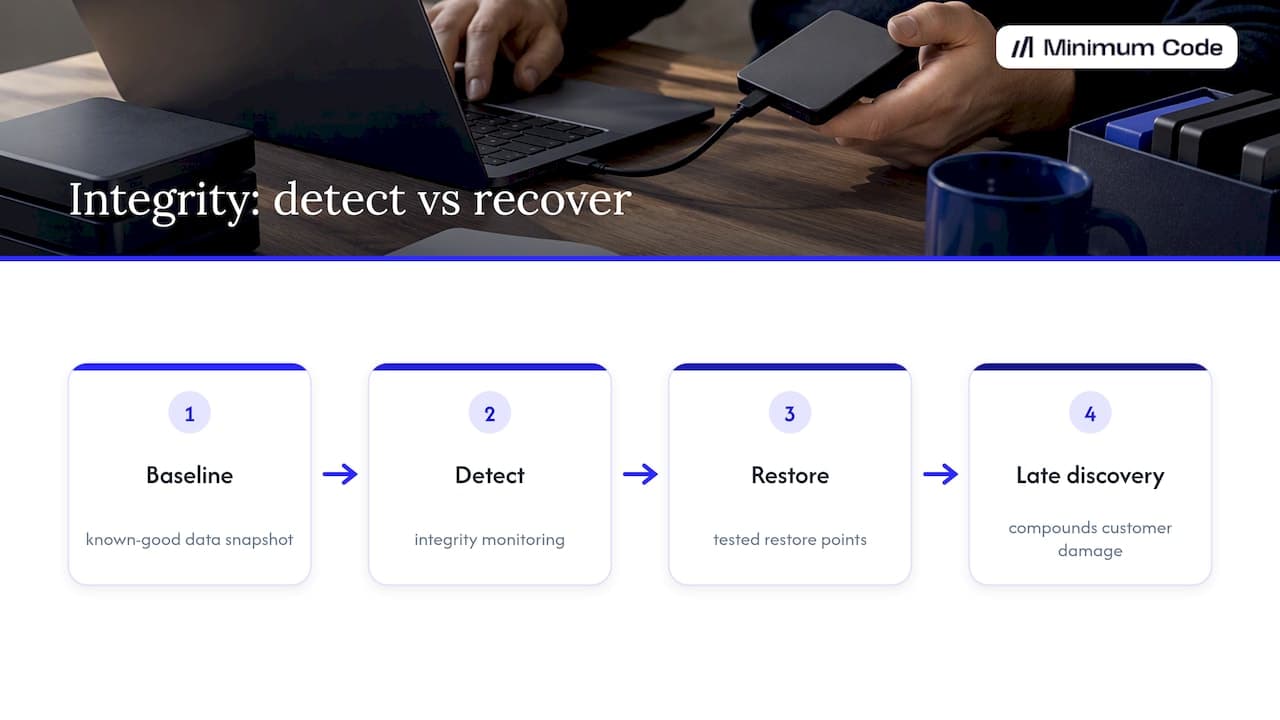
NIST’s data integrity guidance recommends baselining known-good data and pairing backups with logging and verified restore points, because a backup that has never been restored is a guess, not a safety net.
2. Permission drift and tenant isolation failures
Bubble evaluates privacy rules by combining every rule that applies to a data type, and access is granted if any rule permits it. That is workable when rules are simple, but as an app grows, a rule added for one feature can quietly widen access everywhere else. Bubble’s own security documentation is explicit that the Data API and privacy rules must be inventoried together, because exposed data types depend on both.
The bigger hazard is code that bypasses the intended constraints entirely. Admin API tokens and backend workflows can act with developer-level privilege, so a workflow built to skip a rule for convenience becomes a hole in a rebuilt system if nobody re-audits it.
Detection usually happens when a customer notices someone else’s data in their account, which is the worst possible way to find out.
Require in writing:
- A permission matrix showing the combined effective access per role, tenant, object and field, not just the individual rules.
- An automated authorization regression suite covering horizontal, vertical and cross-tenant access attempts, run before every release.
- Time-limited, audited admin API tokens with no standing access left over from the old system.
Pro Tip: Insist on a two-tenant test, sometimes called a “Tenant Alpha, Tenant Beta” check, where the suite actively tries to read one customer’s data as another. If that test doesn’t exist, permission drift hasn’t actually been tested. OWASP’s authorization regression testing guidance recommends exactly this pattern and treats broken access control as a top-tier risk worth gating in CI.
3. Missed workflows discovered by customers
The database migrates cleanly. Then a customer emails to ask why their renewal reminder never arrived, or why a webhook that used to fire on order completion has gone quiet. Hidden behaviour in Bubble tends to live outside the visible page editor: scheduled workflows, backend API workflows, plugin actions and conditional steps buried three branches deep in a workflow tree.
These get missed because migration teams often work from the pages a user sees, not from the full list of things the app actually does in the background. Late discovery follows a predictable pattern: notifications stop, subscriptions lapse quietly, integrations that depended on a webhook go silent for days before anyone notices.
Require in writing:
- A complete workflow inventory covering scheduled jobs, API workflows, plugin actions and every conditional branch, not just front-end pages.
- Signed end-to-end acceptance tests for every customer-visible flow, run against the live environment rather than development.
- Confirmation that the live Bubble environment, not just the development branch, was used to build the inventory, since changes in development don’t appear in the live API documentation until deployment.
Our own migration guide goes into more detail on why the inventory has to include privileged workflows and scheduled jobs, not just database tables.
4. Billing errors and financial mismatch
Money problems after a migration tend to hide in the edge cases: a promo code that applies twice, a currency conversion that rounds the wrong way, a scheduled billing job that fires against the old system and the new one on the same day. Customers notice a double charge immediately. A missing refund or a silently failed renewal can take a full billing cycle to surface.
These faults surface after cutover rather than before because test data rarely includes every discount, trial extension and legacy plan a real customer base has accumulated over time.
Require in writing:
- A side-by-side financial reconciliation of the last full billing cycle between old and new systems before the switch goes live.
- A staged billing switch, moving one cohort or plan type at a time, with a documented fallback to the previous billing system.
- A named owner for reconciling any discrepancy within a fixed number of business days after cutover.
Pro Tip: Run one full billing cycle in parallel, quietly, before switching customers over. If the totals don’t match to the last cent, don’t cut over yet.
5. Roadmap freeze and lost momentum
A migration without a fixed scope tends to expand. “Parity” gets redefined every few weeks as someone remembers another edge case, discovery drags on, and the team building new features gets pulled into fixing migration bugs instead. Months pass with no launch and no new product work either.
Watch for the warning signs: a launch date that has already slipped twice, your product team spending more time in migration meetings than building, or customers churning because the app has visibly stalled while the migration runs in the background.
Require in writing:
- Fixed-scope milestones with a written definition of what counts as parity for each feature.
- A time-boxed discovery phase with a hard stop, after which scope is frozen.
- Explicit written criteria for which features stay on Bubble during the transition and which move first.
Our guide on migrating without losing momentum covers how to structure milestones so the roadmap keeps moving during the switch rather than stopping for it.
6. Big bang cutover with no rollback
Switching every customer to the new system in one move looks efficient on a project plan and looks reckless the moment something breaks. Long-running jobs, webhooks mid-flight, and state that exists only in memory or in a queue at the moment of the switch can all vanish or duplicate. Eventual consistency between old and new databases means a record can look correct in one system and stale in the other for minutes that matter.
Detection tends to happen live, in production, because a big bang cutover offers no smaller signal to catch first: the first sign of trouble is a support ticket, then a wave of them.
Require in writing:
- A staged parallel run, migrating a small cohort first and expanding only after it holds.
- A documented rollback playbook naming who decides to roll back and under what conditions.
- A witnessed rollback rehearsal, not just a rollback plan on paper, as a condition of acceptance.
NIST and NCCoE’s guidance on data integrity makes the distinction that matters here: detecting a problem and recovering from it are two different capabilities, and a vendor needs to demonstrate both, not just promise the second.
Mitigation summary: copy-ready lines for contracts
Each line below maps to one risk and can go straight into a statement of work.
- Silent data corruption: automated reconciliation reports and a witnessed restore rehearsal before cutover.
- Permission drift: an authorization regression suite with cross-tenant tests required before each release.
- Missed workflows: a signed workflow inventory and end-to-end acceptance tests for all customer-visible flows.
- Billing errors: a side-by-side financial reconciliation of the last billing cycle and a staged billing switch.
- Roadmap freeze: fixed-scope milestones with a time-boxed discovery phase and explicit parity criteria in writing.
- Big bang cutover: a staged parallel run with a documented and rehearsed rollback playbook.
Risk | Who witnesses acceptance | Pass or fail threshold |
|---|---|---|
Data corruption | Founder or nominated technical reviewer | Reconciliation report shows zero unexplained discrepancies |
Permission drift | Founder or nominated technical reviewer | Authorization suite passes with zero cross-tenant leaks |
Missed workflows | Founder or customer success lead | Every listed workflow has a signed passing test |
Billing errors | Founder or finance lead | Reconciled totals match to the smallest currency unit |
Roadmap freeze | Founder | Milestones hit their fixed date or trigger a written change order |
Big bang cutover | Founder or nominated technical reviewer | Rollback rehearsal completes within the agreed time limit |
When migrating is not the right choice for your app
Some apps genuinely belong on Bubble, and saying so isn’t a hedge. A simple internal tool with a handful of users, low traffic and no compliance trigger rarely justifies the cost and risk of a rewrite. If nothing in your roadmap needs the speed, SEO or hosting control that code provides, migration solves a problem you don’t have.
Before committing, check:
- Does the app need EU-only hosting for compliance reasons, such as healthcare or financial data?
- Is the current Bubble bill or hosting limit actually blocking growth, or just annoying?
- Would a rebuild pay for itself against the cost of staying, given your actual roadmap?
- Is the team ready to own code, or is the appeal mostly about avoiding Bubble’s reputation rather than a real limit you’ve hit?
If none of those apply, staying put and revisiting the question in a year is a reasonable answer.
Risk mitigation strategies specific to Bubble migration
Most of the risk in a Bubble migration comes from what doesn’t show up in the page editor: privacy rules, backend workflows, scheduled jobs and plugin actions that carry logic no front-end walkthrough will reveal. The starting mitigation is an audit that treats these as first-class citizens, not an afterthought once the visible pages are copied.
Bubble’s own guidance on protecting data with privacy rules recommends Strict search mode for apps handling private data, because search results can leak information even when a direct read is blocked. Any migration audit should check which search mode the source app actually uses, since a permissive setting there often gets carried into the new system by default rather than by decision.
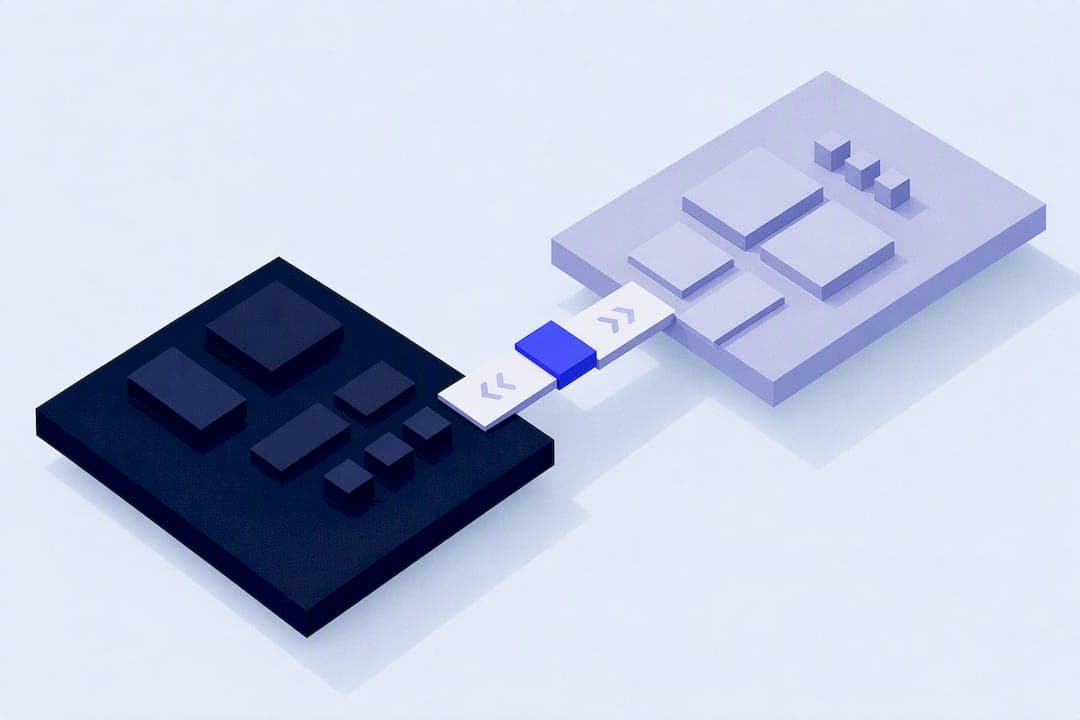
The second lever is sequencing. Running old and new systems in parallel for a defined period, rather than committing to a single switch date, turns an irreversible event into a reversible one. It costs more in engineering time during the transition, but it converts most of the risks above from “discovered by a customer” into “caught in a rehearsal.”
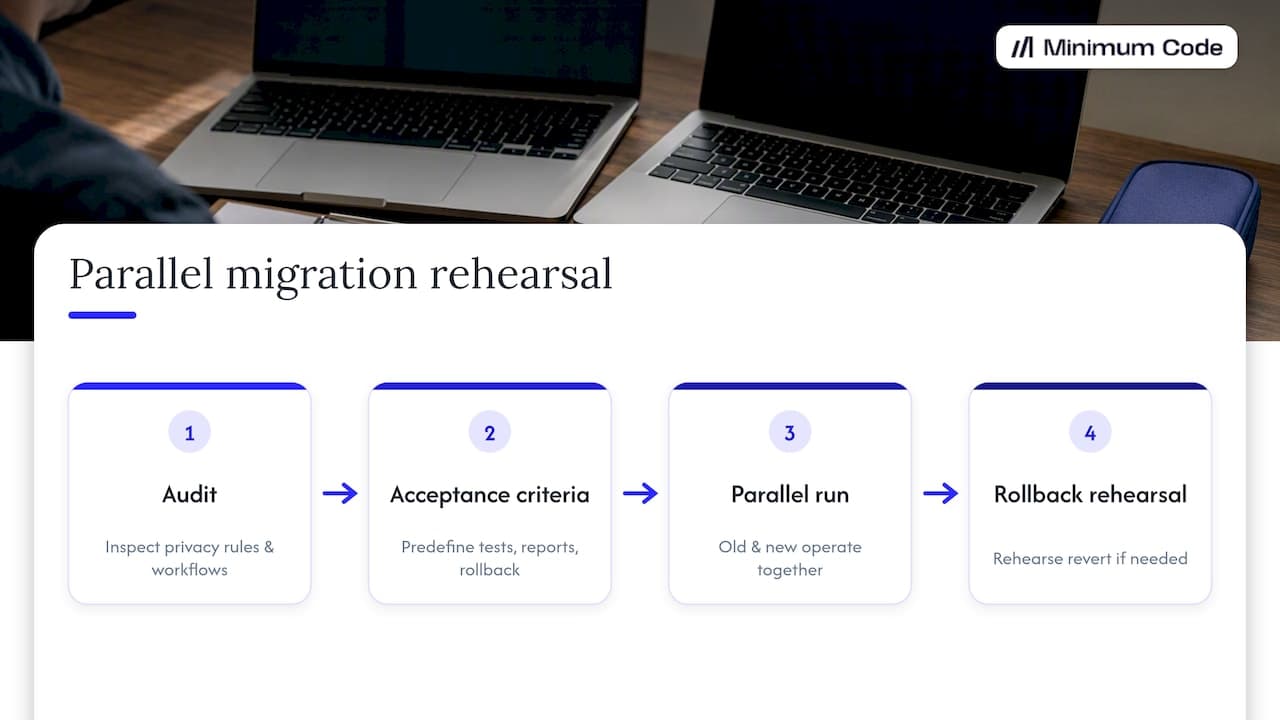
The third lever is acceptance criteria written before the work starts, not negotiated after. A vendor who agrees to reconciliation reports, authorization tests and a rollback rehearsal before the contract is signed has far less room to treat these as optional later.
Case studies or examples illustrating migration risks and outcomes
Concrete, named case studies with results are the kind of evidence that’s easy to invent and hard to verify, so this article won’t manufacture one. What’s useful instead is the pattern that recurs across the risks above: the failures that cause real damage are rarely the ones anyone planned to test.
A permission bug that leaks tenant data is nearly always found by a customer, not a test suite, because nobody wrote the test that would have caught it. A billing mismatch usually involves a plan type or promo code that existed for a handful of customers and got left out of the sample data used for testing. A missed workflow is, almost by definition, the one nobody remembered existed until it stopped firing.
The pattern points to a mitigation rather than an anecdote: the risks that cause the most damage are the ones outside the obvious, visible parts of the app. An inventory that only covers pages and the main database misses exactly the workflows, tokens and edge cases that cause the expensive failures. Treat “what could we have missed” as a standing question through the whole project, not a single audit step at the start.
Monitoring and alerting during migration
A migration needs its own monitoring, separate from whatever alerting the app already has, because the failure modes during a switch are different from the failure modes of steady-state operation. Reconciliation jobs comparing record counts, relationship integrity and file checksums between old and new systems should run continuously during a parallel period, not just once at the end.
Authorization tests belong in the same continuous loop. Running the cross-tenant and role-bypass suite on every deployment, rather than once before launch, catches permission drift introduced by a late change rather than only the drift that existed on day one. OWASP’s guidance on authorization testing frames this as testing across identities, not a single code review, which matters more during a migration than at almost any other point in an app’s life.
Financial reconciliation and workflow completion checks need the same treatment: automated, scheduled, and reviewed by a named person, not eyeballed once before launch and forgotten. The goal isn’t to catch every issue before it happens. It’s to catch it within hours instead of within the weeks it takes for a customer complaint to reach the right person.
Impact on data integrity and system reliability
Every risk in this article ultimately reduces to one question: can you trust what the new system says, and can you recover if it’s wrong? Silent corruption, permission drift and missed workflows all erode trust in the data itself. Billing errors and a rushed cutover erode trust in the system’s reliability under load.
NIST’s data integrity guidance treats detection and recovery as separate, necessary capabilities, and recommends baselining known-good data alongside integrity monitoring and tested restore points. A system that can detect corruption but can’t demonstrate a working restore hasn’t solved the problem, it’s just found a more sophisticated way to notice it too late.
The reliability cost compounds over time. A tenant isolation failure discovered a month after launch damages customer trust far more than the same bug caught in a rehearsal, because by then the data has already been exposed. A billing error that isn’t reconciled within the first cycle turns into a dispute, then a chargeback, then a support burden that outlasts the migration project itself. The mitigations in this article aren’t extra insurance against unlikely events. They’re what determines whether the migration actually reduces risk or just moves it further down the road.
How Minimum Code handles Bubble-to-code migrations
Minimum Code runs migrations from Bubble to Next.js and Supabase as fixed-price, fixed-scope projects, with no downtime during the switch and 60 days of free support after launch. Senior engineers own architecture, code review and testing, with AI coding tools handling implementation under that supervision.
Most of the project time goes into planning and testing, not writing code, which is where the risks in this article actually get caught. The team started on Bubble in 2022 and remains a Bubble Gold agency, so the advice on whether an app should move or stay is grounded in daily use of the platform, not a sales pitch to migrate everything.
If your roadmap needs speed, SEO or control over hosting that Bubble can’t give you, a fixed-scope migration with a rehearsed rollback is the way to get there without betting the business on a single cutover weekend.
Sources
- Data API security (Bubble manual)
- Authorization Regression Testing - OWASP Cheat Sheet Series
- NIST data integrity guidance (NCCoE)
FAQ
What are the risks of migration?
The biggest financial risks are silent data corruption, permission drift that exposes one customer’s data to another, missed customer-facing workflows, billing errors, a frozen product roadmap, and a big bang cutover with no way back. Each has a specific, testable mitigation, from automated reconciliation to a rehearsed rollback, that a founder can require in writing before signing off on launch.
What is a Bubble environment?
A Bubble app has separate development and live environments, and changes made in development don’t appear in the live version until they’re deployed. Migration audits need to check the live environment specifically, since the live API documentation only reflects deployed changes, not whatever is being tested in development.
What are the four types of data migration?
Common categories include storage migration, moving data between hardware or storage systems, database migration, moving data between database engines or schemas, application migration, moving data between software platforms, as in a Bubble to code project, and business process migration, moving how workflows and processes operate alongside the data. The category that matters most for a Bubble project is application migration, since it carries the workflow and permission risks covered above.
What does migration risk refer to?
Migration risk refers to anything that can go wrong when moving an app’s data, logic and access rules from one platform to another, ranging from data loss to permission failures to service interruption. It also covers the business risk of a stalled roadmap or unexpected cost, not just the technical risk of a broken system.
How much does a Bubble to code migration typically cost?
Costs vary widely depending on the app’s size, the number of workflows and integrations, and how much testing the risks above require. Minimum Code prices Bubble to code migrations as fixed-price, fixed-scope projects, with the price set after an audit of the specific app rather than a generic rate.
Recommended

Written by Tom
Founder and Lead Developer

Ready to start your project?
Book a free discovery call to learn how we can build your app in 4 weeks, or less.
Book a call