

A data migration plan is the written roadmap that ensures defined data moves from a source system to a target system with verified parity, acceptable downtime and signed acceptance criteria. It sets out three measurable outcomes: data parity between old and new systems, a downtime window the business can live with, and user journeys that behave correctly once the switch is made. The first practical step, before any tooling decision, is a discovery inventory that lists every data source, dependency and integration touching the system.
TL;DR:
- Data migration plans must include detailed inventories, dependency maps, and signed acceptance criteria to reduce risks and ensure business approval before go-live.
- Sequencing migration phases with clear ownership and gate checks prevents skipped steps; most failures stem from rushing or neglecting pilot and rollback rehearsals.
- Field-level mapping documents should be in a spreadsheet format with explicit transformation rules, validation, owner, and exception handling for error tracking.
- Validation involves multiple rehearsals that test schema, referential integrity, business totals, and performance under production-like loads, with log collection for evidence.
- Post-go-live monitoring must track error rates, lag, and exceptions, with legacy systems kept in read-only state until full acceptance criteria are met and data is archived properly.
What should the plan actually contain?
A migration plan is only useful if it produces documents a team can act on and sign off rather than a slide deck of intentions. AWS defines the migration lifecycle as a roadmap that states tools, security controls, transformations, people, cost, timeline, user impact, communications and contingency arrangements, and that list doubles as a checklist for what the finished plan should cover.
The deliverables that make a plan real:
- An inventory and dependency map listing every table, file store, integration and third-party service the migration touches.
- A field mapping specification with transformation rules for every data element moving between systems.
- Cutover and rollback runbooks that name the trigger points, the owner and the exact steps to reverse a failed switch.
- Test evidence and a reconciliation report proving the target data matches the source within agreed tolerances.
- Signed acceptance criteria that the business owner, not just engineering, agrees to before go-live.
Each deliverable maps to a stakeholder who signs off on it: the data lead owns the mapping spec, the test lead owns the reconciliation report, the business owner signs the acceptance criteria. That structure is what turns a plan into a risk-mitigation tool rather than paperwork. Cost and timeline follow from data volume, transformation complexity and the tooling required, a point covered in more detail under cost drivers later in this piece.
How do you sequence the migration in practice?
Most failed migrations skip a phase rather than get one wrong, so a defined sequence with named owners matters more than any single tool choice.
- Discovery and assessment: catalogue data sources, volumes and dependencies. Owner: data lead. Gate: complete inventory signed off by app lead.
- Scope and strategy: decide what moves, what’s retired and which of the 7 Rs applies to each component. Owner: business owner with data lead.
- Target design and mapping: design the target schema and draft the field-level mapping document. Owner: data lead with app lead.
- Cleansing and transformation rules: define how dirty or legacy data gets normalised before load. Owner: data lead.
- Tooling and environment setup: provision migration tooling, staging environments and access controls. Owner: infra lead with security.
- Pilot migration: run a representative subset through the full pipeline. Owner: test lead.
- Full or incremental loads: execute bulk or phased data loads into the target. Owner: data lead.
- Application cutover: switch live traffic using the cutover runbook. Owner: app lead with infra.
- Validation: reconcile counts, totals and user journeys against acceptance criteria. Owner: test lead with business owner.
- Decommissioning: retire or archive the legacy system once criteria are met. Owner: infra lead with security.
Wave planning matters once more than one system or tenant is involved: sequence the lowest-risk, lowest-dependency workloads first, and hold anything touching payments, authentication or regulated data until the process has proven itself on simpler data. Each phase needs a deliverable and an explicit gate before the next one starts. Skipping the pilot to save a week is the single most common cause of a chaotic cutover weekend.
Pro Tip: Never let the same person who built the mapping also sign off the reconciliation report. A second pair of eyes catches the assumptions the builder stopped questioning.
How do you build the field-level mapping document?
The mapping document is the technical spine of the plan, and AWS’s migration guidance treats it as a distinct deliverable, separate from the ETL scripts that implement it. Build it as a spreadsheet or table with one row per field, not one row per table, because that’s the level at which transformation errors actually occur.
Columns to include:
- Source field name and type, exactly as it exists today.
- Target field name and type, matching the new schema.
- Transform expression, the rule converting one to the other.
- Default or null behaviour, what happens when the source value is missing.
- Lookup table reference, where a value maps through a reference list.
- Validation rule, the check that confirms the transform worked.
- Owner and exception path, who resolves a failed row and how.
Schema conversion and application code changes are separate work packages from the mapping itself. AWS’s guidance is explicit that a plan describing only data movement is incomplete: the application code that reads and writes that data usually needs updating too. Track lineage so every target value can be traced to its source, and treat foreign keys and lookups as first-class mapping items, since a broken reference table breaks every record that depends on it. Design loads to be idempotent, so a rerun after a failure doesn’t duplicate data.
What testing and rehearsal evidence do you need before go-live?
A single successful test run proves nothing. NIST’s guidance on migration readiness recommends at least one representative pilot and multiple rehearsals using production-like volumes, because performance and data-quality problems that never show up in a small sample surface reliably at scale.
The tests that matter:
- Format and schema validity, confirming every field lands in the correct type and length.
- Referential integrity, checking that foreign keys and lookups resolve correctly.
- Counts and business totals, not just row counts but sums that matter to the business, such as order values or account balances.
- Permissions and access control, verifying users see only what they should.
- Integrations, testing authentication, payments, file storage and third-party APIs end to end.
- Performance and end-to-end user journeys, walking through the actual paths customers take.
Collect logs, a reconciliation report, sample record checks and performance baselines from every rehearsal, and keep them as evidence for the go/no-go decision rather than relying on memory.
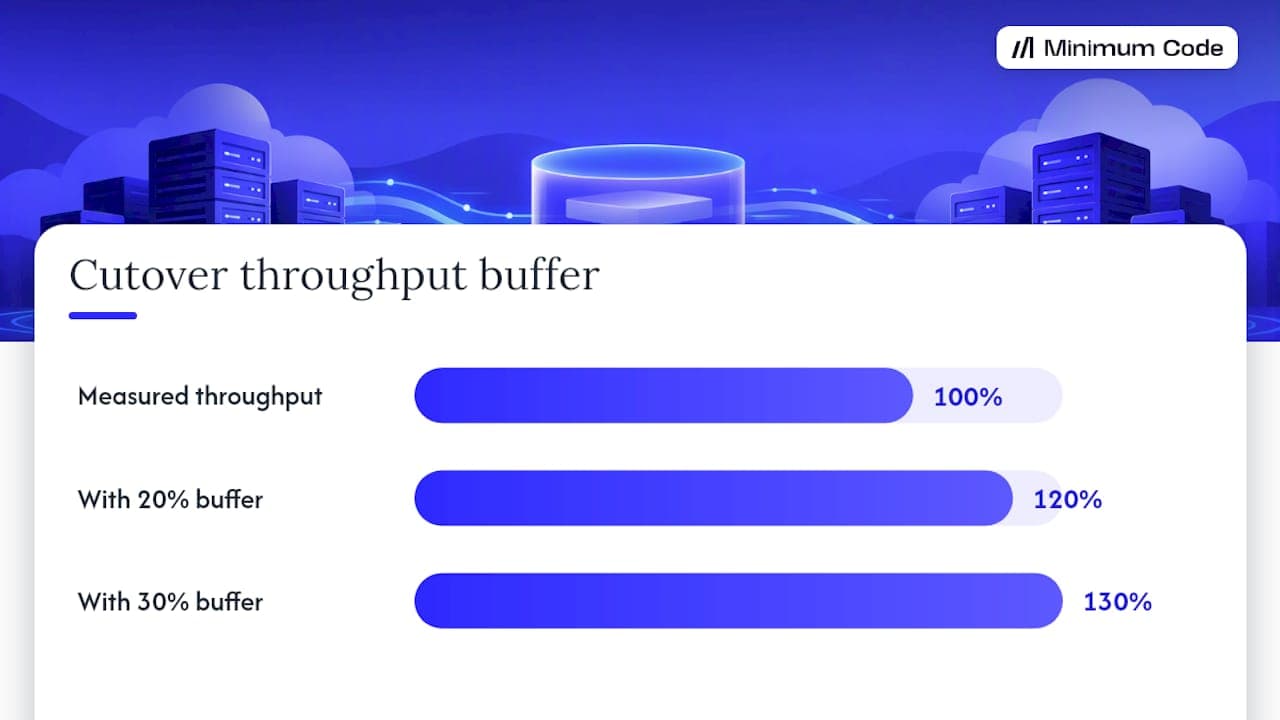
Measuring throughput matters more than a calendar estimate. Microsoft’s cutover planning guidance recommends measuring records-per-second under production-like conditions and adding a buffer of 20 to 30% for monitoring overhead, since optimistic timelines that don’t reflect real workload are the most common reason a promised cutover window slips.
What goes into the cutover runbook and rollback plan?
The cutover runbook is the single document the team follows during the live switch, and it needs to exist before rehearsal, not get written the night before. Microsoft’s cutover planning documentation lays out the elements a runbook should specify.
- Freeze or write-drain point: the moment writes to the source system stop or slow.
- Final backup: a verified, restorable snapshot taken immediately before the load.
- Final delta load: moving anything that changed since the last full load.
- Reconciliation steps: confirming counts and totals match before flipping traffic.
- Readiness checks: infrastructure, permissions and integrations confirmed live.
- Go/no-go authority: a named person with the power to halt the cutover.
- DNS or connection change: the actual traffic switch.
- Smoke tests: quick checks confirming the system is functioning post-switch.
- Observation period: a defined window of close monitoring before declaring success.
- Rollback triggers: the specific conditions that mean reversing the switch.
Progressive traffic shifting, moving a small percentage of users first and increasing gradually, or a blue-green setup that keeps the old system live in parallel, both reduce the blast radius of a bad cutover compared with an all-or-nothing switch. Whether rollback is automated or manual, Microsoft’s Cloud Adoption Framework recommends testing it in staging before go-live, since a rollback plan nobody has ever executed usually fails when it’s actually needed.
Pro Tip: Rehearse rollback, not just the forward migration. If nobody has watched the rollback actually work, treat the plan as untested.
What happens after the switch, before you retire the old system?
Go-live isn’t the finish line. Monitor error rates, replication lag, failed transforms, reconciliation exceptions, support ticket volume, business transaction success and security alerts through a defined observation period before calling the migration complete.
- Error rates and failed transforms flag data that didn’t convert cleanly.
- Replication lag matters if the legacy system stays live during a phased cutover.
- Reconciliation exceptions need a named owner to resolve, not a backlog nobody reads.
- Support ticket trends often surface issues automated monitoring misses.
- Security alerts confirm access controls carried over correctly.
Keep the legacy system in a read-only or recoverable state until the acceptance gates are met, not decommissioned the moment the new system looks fine. Once criteria are satisfied, archive data according to whatever retention rules apply and decommission on a schedule, not impulsively.
When migration isn’t the right choice
Migration is one option among several, and treating it as the default answer wastes budget on systems that don’t need it. The 7 Rs framework, retain, retire, rehost, replatform, refactor, repurchase or rebuild, gives a structured way to decide.
- Retain when the system works, the ROI on change is weak and the risk of touching it outweighs the benefit.
- Retire when the data or function no longer serves the business.
- Refactor or modernise partially when only part of the system needs to change, which is often cheaper than a full migration.
- Rebuild when the underlying platform can’t meet requirements around SEO, code ownership or hosting no matter how it’s patched.
Cost varies with data volume, transformation complexity and the tooling and infrastructure required, and regulatory constraints can rule out otherwise sensible options entirely.
How Minimum Code handles this
Minimum Code offers migration of live web apps to Next.js and Supabase with a fixed price and scope, aiming for no downtime during the switch and providing a support period after launch.
- We tell founders honestly when an app should stay on Bubble rather than pushing every client towards a rebuild.
- The usual reasons founders move are development speed, SEO requirements, owning the code and choosing where it’s hosted, not the frustrations people expect like hiring or a rising Bubble bill.
- Most of the project time goes into planning and testing rather than writing new code, which matches the phase structure described above.
- Timelines and ownership are agreed upfront as part of the fixed-scope engagement, so there’s no ambiguity about who owns what once the project starts.
Lessons from migrations that went wrong before they went right
The traps repeat across projects: teams test with a sample dataset that’s a tenth the size of production, skip rehearsing rollback because it “shouldn’t be needed,” or leave reconciliation with no named owner so exceptions sit unresolved for days. Every one of those is preventable with the phase gates above.
A short sponsor checklist worth pinning somewhere visible: has someone rehearsed rollback, does reconciliation have a named owner, and has a pilot run at something close to production volume. If the answer to any of those is no, the cutover date should move, not the standard.
— Tom
How Minimum Code can help you move without the guesswork
If you’re running a live Bubble app and weighing whether to migrate, Minimum Code builds the plan and does the work: fixed price, fixed scope, no downtime during the switch, and 60 days of free support once it’s live.
- Get in touch if you’re on a live app with real users and can’t afford an extended outage during the move.
- Talk to us if EU hosting or GDPR is a requirement your current setup can’t meet cleanly.
- We’ll tell you plainly if your app is better off staying where it is, before any contract is signed.
For live Bubble apps specifically, our Migrate Bubble to Code service page sets out the guarantees and what a typical engagement looks like. If your migration touches search rankings, the SEO migration checklist from Babylovegrowth is a useful companion for URL mapping and preserving rankings through cutover.
Sources
The AWS, Microsoft and NIST guidance cited throughout this article covers migration lifecycle, cutover planning and rehearsal standards in more depth than any single blog post can.
- What is Data Migration? - AWS
- AWS documentation (migration prescriptive guidance)
- NIST guidance on migration rehearsal and backup testing
- Microsoft: Cut-over planning for data migration
FAQ
What are the four types of data migration?
The commonly used categories are storage migration, database migration, application migration and business process migration, each describing a different scope of what’s moving. A live web app migration, such as moving off Bubble, usually combines database and application migration since both the data and the code layer change together.
What are the top data migration tools?
Tool choice depends heavily on source and target systems, so there’s no single list that fits every migration. AWS’s prescriptive guidance recommends treating tooling as one work package among several, alongside schema conversion, application changes and testing, rather than the deciding factor in a plan’s success.
What is a migration plan?
A migration plan is the written roadmap for moving defined data from a source system to a target system, covering tools, security, transformations, people, timeline and contingency arrangements. AWS defines the core lifecycle as prepare, extract, transform, load, test, cut over, validate, and retire or archive the source.
What are some examples of data migration?
Common examples include moving a database between cloud providers, migrating a no-code app like Bubble to a coded stack such as Next.js and Supabase, or consolidating multiple legacy systems into one platform after a merger. Each case still follows the same phases: discovery, mapping, pilot, cutover, validation and decommissioning.
How long does a typical data migration take?
Duration depends on data volume, transformation complexity and measured throughput rather than a fixed rule of thumb. Microsoft’s cutover guidance recommends measuring records-per-second in rehearsal and adding a moderate buffer around 20 to 30%, since estimates based on calendar guesses rather than measured throughput are the most common source of missed deadlines.
Recommended

Written by Tom
Founder and Lead Developer

Ready to start your project?
Book a free discovery call to learn how we can build your app in 4 weeks, or less.
Book a call