

Bubble can rank for simple, content-led pages if you set it up carefully. Next.js gives you much more control over rendering, metadata and page speed, which matters once search becomes a real acquisition channel. If organic traffic is a minor part of your business, staying on Bubble is often the right call.
This guide is for non-technical founders with a live app, often on Bubble, who are trying to work out whether SEO alone justifies a migration. We’re software engineers, and we’ll explain the trade-offs plainly.
TL;DR
Key takeaways
- Bubble apps are largely client-side rendered by default, and Bubble’s server-side option is selective rather than framework-level, according to Fokal’s Bubble SEO guide.
- Next.js resolves metadata on the server, so crawlers get finished HTML on the first request, per the Next.js documentation (2026).
- SEO is one of the four reasons founders actually move: speed, SEO, code ownership and hosting choice. It rarely justifies a move on its own.
- If your app sits behind a login and you have a handful of marketing pages, Bubble is probably fine.
- If you need thousands of indexable pages, programmatic content or tight control over speed, Next.js is the better foundation.
What is the real difference between Bubble SEO and Next.js SEO?
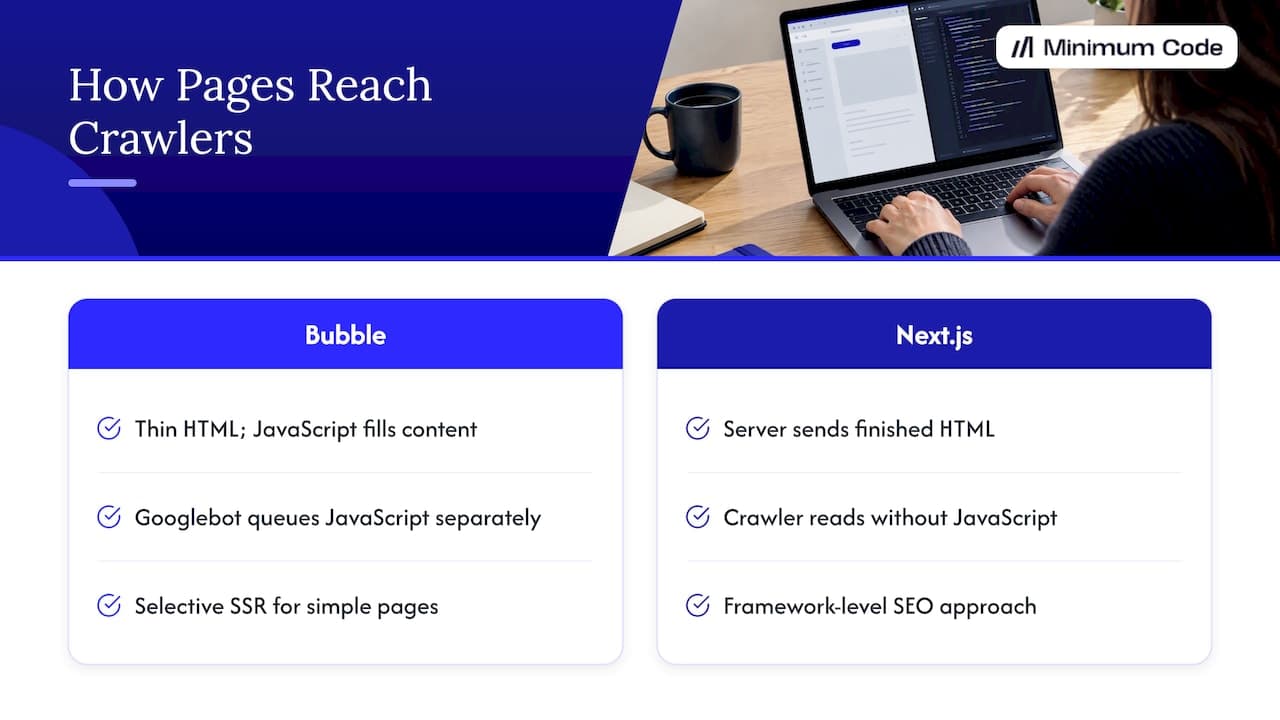
The difference is where the page gets built. In a typical Bubble app, the browser receives a thin shell and JavaScript fills in the content. In Next.js, the server can send the finished HTML, so a crawler reads your content without running any JavaScript.
Fokal’s guide on Bubble SEO settings and limits describes Bubble apps as largely client-side rendered by default, and notes that Googlebot queues JavaScript rendering separately from HTML parsing, which can delay indexing. It also points out that many AI crawlers often don’t execute JavaScript at all. Bubble has added an SEO and server-side rendering capability for content pages. The same guide says it applies selectively and works best on fairly simple, content-driven pages, unlike the framework-level approach of Next.js.
None of this means Bubble pages can’t rank. Google does render JavaScript, and plenty of Bubble sites get indexed. It means you’re relying on a more fragile path, and you have fewer levers when something goes wrong.
How does Next.js handle SEO differently?
Next.js treats SEO as part of the framework, not a plugin or a settings panel. Titles, descriptions, canonical tags and social previews are defined in code and resolved on the server before the page reaches the browser.
The Next.js metadata documentation (2026) describes two routes: a static metadata object for fixed pages, and a dynamic generateMetadata function for pages whose content comes from a database. The generateMetadata reference (2026) shows how a page can read its own data and produce a unique title and description from it.
In practice, that gives you things that are awkward on Bubble:
- Unique metadata for every record. A directory with 5,000 listings can have 5,000 distinct titles and descriptions generated from the data.
- Clean URL structures. You decide the routes, redirects and canonical rules, rather than working inside a platform’s conventions.
- Control over page weight. You choose what JavaScript loads on each page, which affects speed.
- Structured data. Schema markup can be generated per page from the same data that renders the page.
None of that is magic. A badly planned Next.js site will rank worse than a well-run Bubble one. The framework gives you the tools, and someone still has to use them.
Bubble vs Next.js for SEO: a side-by-side comparison
This table sums up the practical differences. It reflects how we see apps behave in practice, plus the sources linked above. Your own app may differ.
Factor | Bubble | Next.js |
|---|---|---|
Default rendering | Largely client-side, with selective server-side rendering for some content pages | Server-rendered or statically generated, your choice per page |
Metadata | Set in the editor, often dynamic on content pages | Defined in code, resolved on the server |
Scale of indexable pages | Workable for dozens or low hundreds of pages | Built for thousands, including programmatic pages |
Page speed control | Limited to what the platform exposes | Full control over what ships to the browser |
AI crawler visibility | Weaker where content depends on JavaScript | Content is in the initial HTML |
Technical SEO changes | Constrained by the platform | Anything you can write in code |
Setup effort | Low | Higher, needs engineers |
Ownership of code and hosting | Platform-managed | You own the code and choose the host |
The bottom row matters more than it looks. SEO needs change over the years, and owning the code means you’re never waiting for a platform to support the next requirement.
Can a Bubble app still rank well?
Yes, if the pages that need to rank are few, simple and content-led. A marketing site, a blog and a handful of landing pages can perform well on Bubble with careful setup.
The usual trouble starts when founders expect a Bubble app to behave like a content platform. Pages built around heavy dynamic data, many workflows or real-time content are exactly where selective server-side rendering struggles, as the Fokal guide notes.
A common pattern that works: keep the product on Bubble and run the public marketing site separately, so search traffic doesn’t depend on the app’s rendering. If you’d rather stay put and push content volume, automated SEO tooling for Bubble sites can help with keyword research, content planning and publishing. Tools like that can’t change how your pages are rendered, so they work best where the rendering is already good enough.
When does SEO alone justify moving from Bubble to Next.js?
SEO alone justifies a move when organic search is a core acquisition channel and your indexable content depends on app data. Think marketplaces, directories, job boards, course catalogues and comparison tools. Each record is a potential landing page, and each needs its own metadata, URL and fast load.
The signs we see most often:
- You need thousands of indexable pages generated from your database.
- Search traffic is your main growth plan, and you’ve already fixed the obvious on-page issues.
- Pages are slow and you can’t trim what the platform loads.
- You want visibility in AI search tools, and your content only appears after JavaScript runs.
- You’ve hit a technical SEO requirement the platform can’t meet.
If none of these apply, SEO is probably not your reason to migrate. In our experience, founders move for four reasons: development speed, SEO, owning the code and choosing where it’s hosted. Hiring problems, downtime and a rising Bubble bill are real frustrations, but they’re rarely the trigger.
Is Next.js faster to develop than Bubble now?
It can be. AI coding tools have closed the gap, and for many projects development in code is now as fast as Bubble or faster. That changes the old argument that no-code is always quicker to build.
The catch is who’s steering. AI tools handle a lot of the implementation, but architecture, code review and testing still need senior engineers. Without them you get code that works in a demo and breaks under real users. That’s the model we use: senior software engineers own the structure and quality, and AI handles much of the typing.
How long does a Bubble to Next.js migration take, and will SEO suffer?
The timeline depends on the size of the app, and we won’t quote a number without seeing it. What we can say is that most of the time goes into planning and testing, not building. For SEO, the planning is where rankings are protected.
A careful migration keeps every URL that already earns traffic, or redirects it properly. That means:
- Audit what ranks today. List the URLs that bring in clicks and links.
- Map old URLs to new ones. Keep them identical where you can, and use permanent redirects where you can’t.
- Carry over metadata. Titles, descriptions and canonical tags should match or improve on the originals.
- Test before the switch. Crawl the new site and compare it with the old one.
- Switch without downtime. Search engines should never meet an error page.
- Watch Search Console afterwards. Rankings can wobble briefly, so check for crawl errors and indexing gaps.
Skip the URL mapping and you can lose traffic you spent years earning. Done properly, the migration is invisible to search engines, and the gains come from what you build afterwards. Our wider Bubble to Next.js migration guide covers the full process.
Our view: SEO is a good reason to move, but rarely the only one
We started on Bubble in 2022 and we’re still a Bubble Gold agency. That’s why we can say openly when an app should stay.
Simple all-in-one tools and prototypes often belong on Bubble. If your product is a login-gated workflow tool and your marketing site is ten pages, moving for SEO would cost you time and money for a small return.
The case flips when search is how you grow and your pages come from your data. Then rendering becomes a business constraint, not a technical footnote. Moving to code also gets you something SEO tools can’t give you: you own the code, you choose the hosting, and nobody changes the rules on you.
A practical test: write down how many pages you want Google to index in two years, and how much revenue depends on them. If the answer is “a few dozen” and “not much”, stay. If it’s “thousands” and “most of it”, plan the move.
— Tom
When this isn’t right for you
Moving to Next.js for SEO is the wrong call in these situations:
- Your app is mostly behind a login. Search engines can’t see it, so rendering strategy barely matters.
- Your marketing site is small. A few well-written pages on Bubble, or a separate simple site, will do the job.
- You’re still validating the idea. A prototype should be cheap and fast to change. Stay on Bubble until you know people want it.
- Your SEO problems are content problems. Thin pages, weak targeting and no backlinks won’t be fixed by a new framework.
- You’d lose a platform you rely on. If the all-in-one nature of Bubble suits your team, there’s no shame in keeping it.
If you’re not sure which side you’re on, ask for an audit before committing to a rebuild. A good engineer will tell you to stay if staying is right.
How Minimum Code handles this
We migrate live Bubble apps to Next.js, Supabase, Vercel and TypeScript. Engagements are fixed price and fixed scope, with no downtime during the switch and 60 days of free support after launch. You own the code and choose the hosting, and as a European team with an Austrian entity, EU hosting and GDPR are a default. If you want to see what that involves, start with our Bubble to code migration service, or talk to us about web app development if you’re building from scratch.
FAQ
Is Bubble bad for SEO?
No, but it’s less forgiving than a framework like Next.js. Bubble apps are largely client-side rendered by default, and server-side rendering is selective, so complex dynamic pages are harder to get indexed reliably. Simple, content-led pages can rank well.
Does Next.js guarantee better rankings?
No. Next.js gives crawlers finished HTML and gives you control over metadata and speed, but rankings still depend on content quality, relevance and links. It removes technical obstacles. It doesn’t replace good content.
Will I lose traffic if I migrate from Bubble to Next.js?
Not if the migration is planned for SEO. Keep or redirect every URL that earns traffic, carry over metadata, test before the switch and monitor Search Console afterwards. Traffic loss usually comes from skipped URL mapping.
Can I keep Bubble for the app and use Next.js for the public pages?
Yes, that’s a common middle path. The public marketing and content pages run on Next.js, while the logged-in product stays on Bubble. It limits the scope of the work, though you then maintain two systems.
Does moving to Next.js help with EU hosting and GDPR?
It helps with hosting choice, because you decide where the app runs. On Bubble, EU hosting is only available on the Enterprise plan, though for most apps Bubble’s DPA keeps US hosting GDPR compliant. Healthcare, fintech and defence usually need EU hosting, and a coded stack handles that more easily.
Sources
- Metadata and OG images, Next.js documentation (2026)
- generateMetadata, Next.js documentation (2026)
- Bubble SEO: Settings, Limits, and What to Fix First, Fokal
Recommended

Written by Tom
Founder and Lead Developer

Ready to start your project?
Book a free discovery call to learn how we can build your app in 4 weeks, or less.
Book a call