


Bubble paired with Xano is a sound transitional architecture when you treat it as a stopgap with a deadline, and a liability when you treat it as the finished product. Used well, it buys you server-side power while you plan a proper migration. Used without a plan, it turns into two systems with duplicated permission logic, split state and nobody quite sure who owns what.
Key takeaways
- Bubble plus Xano works as a staged step towards a fuller rebuild, not as a permanent architecture, and optimizing its SEO impact is crucial for growth, as detailed in Bubble SEO Automation.
- Connect the two through Bubble’s API Connector or a community Xano plugin, with authentication routed server-side.
- The real cost shows up later: duplicated auth rules, two deploy pipelines, two places to debug the same bug.
- Write exit criteria and a migration date before you build the hybrid, not after it starts hurting.
- Xano earns its place when you need heavier server-side queries, scheduled jobs or one backend serving several front ends.
- If nobody can tell you when the hybrid ends, that is your answer: it already has become the architecture.
TL;DR:
- Choose Bubble’s API Connector for custom headers or response handling, keep credentials in private headers, and initialize each endpoint with a successful test record.
- Make Xano authoritative for roles and API permissions, then test restricted actions in both platforms because Bubble’s hidden controls cannot block direct API calls.
- Xano adds value for complex queries, scheduled jobs, or one backend shared by multiple front ends; simple CRUD apps usually incur duplicated work without benefit.
- Set measurable exit triggers for cost per user, response latency, and duplicated logic, choose a review date, then migrate one domain with tests and rollback.
Step-by-step: get Xano talking to Bubble today
You have two routes into Bubble: the official API Connector or a community Xano plugin. The plugin is quicker to set up for simple cases; the API Connector gives you full control over headers, authentication and response handling, which matters once your endpoints get more complex. Xano’s own documentation confirms both paths work, and recommends the API Connector when you need precision.
- Decide plugin versus API Connector: pick the plugin for a fast first connection, the API Connector when you need header control or custom response handling.
- In Bubble, add a new API collection and set authentication to a private header, typically
Authorization: Bearer, rather than passing keys in the URL. - Paste in your Xano endpoint URLs and initialise each call with real test data so Bubble can detect the response schema.
- Run a GET and a POST against Xano with sample records, then confirm the returned fields match what your workflows expect.
- Where available, pull in your Xano workspace’s Swagger or OpenAPI documentation to speed up bulk endpoint setup rather than typing each one by hand.
Skipping the initialisation step is the most common reason Bubble “can’t see” fields that genuinely exist in Xano. The schema only populates after a live, successful call.
What the Bubble front end plus Xano backend architecture actually looks like
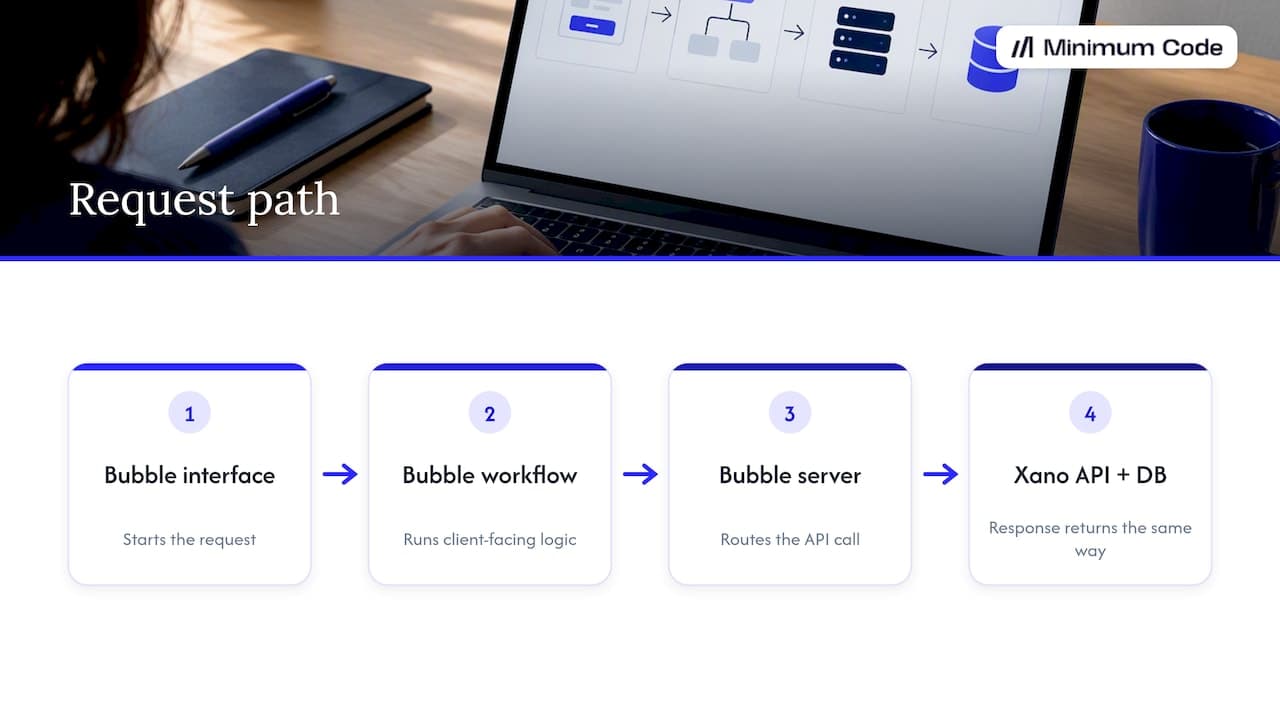
In this setup, Bubble keeps the interface, workflows and client-facing logic, while Xano holds the database and the heavier server-side logic. A typical request runs from the Bubble interface through a Bubble workflow, out to a Bubble server, across to the Xano API, and down into the Xano database before the response travels back the same way.
Session and authentication state usually need a clear home. If Bubble manages logins while Xano also issues its own tokens, you get two sources of truth for who a user is, and that split authority is where subtle bugs creep in. Keeping one system as the authority for identity, with the other trusting it, avoids most of that.
One genuine advantage: Bubble routes API Connector calls through its own servers by default, so your Xano keys stay off the client and out of the browser.
Why you might pick Xano as your external backend
Founders usually reach for Xano when Bubble’s native database starts to strain under complex queries or heavier data volumes. It is a reasonable choice for specific jobs, not a wholesale replacement for Bubble’s workflow engine.
- Xano handles more complex server-side queries and scales better under heavier datasets than Bubble’s native database.
- One Xano backend can serve a Bubble web app, a mobile app or another front end at the same time, since Bubble itself supports building web and native apps from a single editor and teams sometimes want one shared backend behind them.
- Scheduled jobs, background processing and third-party integrations are often easier to manage cleanly in Xano than bolted onto Bubble’s workflow engine.
- Teams with a separate backend developer or a paid backend service can iterate on Xano independently of the Bubble front end, speeding up backend changes.
Trade-offs: the cost of running two platforms in production
None of this comes free. Running Bubble and Xano together means running two systems, and two systems mean twice the places things can quietly drift apart.
- Permission rules written in Bubble and mirrored in Xano fall out of sync the moment one side changes without the other.
- Every release now means two deploy processes, which slows down your release cycle and doubles the surface you need to test.
- A bug can live in Bubble’s workflow, in the API call, or in Xano’s logic, so debugging takes longer because you are checking three places instead of one.
- Latency can creep up because every request now crosses an extra network hop between Bubble’s servers and Xano’s API.
- Monitoring, backups and version control now cover two platforms with different tools, which adds ongoing maintenance work that a single-stack app does not carry.
Pro Tip: Write every permission rule in one place first, Bubble or Xano, and treat the other side’s copy as generated from it, not maintained separately.
When the hybrid is a sensible step, and when it becomes permanent pain
The hybrid earns its keep short term: when you need server-side query power right now, when a background job needs reliable scheduling that Bubble struggles with, or when you already know a second front end will need the same backend soon. These are concrete, time-boxed reasons.
It turns into permanent pain when the signs stack up: permission logic that keeps drifting between the two systems, nobody who can tell you definitively which platform owns a given piece of data, and a testing matrix that has quietly doubled in size without anyone deciding that on purpose.
The fix is not clever engineering. It is deciding, in writing, before development starts, what conditions trigger moving off the hybrid and setting a target date to review against.
Concrete exit criteria and a staged migration checklist you should write down now
Exit criteria work best as numbers you can check against, not vague intentions. Set thresholds for cost per user, response latency against your SLA targets, and the share of logic duplicated across Bubble and Xano [data needed], then review them on a fixed schedule rather than waiting for a crisis.
- Pick one domain to migrate first, usually the one with the most duplicated logic or the worst latency.
- Export the Xano schema and document every field Bubble currently depends on.
- Add automated tests that cover the permission scenarios on both sides before you touch any code.
- Run a dry-run cutover against a copy of production data to catch surprises early.
- Schedule a rehearsal with a rollback plan, then set a final cutover date and hold to it.
Schema-first exports with small incremental syncs during rehearsals cut the risk of data drift far more reliably than one large export followed by a rushed final cutover.
Pre-launch checklist: security, auth and observability
Before anything goes live, lock down the basics. Keep development and live Xano keys separate inside Bubble’s API Connector, use header-based authentication rather than passing keys in query strings, and initialise every endpoint with real test data so schemas are detected correctly.
- Store credentials as private headers in Bubble, never in a URL parameter.
- Separate development and live API keys so a test call never touches production data.
- Add logging and error monitoring on both Bubble and Xano, with clear alerting thresholds for failed calls.
- Document which system owns each piece of data, including backups and a tested path for moving it later.
Routing calls through Bubble’s own servers by default keeps your Xano keys encrypted and off the client, which Bubble’s authentication documentation confirms is the standard behaviour of the API Connector.
Security beyond storing keys safely
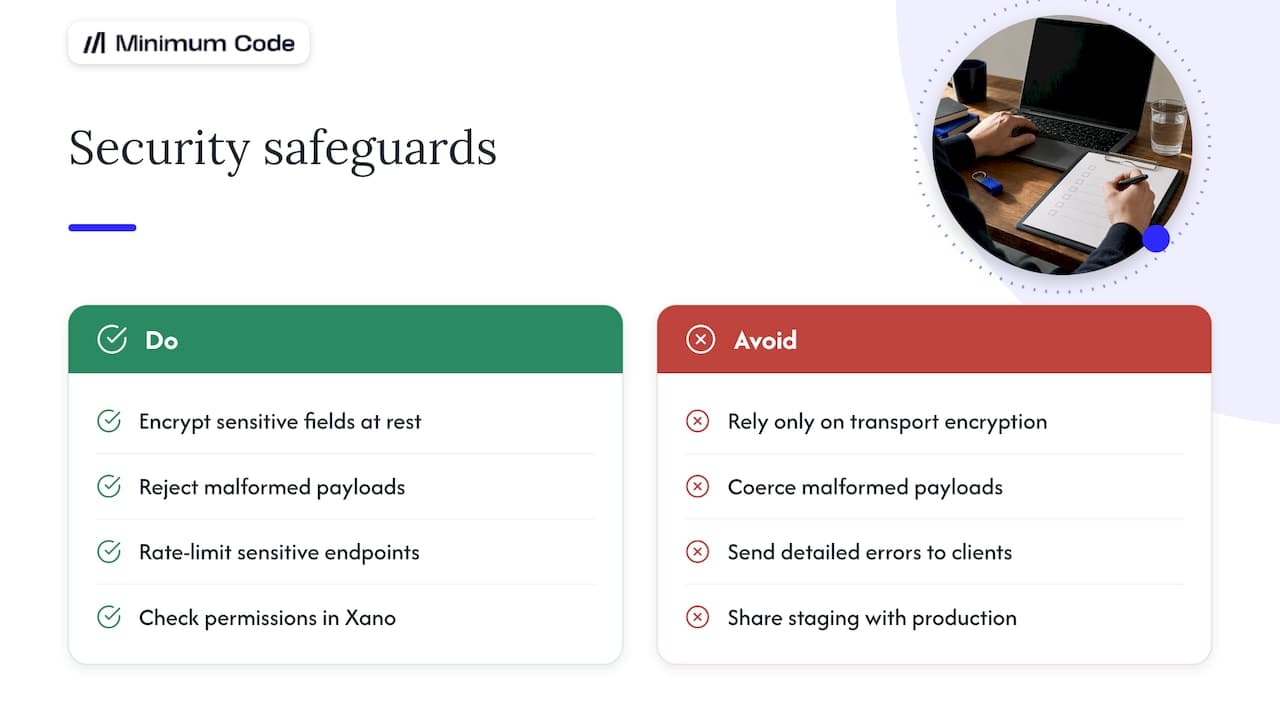
Keeping API keys server-side is the starting point, not the whole job. Encrypt sensitive fields at rest in Xano rather than relying solely on transport encryption, and apply the same rule to anything Bubble caches locally for display.
Design your Xano endpoints so each one does one job and validates its inputs strictly: reject malformed payloads rather than trying to coerce them, and return generic error messages to the client while logging full detail server-side. Rate-limit endpoints that touch sensitive data or expensive queries, since a hybrid architecture gives an attacker two attack surfaces instead of one.
Review permission checks on the Xano side independently of whatever Bubble’s workflows assume. A workflow that only shows a button to admins in Bubble does nothing to stop a direct API call from a non-admin user if Xano does not check the role itself. Treat every Xano endpoint as if it could be called directly, because it can be.
Finally, separate your Xano environments properly: a staging workspace with its own keys and data, never shared with production, so a mistake in testing cannot touch real user records.
Performance: caching and cutting API latency
Every call between Bubble and Xano crosses a network hop, and that hop adds latency you would not have in a single-stack app. The practical fix is to cache what does not change often rather than refetching it on every page load.
Cache reference data, such as lookup lists or configuration values, in Bubble’s own database or in a lightweight state rather than calling Xano for it repeatedly. Reserve live Xano calls for data that genuinely changes per request. Batch related calls where Xano’s API supports it, so a page that needs five pieces of data makes one round trip instead of five.
Keep response payloads lean: return only the fields Bubble’s workflow actually uses, since an oversized JSON response slows parsing on the Bubble side as well as the network transfer. Where Xano supports server-side filtering and pagination, use it instead of pulling a full dataset into Bubble and filtering there.
Monitor response times on both ends separately. A slow page could be a slow Xano query, a slow Bubble workflow processing the response, or the network hop itself, and you cannot fix what you have not isolated.
Troubleshooting Bubble to Xano communication problems
Most connection problems trace back to one of three places: authentication, schema mismatches, or an uninitialised endpoint. Start with Bubble’s API Connector logs, which show the raw request and response for every call, including the exact headers sent.
If a call returns a 401 or 403, check first whether you are using the correct key for the environment, development or live, since mixing them up is the single most common cause. If the call succeeds but Bubble shows blank fields, the schema likely was not initialised correctly against real data, so re-run the initialisation with a populated test record from Xano.
For intermittent failures, check Xano’s own request history alongside Bubble’s logs side by side for the same timestamp, since a timeout on one side often looks like a different error on the other. Keep a shared log of known issues and their fixes across both platforms, since the same schema mismatch tends to recur when a Xano field changes without updating the matching Bubble call.
Keeping Bubble and Xano data in sync
Once two databases exist, the question becomes which one is right when they disagree. Pick a single source of truth for each type of data: Xano for anything needing complex queries or shared by multiple front ends, Bubble for anything purely cosmetic or workflow-specific that never leaves the app.
Avoid writing the same record to both databases independently. Instead, have Bubble read and write through Xano’s API for shared data, rather than maintaining a parallel copy in Bubble’s own database that can drift out of step. Where some caching in Bubble is unavoidable for speed, refresh it on a schedule or on a clear trigger, and never treat the cached copy as authoritative.
For anything transactional, such as payments or bookings, handle the write in one place only and have the other system read the result, rather than attempting to write the same transaction twice. This avoids the classic hybrid bug where a record exists in one database but not the other because one of the two writes failed silently.
Keeping user roles and permissions coherent
Permission drift is the most common real-world failure in a Bubble plus Xano setup. It happens quietly: someone adds a new role or a new restricted field in Bubble’s workflows, and forgets to mirror the same rule in Xano’s endpoints, or the reverse.
The fix is treating one system as the source of truth for roles and permissions, typically Xano, since it already governs API-level access. Bubble’s workflows can then check against that same role data rather than maintaining a separate permission table that has to be kept in step by hand.
Write automated tests that exercise the same permission scenario on both sides, such as confirming a non-admin user is blocked from a restricted action in Bubble’s workflow and blocked again at the Xano API level if they try to call it directly. Treat any mismatch between the two as a bug, not a minor inconsistency, since this is where unauthorised access most often slips through in hybrid architectures.
Where this combination genuinely fits
Bubble plus Xano suits apps with real server-side demands that Bubble’s native database was not built for: marketplaces running complex search and filtering across large catalogues, SaaS tools with scheduled billing or usage calculations, and products that need the same backend to serve both a Bubble web app and a separate mobile app.
It also fits internal tools where a team already has a Xano backend serving other systems and wants to add a Bubble front end quickly without rebuilding that backend from scratch. In each of these cases, the backend logic is substantial enough to justify a dedicated platform, and the duplication risk is managed because the team has planned for it from the start.
It fits poorly for simple CRUD apps, early prototypes, or internal tools where Bubble’s own database already handles the volume and complexity comfortably. Adding Xano there adds the two-system tax described earlier without a corresponding benefit, which is exactly the trap this guide is about avoiding.
Our view: real delivery patterns and guarantees
We take on hybrid Bubble and Xano projects when the server-side need is genuine and the client is willing to set exit criteria upfront. When duplicated permission logic and split state are already causing production bugs, we recommend moving to a single codebase instead of patching the hybrid further.
Our process starts with discovery to confirm which domains actually need Xano’s power, then written exit criteria before any hybrid code goes in. You can read more about how we approach migrating a Bubble app to code.
— Tom
How we can help you decide or migrate
If you are weighing up whether to bolt Xano onto Bubble or move to a single owned codebase, we can help you work through the trade-offs honestly, including the option of staying on Bubble if that is genuinely the right call for your app right now.
When a rebuild is the better route, our migrate your Bubble app to code service moves you to a stack you own, with a fixed price and no downtime during the switch. For a fresh build on a modern stack from the outset, our web app development service covers that too.
FAQ
Is Bubble a real, production-grade platform or just a prototyping tool?
Bubble is a genuine production platform used for live, revenue-generating apps, not only prototypes. Many teams run it long-term successfully, and the right call depends on your app’s complexity and growth plans rather than any inherent limitation in the platform itself.
How much does Bubble’s AI feature cost per month?
Bubble’s pricing and any AI-related features are set directly on Bubble’s own pricing page, and costs vary by plan tier. Check Bubble’s current pricing page for exact figures before budgeting, since plan structures change over time.
Is Glide or Bubble the better choice for building an app?
The better choice depends on your app’s complexity: Glide suits simpler, data-driven apps built quickly from a spreadsheet or table, while Bubble supports more complex workflows, custom logic and external integrations like Xano. For anything beyond a simple internal tool, Bubble’s flexibility tends to matter more.
Is Bubble still a relevant platform in 2026?
Yes, Bubble remains a widely used platform for building and launching web apps without a traditional codebase. Whether it remains the right long-term choice for a specific app depends on factors like SEO needs, hosting requirements and whether you want to own the underlying code outright.
Do I need to migrate away from Bubble if I add Xano as a backend?
Not necessarily. Adding Xano can be a sound transitional step for specific needs like heavier server-side queries, but it works best with written exit criteria and a target review date rather than as an open-ended architecture.
Sources
Documentation and guides to follow next
- No-code app builders in Xano’s documentation
- Authentication guidance in Bubble’s API Connector docs
- Our comparisons of Xano versus Supabase and Bubble backend options
- Our practical walkthrough on building an app with Bubble and Xano
Recommended

Written by Tom
Founder and Lead Developer

Ready to start your project?
Book a free discovery call to learn how we can build your app in 4 weeks, or less.
Book a call