
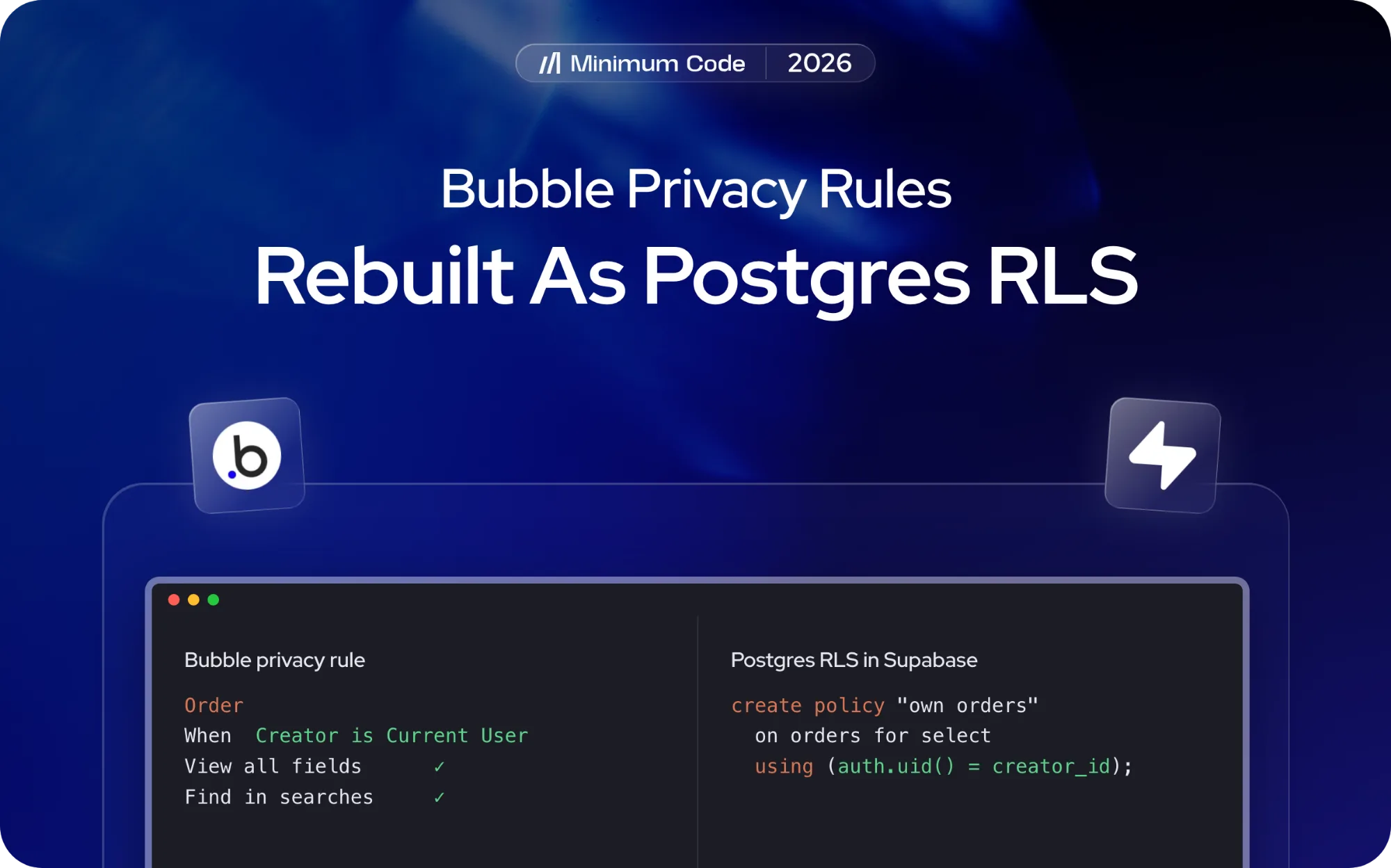
Bubble privacy rules are the server-side filter controlling which records, fields and search results each user can access. If your app handles private or regulated data, enable strict search mode, run the privacy rules checker using sample data, and build a test matrix as your first steps. If you need database-level defence in depth or you’re planning a move off Bubble, mapping those same rules to Postgres row level security in Supabase gives you one place to prove who can see what.
Key takeaways
- Strict search requires explicit permission for each searchable field; find affected queries with the editor’s Uses constraint search, then test them in staging before switching.
- Admin API tokens bypass privacy rules entirely, while workflow steps marked Ignore privacy rules also override them; keep tokens server side and audit overrides regularly.
- Build a resource by role matrix covering reads, inserts, updates, deletes, and file access; verify both allowed and denied outcomes with representative sample data.
- Bubble offers EU hosting only on Enterprise, and privacy rules alone do not establish GDPR compliance because consent, retention, and breach procedures require separate controls.
What are Bubble privacy rules?
Privacy rules are set on each data type in the Data tab and control what logged-in or anonymous users can access or modify before any data leaves the server. According to Bubble’s own manual, these rules govern three things: whether a record is visible at all, which fields on that record are visible, and whether an operation like create, modify or delete is permitted.
A field can be set to “everyone can view” or restricted to specific conditions, and separately it can be marked as usable or not usable as a search constraint. Those are two different switches, and conflating them is where most leaks start.
- Record visibility decides whether a user ever receives the row.
- Field visibility decides whether a received row shows that specific field.
- Search constraint permission decides whether a field can filter a search at all.
- File access follows the same record and field rules as any other data.
Page conditions, element visibility and workflow checks matter for user experience, but none of them stop a request at the server. Once a record reaches a browser, hiding it with a conditional is cosmetic, not protection. That’s why every control that matters for data protection has to live in the privacy rules themselves, not in the interface built on top of them.
Should you use automatic or strict search privacy mode?
Automatic mode is faster to build with but strict mode is the one to run once you hold private data. Automatic mode infers which constraints are allowed from the searches your pages and workflows already run, which is convenient early on but unpredictable once other clients, like an API consumer, start searching your data in ways you didn’t anticipate.
Strict mode, by contrast, requires you to explicitly permit every field a search is allowed to filter on. Bubble’s documentation recommends it for apps handling private or sensitive data because it removes the guesswork: if a field hasn’t been explicitly permitted as a constraint, no search can use it, full stop.
Switching to strict mode may cause searches relying on unpermitted constraints to stop working, so plan for some rework. Use the “Uses constraint” search in the Bubble editor to find where fields filter data before switching. Allocate time to test all affected searches thoroughly.
Pro Tip: Turn on strict mode in a staging environment first and let the broken searches surface. That list is your migration checklist.
How do the Data API and API workflows interact with privacy rules?
The Data API and workflow API each introduce their own override behaviour, and missing this is one of the fastest ways to expose data you thought was protected. Once you enable the Data API, Bubble adds separate Create, Modify and Delete via API toggles per Thing, and these are off by default until you turn them on.
A request authenticated with an admin-level Bubble API token bypasses privacy rules entirely, according to Bubble’s Data API documentation. That token should never reach client-side code, a public repository or a front-end environment variable; treat it the way you’d treat a database root password.
- API workflows respect privacy rules for reads by default, the same as any logged-in user would experience.
- A workflow step can have “Ignore privacy rules” checked, which overrides normal protections for every action in that workflow, as Bubble notes for workflow API behaviour.
- That override is sometimes necessary, for example letting a server-side workflow update a record the initiating user couldn’t normally touch, but it needs a deliberate reason and some form of logging.
- Audit which workflows use the override periodically; it’s easy to add one for a one-off fix and forget it’s there.
Bubble.io security: which privacy rule mistakes leak data?
Most privacy rule failures come from a handful of repeat mistakes rather than exotic edge cases. A field left viewable while also being enabled as a search constraint creates what’s effectively search inference: a user can’t read the field directly but can narrow results by it, which leaks the value indirectly. Relying on element visibility or page conditions as the actual access control, instead of as a UX nicety layered on top of real rules, is the second common gap. The third is leaving admin tokens or test API keys sitting in client-visible code or in a production environment they were never meant for.
- List every field that holds private, financial or personal data across your data types.
- Run a “Uses constraint” search on each of those fields to see where they filter results.
- Use the privacy rules checker with representative sample data loaded into each data type.
- Search your app’s codebase, plugins and workflow definitions for exposed API tokens and rotate any you find.
How do you build a privacy rule test matrix?
Rebuilding a permission model starts with an honest inventory, because access control in Bubble is scattered across privacy rules, page conditions, element conditions and workflow checks with no single file that shows you the whole picture. Walk through every data type, every field, every page search, every workflow and every API endpoint, and write down what each one is supposed to allow and for whom.
- Enumerate data types and their fields, flagging anything containing personal, financial or otherwise sensitive data.
- List every page-level and workflow-level search, noting which fields they filter on.
- List every API endpoint, including whether the Data API is enabled per Thing and whether any workflow uses “Ignore privacy rules.”
- Build a test matrix with resources, meaning things and fields, as rows and roles as columns, then fill each cell with the actions it should allow: select, insert, update, delete, file access.
- Run the privacy rules checker with sample data in each data type and record what it flags as publicly accessible.
Pro Tip: Treat the test matrix as a living document. Every time you add a role or a data type, add a row or column before you ship, not after.
For each cell, log the expected outcome and the actual outcome, and assert that API workflows with “Ignore privacy rules” enabled don’t leak data to roles that shouldn’t see it. This matrix becomes the specification you carry into any later migration, including a move to row level security in Supabase.
How do Bubble privacy rules map to Postgres row level security in Supabase?
Client-side checks, whatever form they take, only ever decide what a user interface shows. They never decide what a server will actually hand over, which is exactly the gap Postgres row level security is built to close. Supabase’s row level security documentation describes policies that run inside the database itself, so a request is checked against a USING clause for reads and a WITH CHECK clause for writes, no matter which API, admin panel or third-party tool is making the request.
Bubble concept | Postgres RLS equivalent |
|---|---|
Record visible if condition | Policy |
Field viewable by role | Column-level grants or view with |
Field usable as search constraint | No direct equivalent: a column the role cannot read cannot be filtered on through the API |
Create/Modify/Delete via API toggle | Per-operation policy ( |
Ignore privacy rules override |
|
The migration steps follow a consistent order:
- Enable row level security on every table that holds data a user shouldn’t fully control.
- Check which table and column grants the
anonandauthenticatedroles have, and remove what a role should never touch. - Write one policy per operation rather than one broad policy, because narrow policies are easier to test and reason about.
- Write SQL test files that assert allow and deny outcomes for each role and resource, and run them with
supabase test dbas part of your pipeline.
A few things catch teams out during this move. Database views can silently bypass RLS unless created with security_invoker, and SECURITY DEFINER functions can do the same if they’re not audited. The service_role key, like a Bubble admin token, bypasses RLS entirely and belongs only in server-side code. Recursive policies, where a policy on one table queries another table that itself has a policy referencing the first, can also produce unexpected results and are worth testing explicitly.
How do privacy rules affect app performance and user experience?
Every privacy rule Bubble evaluates adds a server-side check to each request, and the more conditions a rule contains, the more work the server does before returning a result. A rule with several nested conditions or one that depends on counting or searching a related data type will generally cost more than a simple “logged-in user matches a field” check, particularly on pages that load several lists of records at once.
Strict search mode can also change the experience during the transition period. Any search that relied on an unpermitted constraint simply returns no results once strict mode is on, until you grant that permission explicitly. Users see empty lists rather than errors, which makes the symptom easy to miss until someone reports it.
The practical answer is to keep privacy rule conditions as simple as the requirement allows and to test pages that load multiple data types together, since that’s where performance cost compounds. Field-level restrictions carry very little overhead compared with record-level conditions that involve related records, so it’s worth being more careful with the latter.
None of this is a reason to loosen rules for speed. A slightly slower page that correctly filters data is the right trade against a fast page that leaks records. If performance becomes a real constraint, that’s often one of the signals, alongside genuine speed and SEO needs, that point towards a coded stack where database indexes and query plans give you more direct control over both access and performance.
What other security measures does Bubble apply?
Privacy rules decide who can request data, but they sit alongside separate infrastructure protections that cover how data is stored and transmitted. Bubble apps run over HTTPS by default, so data in transit between a user’s browser and Bubble’s servers is encrypted regardless of how your privacy rules are configured.
Privacy rules and encryption answer different questions. Encryption protects data from interception in transit or exposure if underlying storage is compromised; privacy rules decide whether a legitimate, authenticated request is even allowed to see a given record or field. A beautifully encrypted connection does nothing to stop an over-permissive privacy rule from handing a user data they shouldn’t have, and conversely, tight privacy rules don’t make up for transmitting sensitive data over an unencrypted channel.
For apps with specific regulatory obligations, where the data is physically hosted can matter as much as how it’s transmitted. On Bubble, EU-based hosting is only available on the Enterprise plan; most apps on lower plans run on US-based infrastructure, with Bubble’s data processing agreement covering GDPR compliance for that arrangement. Sectors with stricter residency requirements, such as healthcare, fintech and defence, usually need guaranteed EU hosting, and a coded stack where you choose the hosting region yourself tends to handle that requirement more directly than a Bubble front end paired with an external back end built to work around the limitation.
How should privacy rules change as your app scales?
Privacy rules that worked for a five-table app with two roles rarely scale cleanly to a multi-tenant product with a dozen roles and nested permissions. The main risk when scaling isn’t that existing rules break outright, it’s that nobody remembers to extend them when a new data type, workflow or user role is added.
Treat your test matrix from earlier as a permanent artefact rather than a one-time exercise. Every new data type gets a row, every new role gets a column, and every new workflow gets checked against the “Ignore privacy rules” question before it ships. Re-run the privacy rules checker with current sample data after any significant schema change, since a field added to an existing data type doesn’t automatically inherit sensible restrictions.
Multi-tenant boundaries deserve particular attention at this stage. A rule that correctly separates “my records” from “everyone else’s records” within a single organisation often needs rework once the app supports multiple organisations, because the condition has to check organisation membership as well as individual ownership. It’s worth testing that boundary explicitly, with sample accounts in at least two separate tenants, rather than assuming an existing rule generalises correctly.
If the architecture change on the table is bigger than adding a role, for instance restructuring how organisations and users relate to each other, that’s also a natural point to reconsider whether privacy rules spread across dozens of data types are still the right model, or whether consolidating that logic into database-level policies would be easier to maintain going forward.
What do multi-tenant privacy rules look like in practice?
A reasonably common pattern is a multi-tenant project tool where each organisation’s users should see only their own organisation’s records, admins within an organisation should see everything in it, and a small internal support team needs to see across all organisations to resolve tickets. Built in Bubble, this typically means a privacy rule condition checking organisation membership for ordinary users, a separate condition checking an “is admin” field for org-level admins, and a third condition checking a “support staff” flag that bypasses the organisation check entirely.
Each of those conditions has to be kept consistent across every data type that holds organisation-scoped data, and each needs its own row in a test matrix: ordinary user from organisation A against a record from organisation B should be denied, org admin from A against any record in A should be allowed, and support staff against any record regardless of organisation should be allowed. Miss testing the “wrong organisation” case specifically, and it’s easy to ship a condition that technically works for the happy path while quietly allowing cross-tenant access.
A simpler but still instructive case is a marketplace app where buyers and sellers share a listings data type. Sellers need to edit their own listings and view orders placed against them, buyers need to view listings generally but only their own order history, and neither should see the other’s private fields, like a seller’s payout details or a buyer’s saved payment method. That pattern, several roles sharing one data type with different field-level and record-level rules layered on top, is exactly the shape that benefits from the resource by role by action matrix described earlier, since it’s easy to correctly protect a record while accidentally leaving a related field exposed.
Do Bubble privacy rules make an app GDPR compliant?
Bubble privacy rules are a technical access control mechanism, while GDPR is a legal framework, and conflating the two is a common mistake. Privacy rules can be one of the technical measures that helps satisfy GDPR’s requirements, but configuring them correctly doesn’t by itself make an app compliant.
The European Commission’s legal framework for data protection describes principles like data minimisation, transparency and data protection by design and by default, alongside a general requirement for appropriate technical and organisational measures. Tightly scoped privacy rules, in strict mode, with field-level restrictions and a tested audit trail, map reasonably well onto “data protection by design”: you’re building access limits into the structure of the app rather than bolting them on afterwards.
What privacy rules don’t cover is the rest of the GDPR picture: lawful basis for processing, consent records, data subject access request handling, breach notification procedures and retention policies. Those need their own implementation regardless of how your database access is structured. For apps with genuine regulatory exposure, particularly where EU hosting is a requirement rather than a preference, the practical reality is that Bubble’s own EU hosting sits behind the Enterprise plan, while a coded stack lets you choose a hosting region and build the surrounding compliance processes directly into your infrastructure rather than around it.
When to stay on Bubble and when to plan a migration
Bubble’s privacy rules work well for apps with a straightforward permission model, modest regulatory exposure and a priority on iterating quickly, and there’s no reason to rebuild something that’s already doing its job. The case for migrating builds when you need EU hosting for compliance reasons, want the predictability of database-level RLS rather than rules spread across data types and workflows, have SEO requirements Bubble’s rendering model makes harder to meet, or simply want to own the code outright. When we scope a migration, we start with the inventory and test matrix described above. The data side of that move is covered in how to migrate a Bubble database to Supabase, which also explains why privacy rules only exist in the .bubble export file.
How Minimum Code handles privacy audits and migrations
If you’re staring at a Bubble app with privacy rules nobody fully remembers configuring, we start by building the inventory and test matrix ourselves: every data type, every role, every action, checked and documented. Where that points to a coded rebuild, we map those same rules into Postgres row level security policies in Supabase, write the SQL tests that prove each policy, and plan the cutover so your app stays live throughout.
We offer a fixed price and fixed scope. If you want a second opinion on where your app’s permission model stands, our Bubble to code migration page explains how we scope and run that work, and the code audit checklist shows what else an audit covers.
FAQ
Where do you set privacy rules in Bubble?
In the Data tab, under Privacy, per data type. Each rule has a condition, the fields it makes viewable, whether those fields can be used in searches, and whether files and auto-binding are allowed.
Do admin API tokens respect Bubble privacy rules?
No. A request authenticated with an admin API token bypasses privacy rules, and so does a workflow step with “Ignore privacy rules” checked. Keep admin tokens server-side only.
Do I need to rebuild my Bubble app to fix privacy rule issues?
No, most privacy rule issues can be fixed directly in Bubble by tightening conditions, enabling strict search mode and removing exposed tokens. A rebuild into a coded stack with Postgres row level security becomes worth considering only when you need database-level defence in depth, EU hosting, or the kind of multi-tenant complexity that’s getting hard to reason about across scattered rules.
Sources

Written by Tom
Founder and Lead Developer

Ready to start your project?
Book a free discovery call to learn how we can build your app in 4 weeks, or less.
Book a call