
A Claude Code security audit uses the coding agent to investigate weaknesses in an application, with an engineer validating findings and checking repairs. The goal is to understand what could expose customer data, allow unauthorised actions or put the product at risk before launch. For a founder, the useful outcome is a report explaining those risks, the repairs needed and the areas the review did not cover.
At Minimum Code, we use AI coding agents within a development process where experienced engineers remain responsible for architecture, review and release decisions. Security reviews need the same ownership. Claude Code can help trace a problem through the application, but somebody still has to establish whether the weakness is real, whether the repair works and what remains unresolved.
Key takeaways
- Define scope and boundaries. Name the repositories, live settings and user roles under review, and record every exclusion.
- Limit agent access. Use a separate review environment with synthetic data, and grant access to live configuration only when the task genuinely requires it.
- Focus on access control and data isolation. Check authentication, authorisation and tenant isolation across code, APIs and database policies.
- Validate findings and repairs. An experienced engineer checks the evidence, confirms the impact and retests the affected behaviour.
- Demand a usable report. Launch blockers must be separated from minor issues, with evidence behind each call.
What does a Claude Code security audit cover?
The main job is to assess the application's security: how it handles access, data, secrets and sensitive operations. The review also needs a safe working environment for Claude Code itself. An agent used to investigate a permission flaw should not have unnecessary access to production credentials or customer records.
Claude Code can inspect a repository and help trace a feature from its API endpoint to its database query. This helps when security checks span several files. It still needs the intended business rules and configuration held outside the codebase; repository access alone does not provide complete coverage.
Claude Code includes an on-demand /security-review command, and Anthropic provides a security-review GitHub Action for pull requests. Both can surface suspected vulnerabilities, but their output needs validation and their coverage should be recorded.
The developer opens Claude Code in the project directory and runs /security-review, then investigates each finding: the affected code, the conditions required and whether the issue can be reproduced safely. Asking Claude to implement a fix is a separate step from confirming its diagnosis.
Once configured, the GitHub Action automates reviews of pull-request changes. It does not establish that untouched code, deployed settings or every user role have been tested. Anthropic's automated security review documentation explains both workflows.
A source code review examines the implementation. Behavioural testing checks what the application actually allows under agreed conditions. A deployment configuration review examines settings that may live outside the repository, such as database permissions or storage access. The scope should specify which methods will be used and what evidence each will produce.
Review area | Evidence to request |
|---|---|
Application code | Relevant files, suspected weaknesses and an explanation of affected behaviour |
User permissions | Tests showing which roles can access or change protected information |
Agent access | A record of accessible systems, credentials and connected services |
Deployment configuration | Which live settings were examined and which remain unchecked |
Remediation | Reviewed changes and results from retesting the original finding |
The report should make the limits of that scope visible. A review of one pull request can be valuable without covering the whole application. It becomes misleading only when the conclusions imply that areas outside the review have also been checked.
Assess the risks in your product
Start with the information and actions the product must protect. A public marketing page and a platform holding private customer records need different kinds of scrutiny. In an admin workflow, a permission error could let someone change account ownership or export information they should never see.
The reviewer needs to know what each user role can see and change. Inviting colleagues, approving payments and transferring ownership may have different rules. Without that context, a reviewer can confirm that the code behaves consistently while missing that it consistently gives the wrong person access.
What to settle before requesting a quote
Name the repositories and environments in the review. List the connected services whose settings need checking. Decide whether the engagement covers the whole application or one release, and require a record of the code version examined so later changes are easy to separate from reviewed work.
Exclusions belong beside the agreed scope. If live database permissions will not be inspected, the report cannot establish that those permissions are safe. That may be a reasonable limit for the engagement, provided everyone understands what remains unchecked.
Separate product behaviour from implementation assumptions
Write the important rules in language that describes the intended behaviour. For example, a member of one customer organisation must not read another organisation's private records. A staff-only action must remain restricted when called directly through the API. An account owner may be allowed to invite colleagues without being allowed to change billing details.
Stable project context belongs alongside the code. A CLAUDE.md file can explain the repository, test commands and conventions the agent should follow. The audit brief adds the specific business rules and behaviours under review. Neither document replaces access controls or tests; they provide the context needed to choose the right checks.
Can you control what Claude Code can access?
Yes, through the permissions and environment the team configures. The initial review should expose only the repository, approved tools and test resources needed for the investigation. Access to deployment tools or live services needs a specific reason, even when the same developer normally uses them during everyday work.
A separate working copy with synthetic test data is a sensible default. When deployment settings must be examined, an engineer can inspect them separately or provide limited, read-only access for the defined task. The aim is to gather the evidence without giving the reviewing agent authority to change a live system.
A working copy is not automatically isolated. Local files may contain real API keys, and a test application may connect to production services. Check which credentials and connections the review will inherit.
Include connected tools in the access review
Connected tools can extend Claude Code's access beyond the repository. A Claude Code MCP integration might expose a database, monitoring service or external API. Record the enabled connections, the actions each permits and the credentials it uses. Disable integrations that are unrelated to the review.
Agree on what may appear in prompts, logs and the final report. Evidence should explain a weakness without reproducing sensitive records or credentials. Document where review material is stored and who receives it.
Treat untrusted content as an attack surface
Instructions hidden in an issue, dependency file or other external content may try to redirect the agent's actions. This is prompt injection. During a security review, retrieved content needs to be treated as material to inspect, not authority to change the scope, reveal a credential or contact another system. Restrict unnecessary tools and network destinations so an attempted redirection has less room to cause harm.
Enforce restrictions outside the prompt
Project instructions describe the rules; permissions and isolation enforce access limits. Claude Code Plan Mode supports investigation without editing source files, but it is a workflow control, not a security sandbox.
Permission deny rules can block supported file-tool access to paths such as .env files. They are not a universal barrier: arbitrary scripts may read files indirectly in ways those rules do not cover. Use filesystem restrictions or a configured sandbox, remove unnecessary credentials and limit network access.
Verify those controls before starting. An instruction saying “do not access production” is weaker than an environment without production credentials. Keep approval to inspect separate from approval to change or deploy.
Permissions that protect customer data
Access control deserves particular attention in products that hold private customer information. Authentication establishes who a user is. Authorisation determines what that user may do. A login requirement can work correctly while the application still allows the logged-in user to read or change somebody else's records.
These are application-level checks. Restricting the coding agent's permissions protects the review environment, but it does not establish that the application's own permissions work. AI-generated code vulnerabilities can remain in a feature even when the agent that built it had tightly controlled access.
Follow permissions through to the data
Trace a protected action from its entry point to the operation that reads or changes data. Where is the permission checked? Does the check use the authenticated user's role and organisation, or trust a value supplied in the request? Direct API tests matter because an interface can hide a button without preventing the underlying action.
If your product serves multiple customer organisations, demand explicit tests of tenant isolation, the separation that keeps one organisation's data invisible to another. If you use row-level security, put those database policies in scope. The report should distinguish policies that were read from behaviour that was tested.
Cover sensitive actions as well as sensitive pages
Look hard at account recovery and privilege changes. Include file access and admin operations wherever they touch private information. For billing, define who may start an action and what evidence the application demands before accepting the result.
Example of a cross-tenant access flaw
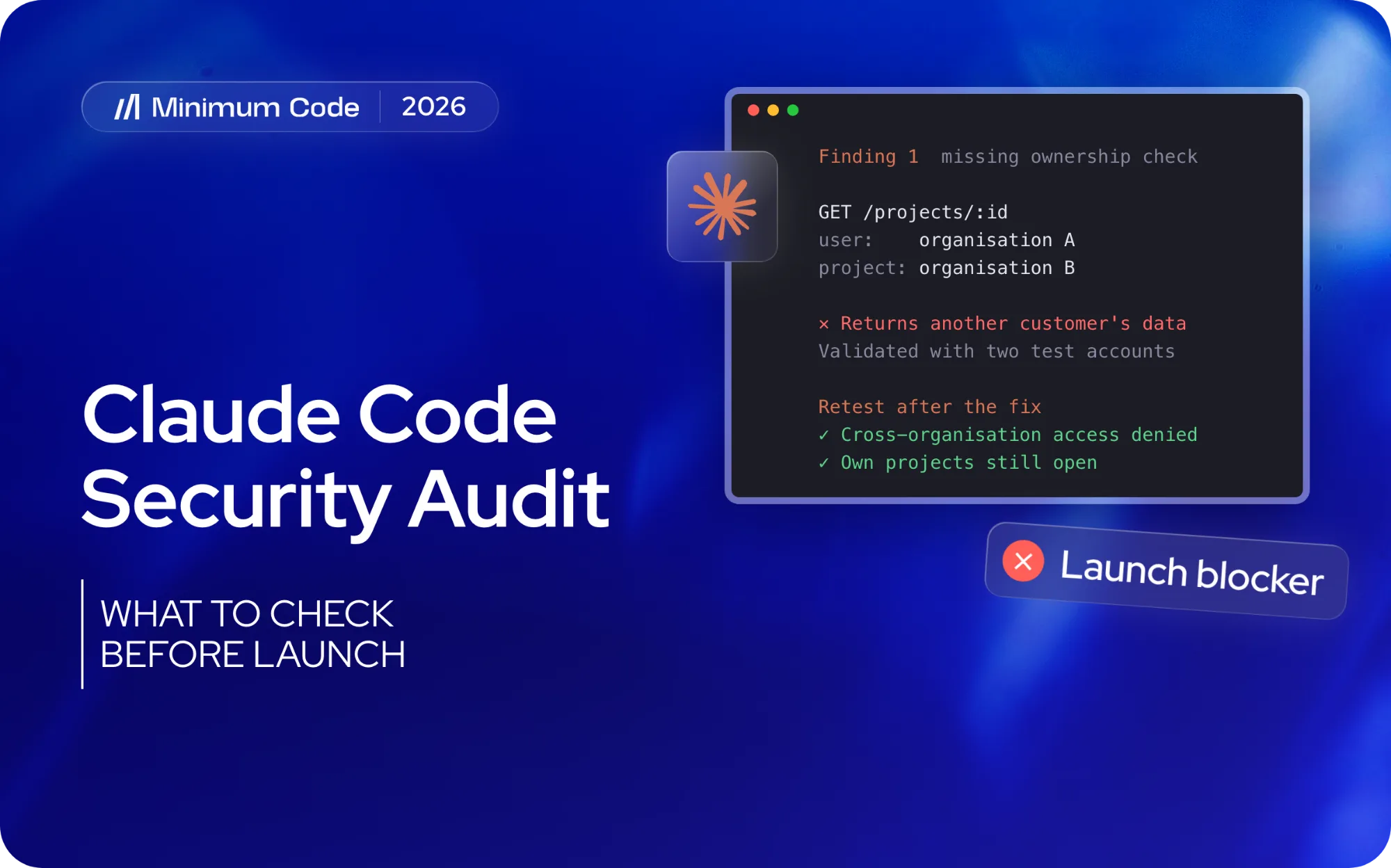
Consider an illustrative B2B application with private projects for each customer organisation. The backend checks that a user is logged in, retrieves a requested project by its ID and returns it, but never verifies that the project belongs to the user's organisation.
The interface appears secure because it lists only that user's projects. In a test environment, changing the requested ID to a second synthetic organisation's project could expose its private data. Claude Code might flag the missing ownership check; an engineer would use two test accounts to confirm it.
The finding should identify the endpoint, code location, attacker prerequisites, exposed information and test evidence. The repair must enforce the organisation boundary wherever the affected data can be reached. Retesting should confirm that cross-organisation access is denied while authorised users can still open their own projects.
The same validation approach applies to file downloads, account changes and other protected operations.
Secrets and dependencies
Secrets handling should be reviewed across the code, client-side bundles, configuration and logs. The report can identify where a credential is exposed without reproducing its value. If a real secret has been exposed, removing it from the current file is not enough; the team also needs to assess its use and rotate or revoke it as appropriate.
Dependency checks need the relevant package versions, the scanner used and the date of the check. A warning should lead to an assessment of the affected functionality and whether the vulnerable component is present in the deployed application. Static analysis, dependency scanning and secret detection can complement Claude Code's investigation, with their results validated rather than accepted automatically.
Give the security review a brief it can follow
A useful Claude Code security audit prompt gives the agent a defined repository version, permitted tools and the behaviours it must examine. The brief also specifies what counts as evidence. “Check this app for security issues” leaves too much unstated about the product, the environment and the depth of review.
A starting brief for your engineer
Review the agreed repository version for security weaknesses within the documented scope. Start by mapping the application's entry points and permission checks against the supplied user roles and business rules. Flag missing context before drawing conclusions.
On this first pass, report findings without modifying application files. Use only approved tools and test environments. Do not access production data, disclose secrets or contact systems outside the agreed scope.
For each suspected issue, identify the relevant code or configuration, describe the conditions under which the weakness matters, and explain the likely effect on users or the business. Separate observations from assumptions. Propose a safe way to validate it and a focused repair. Record checks you could not complete and areas that need human review.
Before running this brief, add the repository version, user roles, allowed test commands and any services included in scope. State the expected output format as well: affected file and location, suspected weakness, prerequisites, impact, validation method, repair proposal and unresolved questions. Keep the initial findings before repairs begin so later verification can refer back to the original issue.
The prompt organises the investigation; it cannot grant or revoke access. Its restrictions need to match the session's configured permissions, and its results still need validation.
Validate findings before approving fixes
Each suspected issue needs assessment. Some will be reproducible vulnerabilities; others will depend on missing configuration or be false positives. Keep those distinctions visible so the repair budget follows evidence rather than confident wording.
Require an explanation of the impact
For each material finding, ask what access an attacker would need and what they could do with it. The reviewer should tie the technical observation to specific records or functionality. A severity label only helps when its reasoning is clear enough to drive a decision about release timing.
Keep validation inside the agreed environment and permissions. If the setup rules out a safe test, record that and decide what extra review is needed. An unperformed check is not a pass.
Verify the repair against the original behaviour
Review each repair as an identifiable change. The engineer should rerun the check that exposed the issue and confirm legitimate users can still finish the affected workflow. Ask what regression coverage will catch a recurrence later.
Read the test changes closely, especially when the agent that proposed the repair also edited the tests. The agreed product behaviour stays the acceptance standard. A passing result needs enough detail for a second engineer to see what was exercised.
A second agent can review a repair, but agreement between models is not proof. Both may share missing context. Validation still depends on the implementation, intended business rule and test evidence.
Require a report that supports a launch decision
A useful audit report connects technical findings to decisions the founder can make. It identifies the reviewed version, explains material weaknesses in plain language and assigns responsibility for the next steps. For each issue, it should be clear whether the evidence is confirmed, incomplete or still awaiting a safe test.
Report component | What it should tell you |
|---|---|
Coverage | The reviewed version, environments, methods and explicit exclusions |
Finding evidence | The affected behaviour, supporting observations and validation status |
Business impact | What could happen, who could be affected and why the priority was assigned |
Repair plan | The responsible person, proposed work and estimated effort |
Retest result | Which repair was checked, how, and what remains unresolved |
Release recommendation | Which issues block launch and who accepts any remaining risk |
Launch blockers should be separated from issues that can be scheduled later, with a reason for each decision. A confirmed route to another customer's private data is very different from a low-impact warning with no established exposure. Severity needs to reflect the likely harm, the conditions required and the strength of the evidence.
Keep the report with the release it covers. When later development changes a permission rule or adds an integration, the team should know which earlier conclusions to revisit. Agree the triggers for another review up front.
Budget for remediation and choose the right reviewer
Allow time and budget for investigation, repairs and retesting. These may be separate parts of the engagement. An audit can identify launch blockers without including the work needed to fix them, so the proposal should make the boundaries clear before the release date is set.
Choose a reviewer who understands your stack, permission model and deployment environment. Familiarity with Claude Code helps, but a multi-tenant product needs someone who can trace access rules through the application and database.
A redacted sample report should show how the reviewer explains impact and handles uncertainty. Establish who validates findings, who approves repairs and whether retesting is included.
If your permissions are complex or your product holds especially sensitive data, consider specialist security expertise or a separately scoped penetration test. Settle the depth you need before you appoint anyone. Your delivery team should be able to state the limits of its assessment and name the work that needs someone else.
Frequently asked questions
Can Claude Code replace a professional security audit?
No. Claude Code can help identify suspected weaknesses and investigate their context, but it does not provide complete coverage or accept business risk on your behalf. Use its output within a review led by a qualified engineer, with specialist security input when the scope calls for it.
Should Claude Code touch production?
Use a separate environment with synthetic data by default. If live configuration must be inspected, define that task separately and use the minimum read access needed. A security review should not require unrestricted production credentials or deployment authority.
Which security checks should come first?
Prioritise according to the product's risks. In an application holding private customer data, broken access control and tenant isolation deserve early attention. Authentication, exposed secrets, file handling and sensitive transactions may also be important depending on the application.
How do I know a fix worked?
Retest the original failure, verify that authorised users can still complete the workflow and add regression coverage for the repaired behaviour. A passing test suite is useful only when it actually exercises the security rule that was previously missing.
Make the launch decision with evidence
A Claude Code security audit should leave you with a clearer understanding of the application: which weaknesses were confirmed, which repairs were verified and which areas still need attention. That evidence helps the team decide what must change before launch and what can be handled later. To discuss the review your application needs, contact Minimum Code.

Written by Tom
Founder and Lead Developer

Ready to start your project?
Book a free discovery call to learn how we can build your app in 4 weeks, or less.
Book a call