


Most Bubble slowness comes from one of three causes: a page fetching more data than it needs, repeating groups or plugins loading too much on first paint, or workflows bumping against Bubble’s server limits. The first two are usually fixable with targeted changes. The third sometimes means the platform has reached its ceiling for what you’re asking it to do.
TL;DR:
- Measure a representative slow page with browser timings, the Network waterfall, Bubble Logs, and workload charts; workload indicates server effort, not direct speed.
- Add database constraints and return only displayed fields before pursuing larger refactors; each nested repeating group also runs its own search.
- Disable plugins one at a time to identify page load costs, but manually compressing images rarely helps unless files bypass Bubble storage.
- Schedule bulk operations as backend jobs; workflows exceeding 300 seconds time out, and concurrent activity can cause failures despite successful solo tests.
- Consider migration if fixes fail under normal traffic, timeouts persist, hosting or search engine needs exceed Bubble’s limits, or concurrency costs keep climbing.
Key takeaways
- Measure browser timings and Bubble’s Logs and workload charts before changing anything, so you fix the actual bottleneck rather than guessing (Manual).
- Cut the data a page fetches first: add database constraints and only return fields the screen uses (Performance | Bubble Docs).
- Flatten nested repeating groups or lazy-load them; each nested group runs its own search.
- Disable plugins one at a time during testing to find which ones are adding weight to page load.
- Move long or bulk operations to scheduled backend workflows so they don’t compete with user-facing requests or hit the timeout.
- If you’ve done all this and the app still stalls under normal traffic, that’s a signal worth treating seriously rather than patching further.
How do you find out what’s actually slow?
Start by reproducing the slow screen yourself and watching what the browser does, not what you assume is happening. Open DevTools, record a session on the slow page, and note First Contentful Paint, Time to First Byte, and the resource waterfall, which shows you what’s loading and in what order.
Then switch to Bubble’s own tools. The Logs tab and workload charts show you which searches, workflows and external calls are consuming the most resources on the server side. Workload is a measure of total server work, not a direct speed metric, so treat it as a pointer towards expensive operations rather than a stopwatch reading (Manual).
A short, repeatable check works best:
- Pick one representative slow page and reproduce it the same way each time.
- List every search and workflow that runs before anything useful appears on-screen.
- Note whether the slowness shows up in the live app, in preview, or only in the editor, since each points at a different cause.
Why are your searches fetching more data than you need?
Bubble’s own documentation is direct about this: a page that fetches 100 records loads faster than one that fetches a million, and filtering at the database level is almost always faster than pulling everything back and filtering afterwards (Performance | Bubble Docs). This is usually the single highest-value fix available to you.
Check whether your searches use the Search palette’s constraints or whether they rely on advanced filters like :filter applied after the data has already been pulled. The second approach does the heavy lifting on the client’s side, which is slower and harder to scale.
- Add database constraints so the search itself returns fewer rows.
- Return only the fields a repeating group or element actually displays.
- Replace chained searches with a single search where possible; each link in a chain runs in series and adds its own delay.
- Paginate or progressively load long lists instead of fetching everything at once.
Are nested repeating groups multiplying your database work?
Yes, often without anyone realising. Each nested repeating group runs its own search, so a parent group with 25 rows and one nested group inside each row produces 26 separate searches on a single page load (Repeating group element | Bubble Docs).
Instead of nesting a group inside each row, fetch the child data once in a single search and map it against the parent list, or load child items on demand when a user clicks into a row. For long lists generally, use internal scrolling and set rows-to-fill versus rows-to-fit deliberately rather than by default, since the wrong setting can force Bubble to render far more rows than are visible (Repeating group element (web) | Bubble Docs).
- Fetch the child list once and map it, rather than searching per row.
- Load nested content on demand instead of on page load.
- Test by hiding the nested group entirely and comparing load times; the gap tells you how much it’s costing you.
Is your plugin stack dragging down page load?
Possibly, and it’s one of the easier things to test. In Bubble’s single-page app model, every plugin and third-party library you’ve added contributes to what loads on that first page visit, whether a user ever interacts with it or not. Forum reports on apps with ten-second load times found that disabling plugins one by one during testing isolated the specific culprits (SPA loads in 10 seconds, still too slow - how to improve? - Need help - Bubble Forum).
- Open the Network tab and look for unusually large bundles, fonts or repeated requests.
- Disable non-essential plugins temporarily and compare load times before and after.
- Favour plugins that store media inside Bubble’s own storage, so Bubble’s image handling still applies.
- If a plugin is doing something simple, check whether a custom state or workflow can replace it without the overhead.
Are your images actually the problem, or just the easiest thing to blame?
Usually not, or at least not in the way people assume. Bubble generates resized and compressed copies of images at display time and caches them, so manually pre-compressing every upload rarely moves the needle (Images | Bubble Docs). The exception is when an uploader or plugin stores files on external storage rather than Bubble’s own, because those images can bypass that transformation and caching layer entirely.
- Check whether uploads go through Bubble’s storage or an external host, since that changes what optimisation applies.
- Count how many images sit above the fold and whether any load twice.
- Lazy-load large or below-the-fold images and use placeholders while they load.
- If you’re resizing manually anyway, a tool like the free image resizer handles quick browser-based resizing before upload without needing design software.
Why do some workflows time out or fail under load?
Bubble workflows that run longer than 300 seconds hit a hard timeout, and concurrent activity can cause a workflow to fail even when the same workflow runs fine in isolation (Hard limits | Bubble Docs). This catches founders out because a feature that tested fine with one user breaks once real traffic hits it.
- Avoid running “make changes to a list” on very large lists inside a user-facing workflow.
- Use “schedule API workflow on a list” to split bulk work into smaller scheduled jobs instead.
- Move batch or heavy processing to backend scheduled workflows, away from anything a user waits on.
- Check the Logs for step-by-step timings before assuming a workflow just needs more workload capacity.
Our article on mapping Bubble workflows to backend patterns goes into more detail on restructuring workflow chains for this.
Could your data structure itself be slowing things down?
It can, particularly when fields are storing more than they should. Large list fields or embedded content inside a text field can slow down searches and any operation that touches that record, and operations that touch the record. Check Bubble’s hard limits before deciding how to restructure them.
- Favour relational structures (a separate data type with constrained searches) over one field holding a huge list.
- Set privacy rules precisely so queries aren’t scanning more than they need to.
- Spot-check the Data tab for unusually large fields or records that have grown far beyond what you expected.
Which fixes are worth trying first?
Effort and impact don’t always line up the way you’d hope, so it helps to see them side by side before you start refactoring.
Fix | Effort | Likely impact |
|---|---|---|
Add database constraints to searches | Low | High |
Return only needed fields | Low | Medium |
Disable a suspect plugin to test | Low | Medium |
Lazy-load nested or long lists | Medium | High |
Move bulk work to scheduled workflows | Medium | High |
Restructure large list fields | High | Medium |
Migrate off Bubble | High | High |
Treat this as a starting point for short experiments, not a substitute for the measurement you did in the Logs. A fix that looks low effort on paper can still miss the actual bottleneck if you skipped the diagnosis step. Our guide to optimising workload units in Bubble walks through how to read those charts properly before you commit to a fix.
When is this not a Bubble problem to fix, but a reason to migrate?
Sometimes the fix list runs out, and that’s worth saying plainly rather than skating past it. A few signals are worth taking seriously:
- You need EU-only hosting for regulated data, and Bubble’s available hosting options don’t meet that requirement or fit your budget.
- Search engines need server-rendered pages and better control than Bubble’s client-side rendering allows for your SEO goals.
- You’ve applied the fixes above and still see unacceptable load times or repeated workflow timeouts under normal, not peak, traffic.
- Concurrency costs keep climbing even after reducing unnecessary data fetches and workflow load.
If that’s where you are, migration becomes a planning exercise: stage the work, test each piece, and switch over without downtime. Our staged migration approach covers how that typically breaks down in practice.
How Minimum Code handles this
We tell you honestly whether targeted fixes will solve it or whether migration makes more sense. When migration is the right call, we agree on scope and pricing up front and plan the transition and post-launch support with you. Senior engineers own the architecture and testing; AI coding tools handle implementation, with EU hosting considered where data residency requires it.

Our take on chasing performance fixes
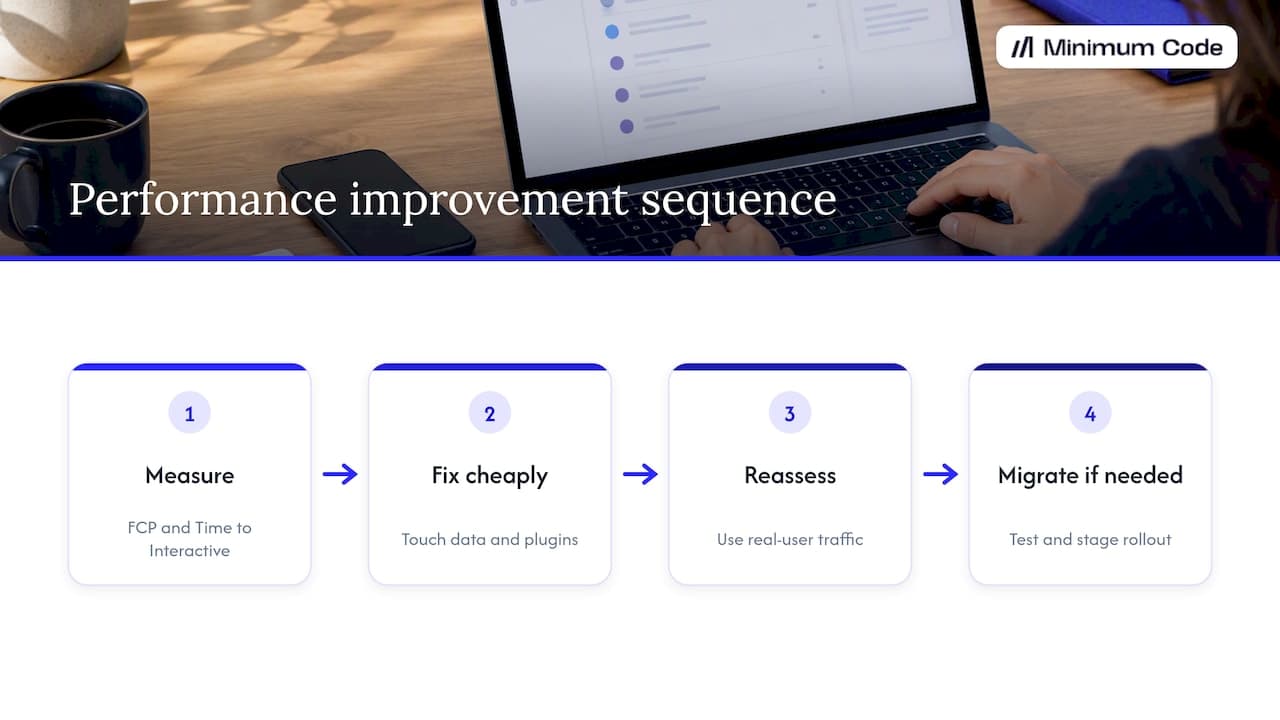
Workload graphs and WU dashboards are useful but they’re not the goal. The goal is what a real person experiences when they open your app, so First Contentful Paint and Time to Interactive matter more than an abstract score falling in the admin panel. Chase the dashboard number alone and you can “fix” a metric while a user still waits five seconds for a button to respond.
The honest order of operations is: measure, apply the cheap fixes that touch data and plugins, then reassess under the kind of traffic your real users generate, not a solo test run. If that reassessment still points at migration, the discipline that matters most is testing and a staged rollout, because a rushed switch creates more downtime than the slowness ever did.
— Tom
FAQ
Is Bubble.io actually good?
Bubble is a capable platform for building and validating web apps quickly, particularly for founders without a development team. It has real limits around concurrency, hosting location and timeouts that matter more as an app grows, which is why some teams eventually move the back end or front end to code.
How does the Bubble app work?
A Bubble app runs on a visual editor where you design pages, define data types, and build workflows that respond to user actions, and Bubble hosts and runs the resulting app on its own servers. Searches, workflows and page rendering all happen through Bubble’s infrastructure rather than custom code you write yourself.
How long does it take to get paid on Bubble?
This depends on whatever payment processor or plugin you’ve connected to your app, such as Stripe, rather than on Bubble itself, since Bubble doesn’t handle payouts directly. Check the payout schedule of the specific payment integration you’re using for an exact timeframe.
Can you build mobile apps with Bubble?
Bubble apps run as responsive web apps that work in a mobile browser, and can be wrapped for app store distribution using third-party tools or Bubble’s own app wrapping options. They aren’t native mobile apps built from Bubble’s editor directly, which is worth knowing if deep native functionality is a requirement.
Why does my Bubble app feel slow even on a simple page?
A simple-looking page can still run several searches and load multiple plugins before anything appears, especially if nested repeating groups or hidden reusable elements are present. Checking the Network tab and Bubble’s Logs for that specific page usually reveals the real cause rather than the page’s apparent simplicity.
Sources
Recommended

Written by Tom
Founder and Lead Developer

Ready to start your project?
Book a free discovery call to learn how we can build your app in 4 weeks, or less.
Book a call