

Yes, Base44 lets you export your code, on the Builder plan or higher ($50 a month, or $40 billed yearly, when we checked on 6 October 2026). You get a two-way GitHub sync or a ZIP download. What comes out is a Vite and React front end, your data model as JSON files, and your backend functions as TypeScript. What does not come out is the backend those files run on. Every data call, login and AI call in it goes through the Base44 SDK to Base44's servers, so the export is a copy of your code, not a way to self-host.
This guide is part of our vibe coding security checklist, which covers the checks every AI-built app needs before launch.
Rather hand it over? We move Base44 apps to code you own, with your data and your users included.
Talk to us about your Base44 app
A note on the examples below. We did not use a Base44 account. We took a public Base44 export from October 2026 (an AI study app with email and Google sign-in, 22 data tables and 22 backend functions, 226 of its 249 commits made by Base44's bot) and ran it the way a client would hand it to us. We also scanned 100 public Base44 exports on GitHub, all pushed between 23 September and 6 October 2026, for the patterns that repeat. Your export will differ in names, not in shape.
Step 1: Export Base44 code to GitHub or a ZIP
Both export routes need the Builder plan. The cheaper Starter plan ($20 a month) does not include GitHub integration.
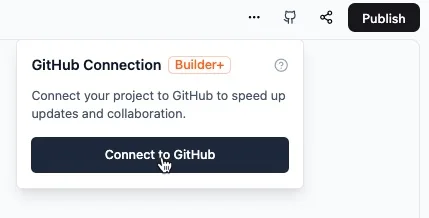
The GitHub panel in the Base44 editor. Note the Builder+ badge. Screenshot: Base44 docs, docs.base44.com/developers/app-code/local-development/github.
- In the app editor, click Dashboard, then the GitHub icon at the top right, then Connect to GitHub.
- Click Connect GitHub, then Authorize Base44 Builder in the GitHub window.
- Choose the GitHub account or organisation and which repositories Base44 may use, and click Install.
- Back in Base44, pick the organisation, name the new repository and click Create Repository.
- The panel now shows Connected. Click Go to Repository to get the clone URL for Step 2.
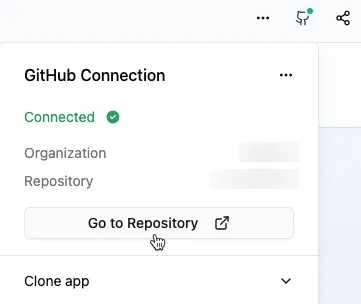
Connected: Go to Repository opens the new repo. Screenshot: Base44 docs, docs.base44.com/developers/app-code/local-development/github.
Before you click: the sync is two-way and automatic, and there is no manual push. Your changes come back into Base44 only from a branch named main (a master branch is not supported). Once connected, Version History cannot restore versions from before the connection. By default the commits show Base44 as the author, which is why base44-builder[bot] made the latest commit in 34 of the 100 repositories we scanned.
If you only want a ZIP, open the More actions menu in the editor and choose Export project as ZIP. Same plan requirement. You may also see base44 eject in the CLI docs. It is not an exit: it copies your app into a new Base44 project with an empty database, still running on Base44.
Step 2: Clone it and run it
Clone, install, start. In our test app this took seven seconds to install and under two seconds to start:
git clone https://github.com/<you>/<your-app>
cd <your-app>
npm install
npm run dev

[base44] Run the app through the Base44 CLI instead:
[base44]   base44 dev           app + local backend (throwaway local data)
[base44]   base44 dev --remote  app + your app's real backend (production data)
  VITE v8.2.0  ready in 1376 ms
  ➜  Local:   http://localhost:5199/
A line above those warns that no Base44 backend is configured. The screens still render; our test app showed its sidebar and a sign-in card:
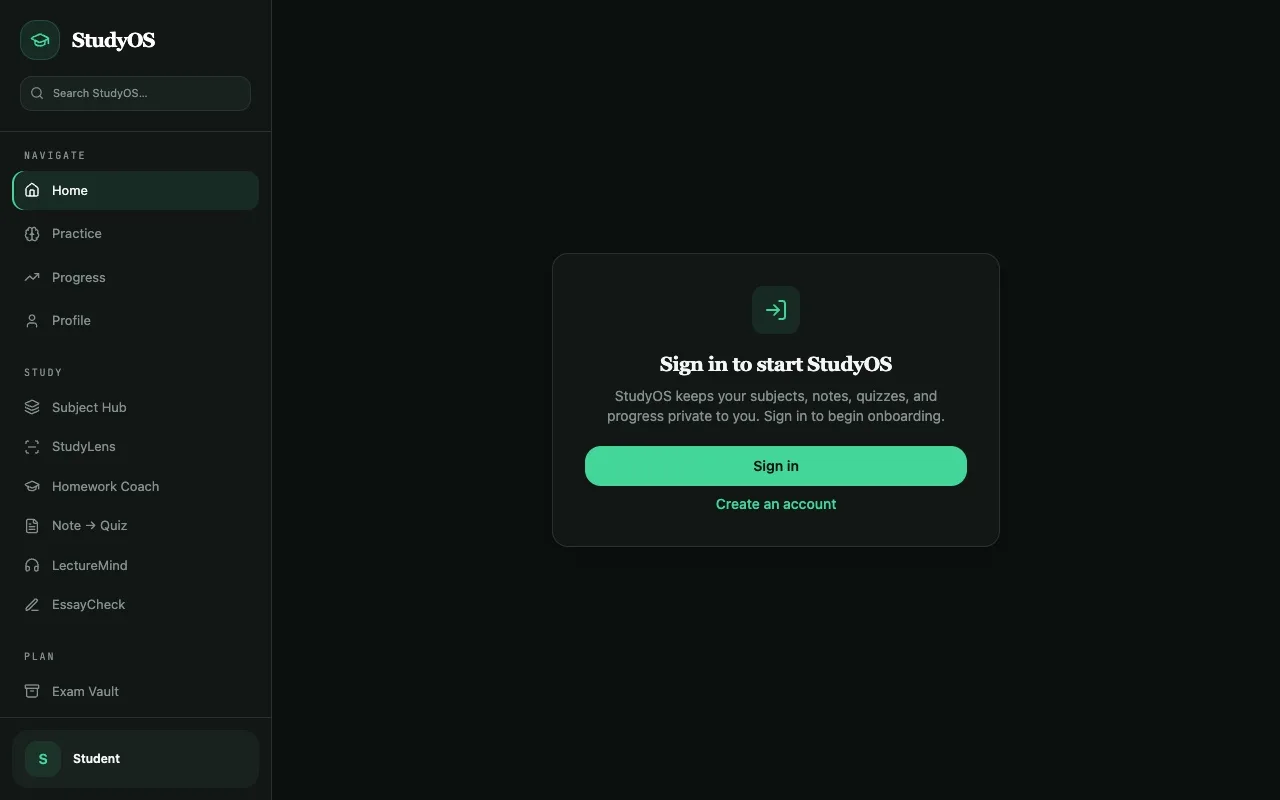
Our test app from a clean clone with npm run dev: the interface loads, nothing behind it does. Screenshot: Minimum Code, 6 October 2026.
Then every request failed. In the browser, the app asked for its settings, its subscription check and its data at addresses like /api/apps/undefined/entities/Subject/v2/list, and each one came back 404. The app needs three variables (VITE_BASE44_APP_ID, VITE_BASE44_APP_BASE_URL, VITE_BASE44_FUNCTIONS_VERSION), and all three point at Base44. No .env.example lists them.
The supported way to run it locally is Base44's CLI: base44 login, base44 link, base44 dev, which needs your Base44 account. Even then, Base44's docs say local data lives in memory and is wiped on restart, while Google login and the built-in integrations (email, AI) are forwarded to your live app. npm run build passed in 1.7 seconds with one 1.09 MB JavaScript chunk, npm install reported 22 vulnerabilities (12 high), and lint was clean.
So you cannot self-host the export as it is. You self-host it by replacing the parts that call Base44, which is what the rest of this page does.
Step 3: See what you actually have
The trimmed tree from our test app. Your tree will have different page and table names; look for src/api, base44/entities and base44/functions:
src/
  api/base44Client.js       the SDK client every call goes through
  lib/app-params.js         app id, token, Base44 URLs
  pages/                    33 pages
  components/               own components + 53 shadcn/ui files
base44/
  entities/                 22 JSON schemas, access rules inside
  functions/                22 Deno functions (npm:@base44/sdk)
  connectors/               github, gmail, sentry
  shared/                   helpers for the functions
AGENTS.md, CLAUDE.md        written by Base44 for coding agents
vite.config.js              @base44/vite-plugin (editor scripts)
The front end is Vite and React 18 in JavaScript, styled with Tailwind and shadcn/ui. In our test app, 39 of the 164 source files import the Base44 client, and they make 75 data calls, 18 auth calls and 22 backend-function calls through it. The functions run on Base44's Deno runtime, read their secrets from a module called base44:runtime that only exists there, and call Base44's built-in AI (InvokeLLM) nine times.
Of the 67 scanned exports still on the SDK, 56 call Base44's built-in integrations: 48 use its AI, 47 its file upload and 41 its email sending. 59 send users to Base44's hosted login page. The median export makes 164 SDK calls across 55 files.
Step 4: Get your data and users out
The code export does not include your data. Export each table as a CSV from the dashboard: Dashboard, Data, pick the table, More actions, Export. The dashboard table only shows the first 5,000 rows, so use the CSV to see everything.
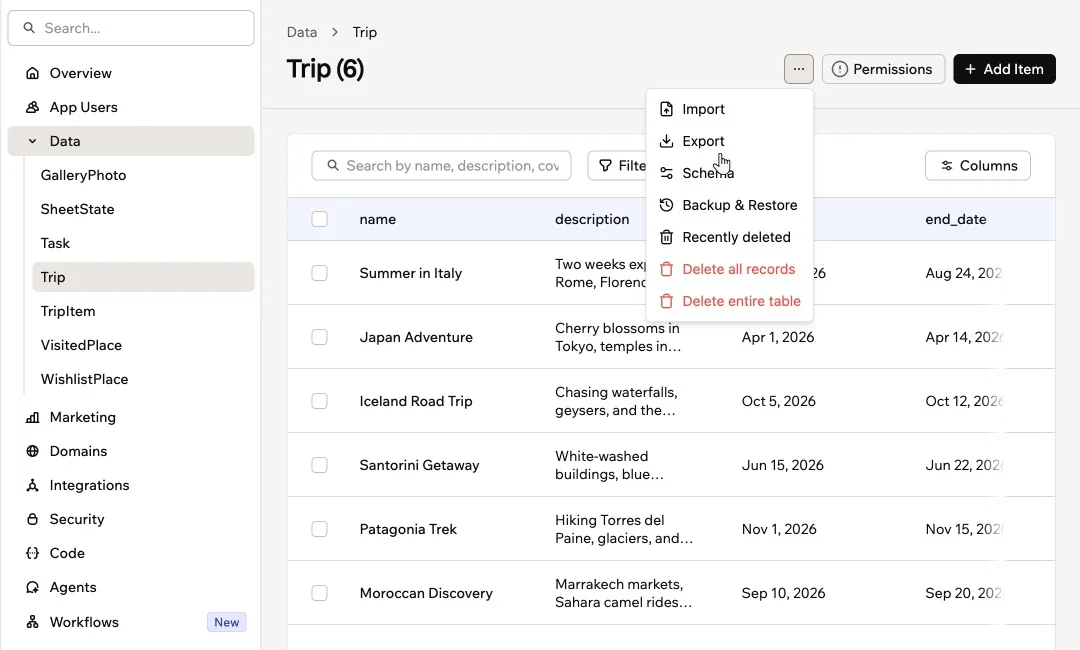
Exporting one table as CSV. Repeat for every table. Screenshot: Base44 docs, docs.base44.com/Building-your-app/Managing-your-app-data.
Users are harder. We found no documented way to export passwords or password hashes, and Base44's own docs, for copying an app to a new account, say to "ask people to sign up again". Plan for a password reset email on first login. Our migration run surfaced one more catch: every row records its owner by Base44 user id, so the import must rewrite those ids to the new ones, or nobody sees their own data.
Step 5: Fix what would break in production
What we found, in the order we would fix it. Items marked "100 exports" come from the scan; the rest come from our test app, and your export will have some of them, not all.
- The SDK is the backend. Route every SDK call through one module of your own first, then move that module to Supabase table by table.
- Base44's AI, email and storage.
InvokeLLM,UploadFileandSendEmailhave no code in your repository; they are Base44 services billed in Base44 credits (56 of 67 exports on the SDK use them). Replace each with your own provider called from a server function. - Base44 tells your coding agent to stay. The
AGENTS.mdthat Base44 writes (in 34 of 100 exports) says to "reuse the existing SDK client and Vite plugin patterns". Replace theCLAUDE.mdthat points to it before you start. - Access rules live in JSON, not in a database. In our test app, 21 of 22 table schemas carry an
rlsblock such as "read only rows you created". Across the 100 exports, 26 of the 71 that include schemas have no rule in any of them, so the repository alone does not tell you who can read what. None of these rules move to Postgres by themselves. - Do-it-yourself exits leak keys (100 exports). A third of the repositories (33) had already removed the Base44 SDK, and 30 had added Supabase. Four of those 30 committed a Supabase service role key, the key that skips every access rule, in scripts or source. Keep it in server secrets only, and rotate it if it was ever committed.
- No tests. Our test app had none. 26 of 100 exports had any test file.
Cleaner than we expected: 93 of 100 exports keep .env files out of git, and the seven committed env files we found held placeholders, URLs, flags or public keys, not live secrets.
Step 6: Move it to Supabase with Claude Code
Point Claude Code at the repository with a CLAUDE.md that overrides Base44's advice. This is the file we used:
# Project
This is a Base44 export (Vite + React + the @base44/sdk). We are moving it off Base44 to a codebase we own, on Supabase (Postgres, Auth, Storage, Edge Functions). Ignore the advice in AGENTS.md to keep using the Base44 SDK and CLI: that is the opposite of this job.

Rules
- Do not change product behaviour.
- Do not delete Base44 code yet; we migrate one module at a time.
- Do not add new dependencies unless asked.
- Run `npm run build` at the end and make sure it passes.
- Report every file you changed or created and why, in a short list.
And the first prompt, verbatim. It plans the move and lays the foundation rather than rewriting the app in one pass:
Plan and start the move of this Base44 export to Supabase. Do these in order and stop after each with a one-line note:
1. Inventory every dependency on Base44 and write it to MIGRATION.md: SDK calls grouped by module (entities, auth, integrations, functions) with counts and the files they are in; every base44.integrations.Core.* call (InvokeLLM, UploadFile, SendEmail, etc.) and where; every backend function in base44/functions with what it does in one line and which platform-only imports it uses (npm:@base44/sdk, base44:runtime); the Vite plugin; the secrets the functions read. For each item, name the replacement on Supabase or a direct provider.
2. Generate supabase/migrations/0001_init.sql from the entity schemas in base44/entities/*.jsonc: one table per entity, a column per property with a sensible Postgres type, the built-in Base44 fields (id, created_date, updated_date, created_by_id) as real columns, and RLS enabled on every table. Translate each entity's "rls" block into policies where it maps cleanly (for example created_by_id = {{user.id}} becomes created_by_id = auth.uid()). List every rule you could not translate in MIGRATION.md under "Needs a human".
3. Create src/api/dataClient.js: a thin wrapper that exposes the same calls the app makes on base44.entities.Task (list, filter, create, update, delete) and, for now, forwards them to the existing base44 client. Switch only the Task page to import it. This is the seam we will later point at Supabase.
4. Run npm run build and paste the last lines.
What it did on our test app, in seven minutes: a 242-line MIGRATION.md listing every Base44 dependency with a replacement for each, a 770-line SQL file creating 22 Supabase tables with row level security on all of them and 86 access policies, and the data seam with the Tasks page switched to it.
What a person had to catch. It could not install packages or run the build in that session, and said so instead of claiming success. We ran the build (it passed), applied the SQL to a throwaway Postgres database (cleanly), and tested the policies with two users: user B could not see or change user A's task. The most useful output is its "Needs a human" list of seven items, the real decisions in this migration: who counts as an admin, whether some lists should be public, remapping every user id during the import, and two places that need a proper database transaction. And the seam is a pattern, not progress: one page of 33 moved, still talking to Base44.
The order of work after that prompt:
- Schema and access rules in Supabase, tested with two users.
- Auth: Supabase Auth in place of Base44 login, with a password reset for existing users.
- Data: each module moved behind the seam to Supabase, one at a time.
- Functions: rewritten as Supabase Edge Functions or server routes, with your own AI, email and storage providers.
- Import the CSVs with user ids remapped, then remove
@base44/sdkand the Vite plugin. - Tests around login and the main flows, then deploy.
Step 7: Deploy and cut over
Once nothing imports the SDK, the app is a normal Vite site that talks to Supabase. On Vercel:
- Click Add New, then Project, and import your repository.
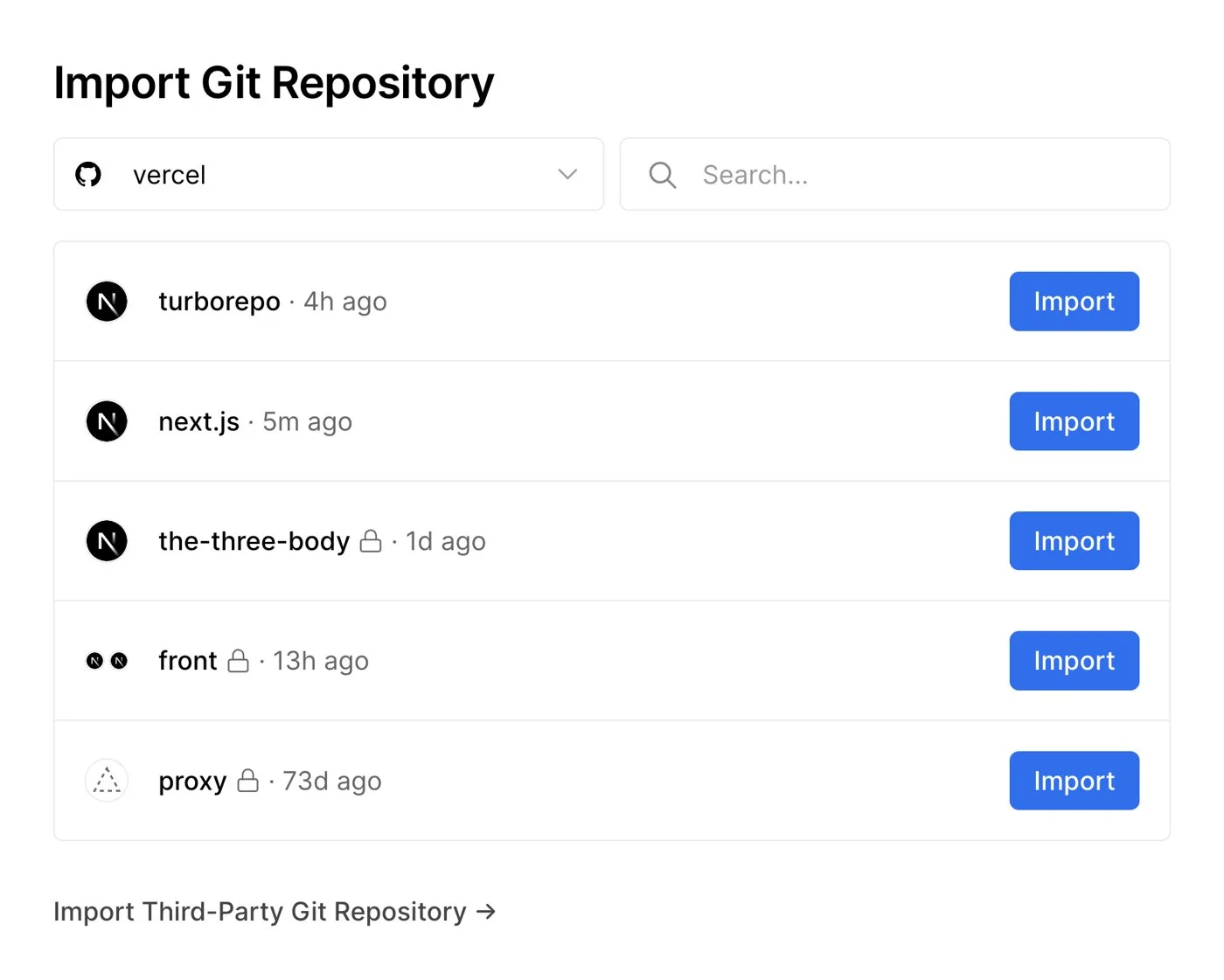
Importing the repository in Vercel. Screenshot: Vercel docs, vercel.com/docs/git.
- Before the first deploy, add your Supabase URL and public key under Environment Variables.
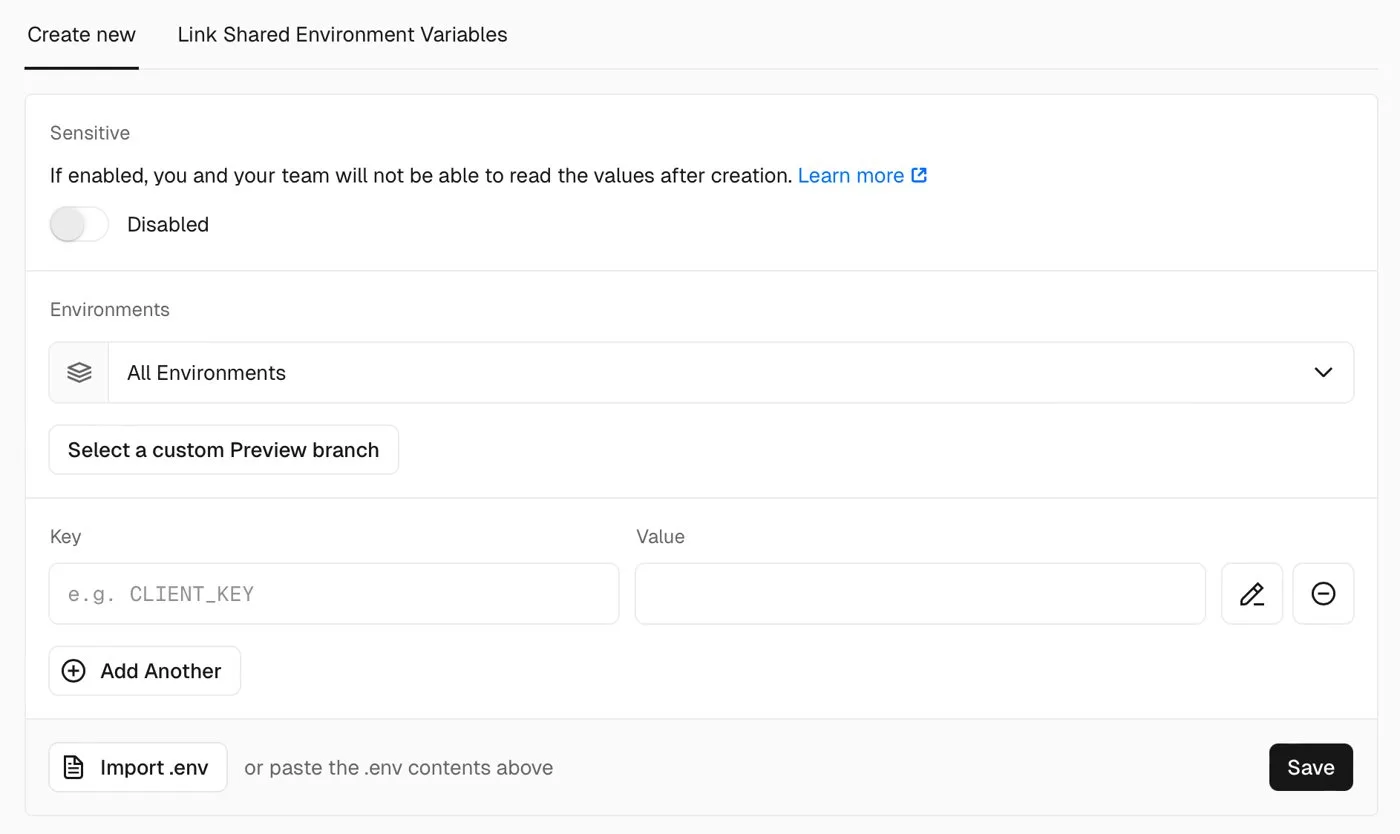
Adding the Supabase variables in Vercel. Screenshot: Vercel docs, vercel.com/docs/environment-variables.
- Deploy. Vite is detected on its own; the output folder is
dist.
Keep the Base44 app live until the new one has the imported data and users have their reset emails. Then point your domain at Vercel, disconnect the GitHub sync (in the code tab, open GitHub, then More actions, then Disconnect), and cancel the plan.
Things to consider
- Should I even migrate yet? If you are still changing the product every week, have a handful of users and nobody to maintain code, stay on Base44 and keep the GitHub sync on as a backup. Move when the app has paying users, when Base44 credits cost more than a developer, or when you need data or logins on infrastructure you control.
- Can I keep using Base44 after exporting? Yes. The sync is two-way, so the app keeps running on Base44 while you work in the repository. Migrate on a separate branch, because anything merged to
mainflows back into Base44. - Do I need my own database? Yes. Base44's database does not come with the export. Supabase is the shortest path because its row level security maps closely to Base44's access rules.
- How long does this take? The prompt above ran in seven minutes. The rest depends on how many SDK calls, tables, functions and built-in integrations your app has, so count them first (the inventory step does that). Our test app, with 22 tables, 22 functions and payments, is a bigger job than a three-screen tool.
- What does it cost to have it done? It scales with the same counts: tables, functions, integrations and users to move. We quote after reading the export.
- What do I lose by leaving Base44? The editor, the hosting, the built-in AI, email and storage, and the hosted login. Your users' passwords do not come with you.
- Can I do it with Claude Code alone? It does the inventory, the schema and the rewiring well. Access rules, the user import and admin decisions need a person.
Who should book a call
If your Base44 app has real users or revenue and you want it on a codebase and database you own, with the access rules tested and your users moved without losing their data, our web app development team does this migration as a fixed piece of work. Still deciding? Read the Base44 tool page and our Bubble versus Base44 comparison. Otherwise send us your repository link and we will tell you honestly whether to move now or stay.
Frequently asked questions
Does Base44 let you export code?
Yes, on the Builder plan or higher, through a two-way GitHub sync or a ZIP download. The export is your front end, data model and functions; the backend they call stays on Base44.
Can I export Base44 code to GitHub on the free plan?
No. GitHub sync and the ZIP download both need the Builder plan or higher, $50 a month or $40 billed yearly when we checked in October 2026.
Can I self-host a Base44 app?
Not as exported. The code calls Base44's servers for data, login, files, email and AI. To self-host, you replace those calls with your own backend, such as Supabase, and move the data across.
Can I export my Base44 users and their passwords?
You can export user and table data as CSV files. We found no documented way to export passwords, so plan for a password reset on first login to the new app.
Sources
What we read:
- GitHub Integration, Base44 docs. Read 6 October 2026. Source of the Step 1 screenshots.
- Base44 developer tools (ZIP export) and eject, Base44 docs. Read 6 October 2026.
- Local development, Base44 docs. Read 6 October 2026.
- Managing your app data, Base44 docs. Read 6 October 2026. Source of the Step 4 screenshot.
- Managing your account and Deleting user data, Base44 docs (users and their data). Read 6 October 2026.
- Base44 pricing. Read 6 October 2026 from Portugal, prices shown in US dollars.
- Deploying Git repositories and Environment variables, Vercel docs. Source of the Step 7 screenshots.
What we ran ourselves:
- A public Base44 export, last pushed 1 October 2026, cloned, installed, built and run on 6 October 2026.
- A scan of 100 public Base44 exports on GitHub, pushed between 23 September and 6 October 2026, run on 6 October 2026.
- The Claude Code prompt in Step 6, run on the same export on 6 October 2026, with the generated SQL applied to a test database and checked with two users.

Written by Tom
Founder and Lead Developer

Ready to start your project?
Book a free discovery call to learn how we can build your app in 4 weeks, or less.
Book a call