
No. No tool reads a Bubble app and outputs production code on its own, because Bubble’s logic sits across workflows, privacy rules and database settings that aren’t exportable as a single file. AI speeds up large parts of a migration, from scaffolding to tests, but a founder still needs engineers to audit the app, choose an architecture and own the result.
TL;DR:
- Before coding, export the Bubble JSON and document every page, workflow, plugin, and integration; engineers need that map to define scope and preserve business rules.
- Use AI for scaffolding, schema drafts, workflow implementation, and tests, but keep architecture, privacy rules, and data integrity decisions with a senior engineer.
- Do not approve launch until workflow maps, passing tests, and data validation reports show no unexplained discrepancies; stage traffic gradually and retain a rollback option.
- Stay on Bubble for a simple prototype or internal tool when performance and cost remain manageable, and migration costs exceed expected ownership or speed benefits.
Key takeaways
- Export your Bubble data and document every workflow before touching code: nothing automated does this step for you.
- AI tools accelerate scaffolding, schema drafts, test writing and refactors, often cutting build time substantially.
- Architecture decisions, privacy logic and data integrity checks need a senior engineer, not an agent.
- Expect most of the calendar time to go into planning and testing, not generating code.
- Before a scoping call, have your Bubble JSON export, a workflow list and your current monthly Bubble bill ready.
What a migration looks like: phases, timeline and major outputs
A Bubble migration runs through a predictable sequence rather than a single conversion step. Each phase has an owner and a concrete output, which is what lets you check progress against reality instead of a vendor’s promise.
- Audit and scope: export the Bubble app’s JSON, list every workflow and plugin, and agree what “done” looks like.
- Architecture decision: pick the stack, define API boundaries, and decide what gets rebuilt versus simplified.
- Build and iterate: scaffold the back end and database, implement the front end, and run tests after each batch of work.
- Staged rollout: move traffic gradually, watch for errors, and keep a rollback path open until the new system proves stable.
Engineers own the architecture and build decisions. Founders own the scope and business priorities. AI agents do a large share of the implementation inside the boundaries engineers set.
Detailed migration roadmap for founders to follow
This is the order we follow on a live Bubble migration, with the person or tool responsible for each step.
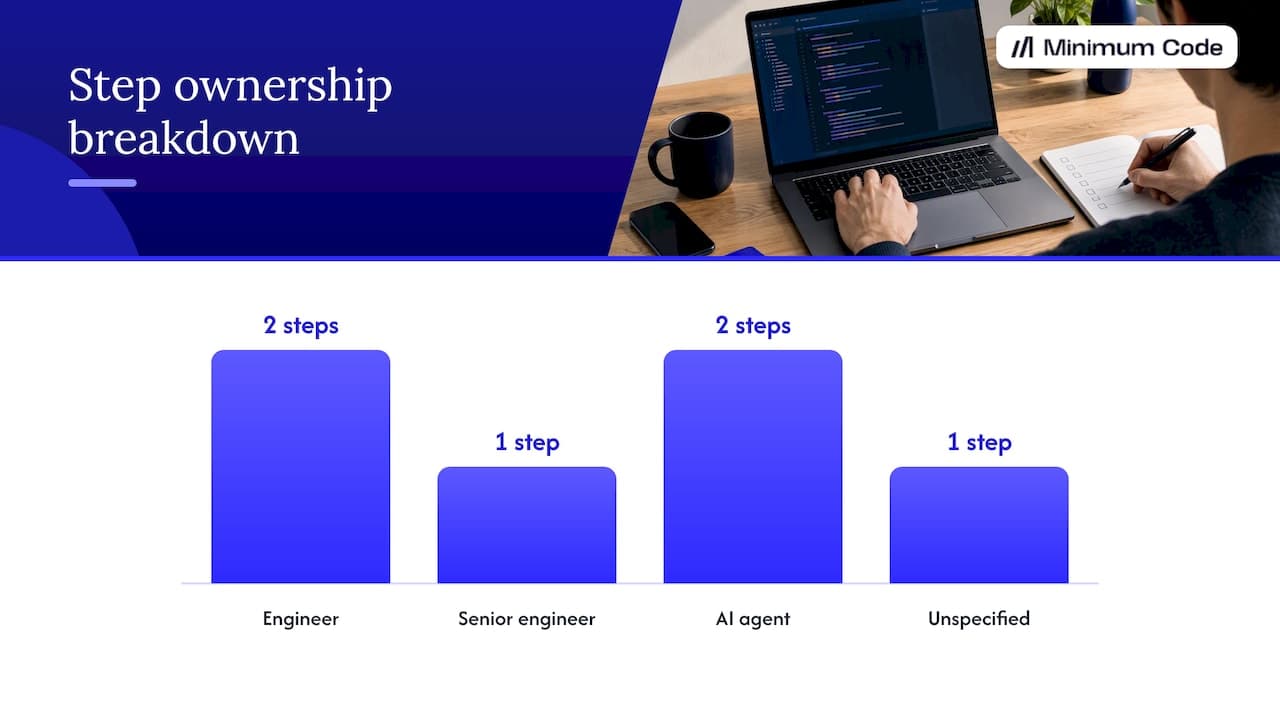
- Audit the app. Export the Bubble JSON and list every page, workflow, plugin and third-party integration. Bubble’s own FAQ confirms the platform supports exporting application logic as JSON, which is the practical starting point for any migration. Owner: engineer, with founder input on which features actually matter.
- Map the domain model and workflows. Turn Bubble’s data types and workflow steps into a plain description of entities and business rules. Owner: engineer.
- Choose the stack and API boundaries. Decide on the back end, database and hosting, and where the API sits between front end and data. Owner: senior engineer, this is not a task to delegate to an agent.
- Scaffold the back end and database. AI agents can generate schema drafts and boilerplate API routes from the documented model quickly. Owner: AI agent, reviewed by engineer.
- Implement or integrate the front end. Rebuild screens or wire up an existing design system, translating each documented workflow into working functions. Owner: AI agent for implementation, engineer for review.
- Migrate data with validation. Move records across with scripts that check row counts, types and relationships against the original export. Owner: engineer, with AI assisting on the migration script itself.
- Test and stage. Run automated suites and put the new app in front of real data before switching any live traffic. Owner: engineer.
- Roll out and monitor. Switch traffic gradually, watch error rates, and keep the old Bubble app ready as a fallback. Owner: engineer.
Pro Tip: Don’t sign off on a migration until you’ve seen a side-by-side data export comparison between the old Bubble app and the new database, not just a demo of the new UI.
Insist on these outputs before any live traffic moves: a complete workflow map, a passing test suite, and a data validation report with no unexplained discrepancies.
Exactly where AI helps (and where it doesn’t)
AI coding tools are genuinely useful for specific, bounded tasks inside a migration, not for the migration as a whole.
- Scaffolding: generating boilerplate API routes, components and project structure from a described schema.
- Schema drafting: turning a documented Bubble data type list into a first-pass database schema.
- Workflow translation: converting a written-out Bubble workflow into a working function once someone has documented the logic.
- Test writing: producing unit and integration tests against a defined specification.
- Refactoring and review: cleaning up generated code and flagging likely bugs before a human looks at it.
AI tools don’t reliably discover Bubble’s implicit privacy rules or reason about side effects that span several workflows, and they can’t choose an architecture or guarantee data integrity on their own. A documented code-review workflow that runs several specialised agents in parallel to flag high-signal bugs, as described in Claude Code’s code review documentation, still depends on engineers setting the rules those agents check against.
The mitigation is simple: pair every agent run with human verification, and write down the rules an agent should never break in a CLAUDE.md or REVIEW.md file rather than trusting default behaviour.
Concrete agent workflows: Claude Code patterns and safety settings
Running agents across a migration works best as a fan-out pattern rather than one giant prompt. According to Claude Code’s best practices documentation, the reliable loop is to run an agent on two or three files first, refine the prompt based on what comes back, then fan that refined prompt out across the rest of the codebase.
- Use hooks to run linters and test suites automatically after each agent change, catching regressions before a human even looks.
- Set allowed-tools and permission-mode so an agent can edit files and run tests but can’t, for example, push to production or alter database settings.
- For code review, run parallel specialised agents, one for security, one for logic errors, one for style, then a validation subagent that confirms each flagged issue is real before it reaches a human reviewer.
We use Claude Code and Codex this way internally: as delivery accelerators that work inside engineer-defined boundaries, not as a feature we hand to clients unsupervised.
How to verify a migration before it goes live
Verification is the part most AI-assisted migrations skip, and it’s where things go wrong. The fix is to give agents and engineers machine-runnable acceptance criteria rather than a vague “looks right” check.
- Write tests and acceptance criteria an agent can run itself, so a change only counts as done once it passes.
- Validate data migration scripts against file diffs, integration tests and a sample of real records, not just row counts.
- Run a staged rollout: shadow traffic against the new system first, then switch a small percentage of users, then the rest, with monitoring and a rollback plan at every stage.
This approach reflects what practitioners call closed-loop development: giving an agent runnable tests as its own success criteria, so it can confirm its own work before a human signs off, as described in this practitioner account of closed-loop AI development.
Pro Tip: Treat a failed test as a blocker that creates a tracked issue, never as something an agent should quietly patch around.
Unsupervised agent actions carry real risk. Reporting from 2025 on an AI coding tool deleting a production database is a reminder that agents need guardrails, not just good intentions, especially around anything that touches live data.
Criteria that justify staying on Bubble instead of migrating now
Migrating isn’t automatically the right call. Several situations make staying on Bubble the sensible choice for now.
- You’re running a simple prototype or internal tool with no SEO dependency and no compliance requirement for a specific hosting location.
- Your user base is small enough that Bubble’s performance and cost aren’t yet a constraint.
- The switching cost (time, budget, risk during cutover) outweighs any speed or ownership benefit you’d get from code.
If none of these apply strongly, you can delay migration safely by keeping workflows documented as you build, so the eventual move takes less discovery work later.
How Minimum Code handles this
We run migrations with clear scopes and fees, aiming for no downtime during the switch and providing support after launch. Experienced engineers oversee architecture, code review and testing, while AI coding tools assist with implementation under their direction. We use a technology stack that includes frameworks and tools popular for web app development. Having worked extensively with Bubble since 2022, we advise clients honestly on whether their app should stay on Bubble or migrate.
Quick check: migration is probably wrong when…
- Your app is a small prototype with no real user growth to plan around.
- You have no budget or engineers in place to maintain a codebase you’d now own.
- Your workload is regulated (healthcare, finance) and needs a careful hosting and vendor review before any migration decision, not after.
If any of these describe your situation, a smaller step, like fixing specific Bubble performance issues, is usually the better first move.
The part of this that gets oversold
Most content on AI-assisted migration implies that tools have closed the gap between “Bubble app” and “production codebase” entirely. They haven’t, and the gap isn’t really about code generation speed. It’s about judgement: knowing which Bubble workflow hides a privacy rule nobody wrote down, deciding whether a feature is worth rebuilding exactly or simplifying, and catching the one data field that silently means something different in two parts of the app.
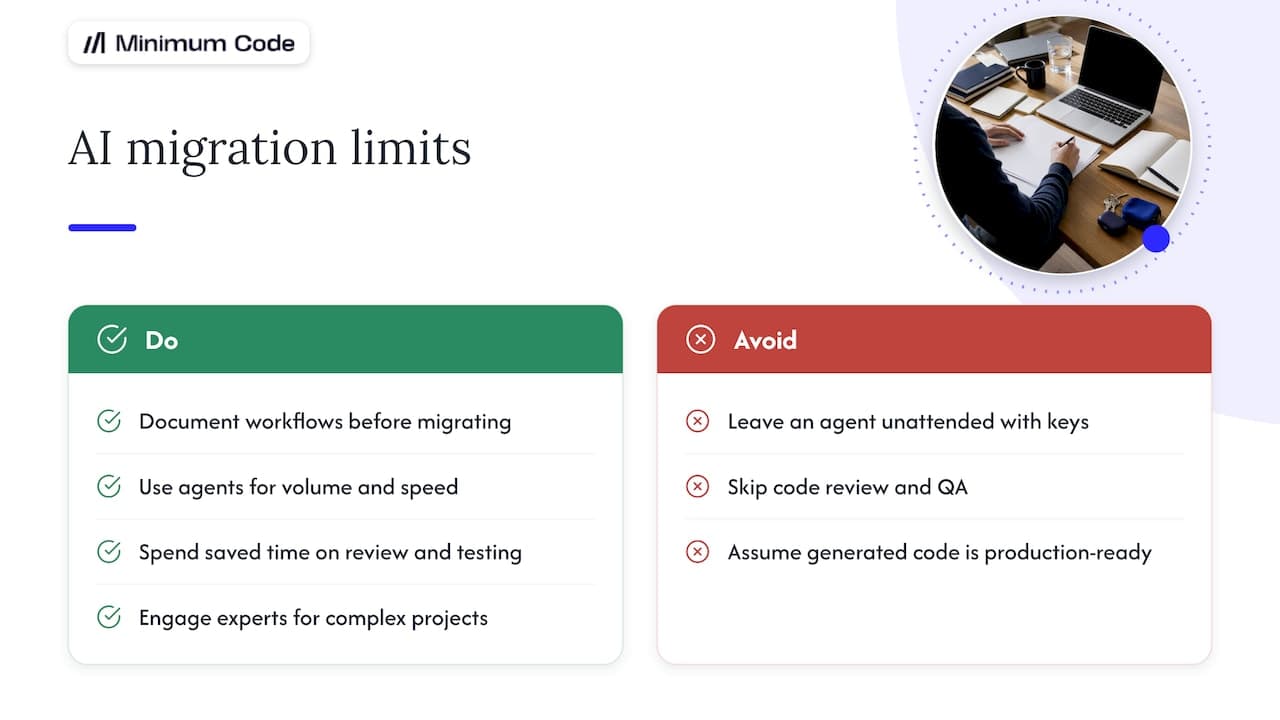
AI tools make the mechanical parts of a migration faster, often dramatically so; for complex projects, consider engaging experts for thorough AI code review & QA to ensure quality and security. That’s real and worth taking seriously. But founders who treat an agent like a contractor who can be left alone with the keys usually find out the hard way that generated code without review is a liability, not an asset. The practical move is to use agents for volume and speed, and spend the time you save on tighter review and testing, not on skipping review altogether.
If you take one thing from this: document your workflows before you touch a migration tool of any kind. That one habit determines more of the outcome than which AI tool you pick.
— Tom
Getting from Bubble to a codebase you own
If you’ve read this far, you already know a migration isn’t a button you press, it’s a project with real decisions in it. That’s exactly what we handle: we run Bubble migrations to Next.js and Supabase as fixed-price, fixed-scope engagements, with no downtime during the switch and 60 days of free support once you’re live.
Because we started on Bubble ourselves and remain a Bubble Gold agency, we can tell you honestly whether migrating makes sense yet or whether your app is better off staying put for another year. When it does make sense, our senior engineers own the architecture, review and testing, with AI coding tools handling implementation inside rules we set, so you get speed without losing the oversight that keeps a migration safe. If your app also needs a product rethink rather than a straight port, our product strategy work is a natural starting point.
Book a scoping call and bring your Bubble export: we’ll tell you what a migration would actually involve for your app.
FAQ
Can AI convert a Bubble app to code automatically?
No single tool reads a Bubble app and produces working production code without human input, because Bubble’s workflow and privacy logic isn’t exportable as a clean specification. AI tools speed up scaffolding, schema drafts, tests and refactors once an engineer has documented the app’s logic, but a person still has to make the architecture and data decisions.
How long does a typical Bubble migration take?
Timelines vary with app complexity, but most of the calendar time goes into auditing the existing app and testing the new one, not into writing code. A small app with a handful of workflows moves faster than one with dozens of interdependent automations and third-party integrations.
Is Claude Code safe to use on a production codebase?
Claude Code includes permission controls, like allowed-tools and permission-mode, that let engineers limit what an agent can touch, alongside hooks that run tests automatically after changes, according to Claude Code’s documentation. Safety comes from how a team configures those controls and reviews output, not from the tool alone.
Should I migrate off Bubble for SEO reasons?
SEO is one of the main reasons founders move off Bubble, alongside development speed and wanting to own their code and choose their own hosting. If SEO isn’t a priority for your app and you’re not hitting performance or ownership limits, migrating purely for SEO may not be worth the switching cost yet.
What happens to my data during migration?
Data migration should include validation scripts that check record counts, field types and relationships against the original Bubble export, not just a bulk copy. A staged rollout, where traffic shifts gradually while the old and new systems run side by side, gives you a safe way to catch discrepancies before fully switching over.
Sources
- Code Review - Claude Code Docs
- What Is Bubble AI? FAQ — Pricing, Features & More
- Closed-loop development: how AI agents build software while you sleep
Recommended

Written by Tom
Founder and Lead Developer

Ready to start your project?
Book a free discovery call to learn how we can build your app in 4 weeks, or less.
Book a call