

An app built in Lovable, Base44, Bolt, Replit or v0 usually works on day one. What it is missing before it can go live is the security nobody prompted for: access rules on every table, secrets kept out of the browser and out of git, and login and server code you control. We scanned 100 public Lovable exports and 100 public Base44 exports on GitHub, ran one export from each, and turned what we found into the eight checks below, ordered by risk. Our vibe coding glossary entry covers the term itself.
Each platform has its own sample of 100 repositories, and each number keeps its own denominator; we never add the two together. We have not scanned Bolt, Replit or v0, so no number here is about them, but the checks apply to them too.
Want someone to run the checks for you? Our web app development team audits your vibe-coded app against all eight and fixes what fails before you launch.
Vibe coding security checklist, ordered by risk
# | Check | Lovable (100 exports, Sept 2026) | Base44 (100 exports, Oct 2026) |
|---|---|---|---|
1 | Every table has access rules | first 40 checked: 4 of 25 repos with table migrations leave a table without RLS | 26 of 71 repos with schemas have no rule in any schema |
2 | No secret database key in the code | not measured | 4 of 30 repos using Supabase committed a service role key |
3 | No secrets in | 36 of 100 committed | 7 of 100 committed an env file; no live secrets found |
4 | No keys hardcoded in source | 32 of 76 client files hardcode the key | not measured |
5 | Login and services you control | Google login via Lovable's broker in our test export | 59 of 67 on the SDK use Base44's hosted login |
6 | Server functions fail safely | raw errors and open CORS in our test export | not measured |
7 | Tests around login and data | one placeholder test in our test export | 26 of 100 have any test file |
8 | Dependencies patched | 24 audit warnings, 1 critical, in our test export | 22 audit warnings, 12 high, in our test export |
The scans read the repositories. Some apps set rules in the platform dashboard, which a repository cannot show, so read "no rule in the repo" as "you cannot prove it is safe", then check.
Check 1: Every table has access rules
What to check: that each database table has Row Level Security (RLS) switched on, with a policy that limits each user to their own rows. In a Lovable app the browser talks to Supabase directly with a public key, so these rules are the whole security model. Supabase's docs put it plainly: "A table in an exposed schema without RLS is readable and writable by any role with a grant on it."
How often: in the first 40 Lovable repos of our sample, 25 create tables in their migration files, and 4 of those 25 leave at least one table with RLS never enabled. In the Base44 sample, 71 repos include their table schemas and 26 of those 71 have no access rule in any of them. This is the issue behind CVE-2025-48757, where a researcher found "303 endpoints across 170 projects (approximately 10.3% of the 1645 analyzed) with inadequate RLS settings" in Lovable apps in spring 2025.
How to check: open the Security Advisor in your Supabase dashboard and look for "RLS Disabled in Public". Or run this in the SQL editor:
select tablename, rowsecurity from pg_tables where schemaname = 'public';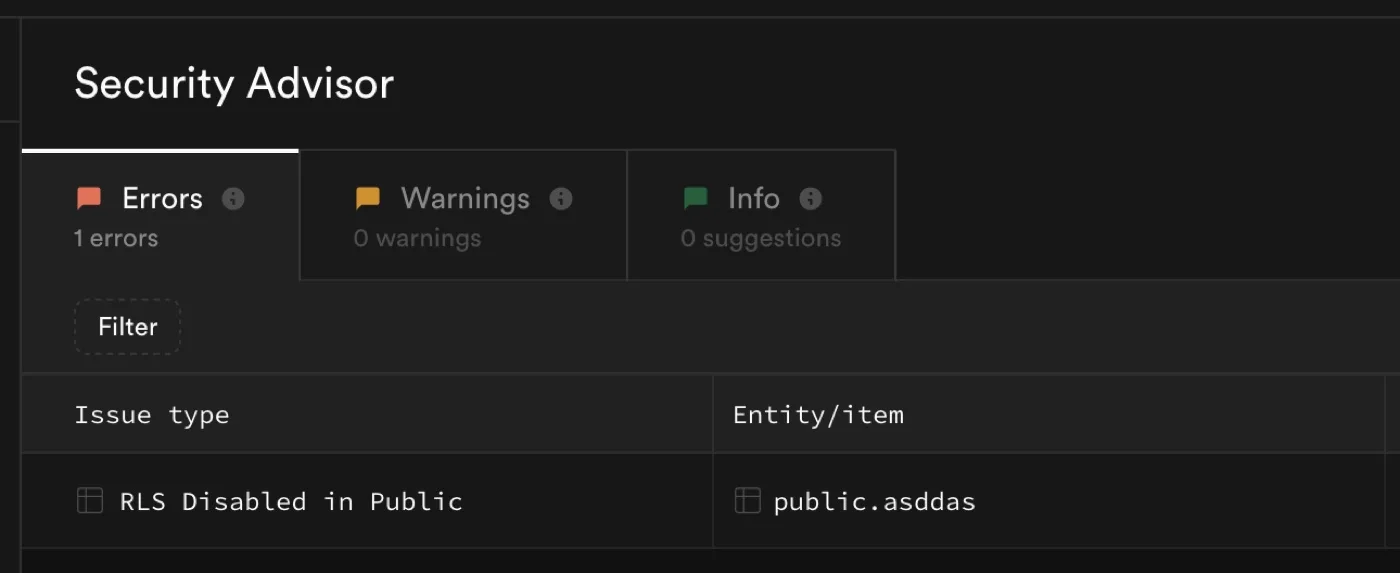
What a table without RLS looks like in the Security Advisor. Screenshot: Supabase, supabase.com/blog/supabase-security-2025-retro.
Then test with two accounts: as user B, try to read and edit user A's rows. On the schema generated for our Base44 test export, user B saw none and an update changed nothing. That is the result you want.
Check 2: No secret database key in the code
What to check: the Supabase service role key (called a secret key in newer projects) never appears in the repository or in the browser. Supabase's docs say it "has the bypassrls attribute", so it skips every rule from check 1.
How often: in the Base44 sample, 30 of 100 repos had added Supabase, usually on the way out of Base44. 4 of those 30 committed a service role key, in scripts, scratch files and in one case a file under src/. We did not measure this for Lovable.
How to check: search the code with git grep -n "service_role". For any long string that starts with eyJ, decode the middle part and read its role. If one was ever committed, rotate it, because it stays in git history. Supabase now revokes its new-format secret keys automatically when they show up in a public GitHub repository; the older keys in our sample were the legacy kind.
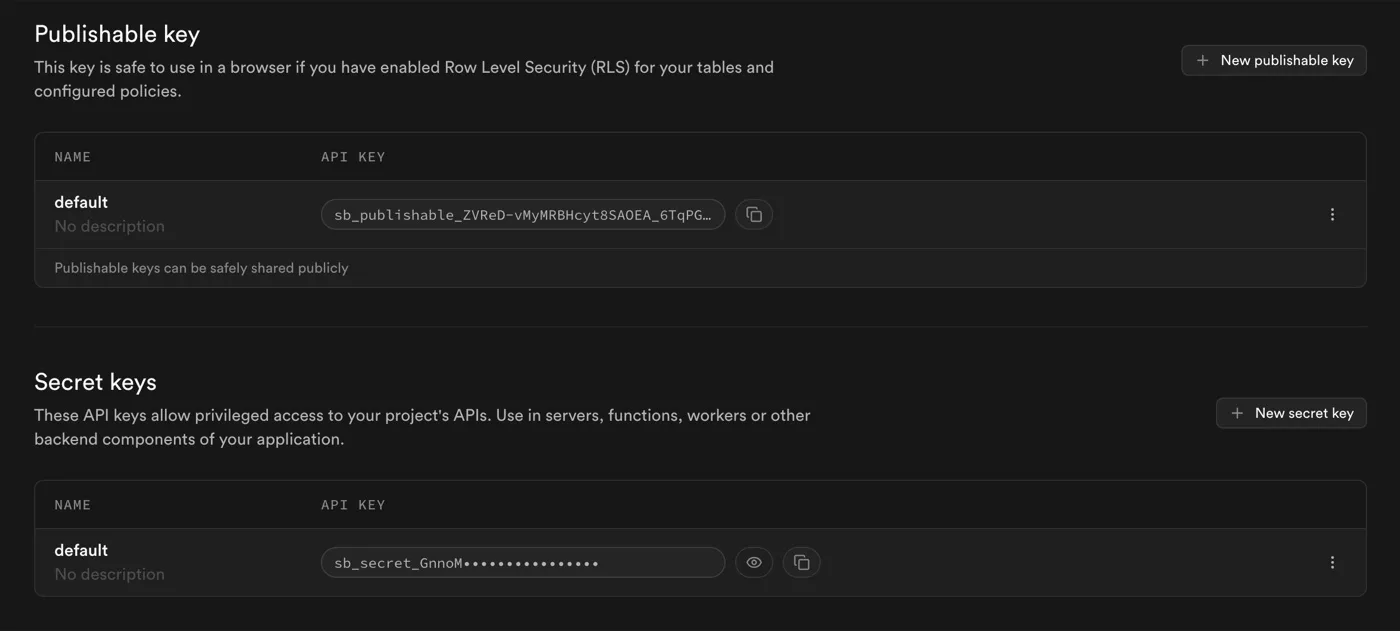
The publishable key can go in the browser once RLS is on; the secret key belongs on the server only. Screenshot: Supabase, supabase.com/blog/supabase-security-2025-retro.
Check 3: No secrets in a committed .env or in VITE_ variables
What to check: the file that holds your keys (.env) is listed in .gitignore, and no third-party key sits in a variable that starts with VITE_. Vite's docs say those variables "will be exposed in client-side source code after Vite bundling", so anyone can read them in the browser.
How often: 36 of 100 Lovable exports had .env committed, because Lovable's default .gitignore does not list it. The Supabase values Lovable writes there are meant to be public. The trouble is what people add next: on 30 September, 14 of those 36 files also held third-party keys, such as an AI provider key, a payment secret and a storage secret key. Base44 is better here: 93 of 100 .gitignore files list .env, and the 7 committed env files we found held no live secrets.
How to check: git ls-files | grep -i env shows committed env files, and git log --all --oneline -- .env shows whether one was ever committed. Move every non-Supabase key into a server function and rotate it. This is not just our sample: Escape scanned more than 5,600 public vibe-coded apps in 2025 and reported "400+ exposed secrets".
Check 4: No keys hardcoded in source
What to check: the database URL and key are read from environment variables, not written into the code. In the Lovable export we ran, the build config even carried a fallback, so a fresh clone quietly talked to the original database.
How often: 32 of the 76 Lovable exports that have the Supabase client file write the key into it as text. Newer exports mostly read environment variables, but older projects keep the old file. Search with grep -rn "supabase.co" src vite.config.*.
Check 5: Login and services you control
What to check: who runs your login page, your file uploads, your emails and your AI calls. If it is still the platform, a platform bug is your bug. In July 2025 Wiz reported that Base44's registration endpoints let an attacker create a verified account on a private app "using only a non-secret app_id value". Wix fixed it within a day and found no sign it had been exploited.
How often: of the 67 Base44 exports still on the Base44 SDK, 59 send users to Base44's hosted login and 56 call Base44's built-in AI, upload or email services. In the Lovable export we ran, Google login went through Lovable's own login broker. Search with grep -rn "redirectToLogin\|cloud-auth-js\|integrations.Core" src.
Check 6: Server functions fail safely
What to check: server functions return a plain error message, not the raw error, and only accept requests from your own domain. In the Lovable export we ran, the catch-all error path sent raw error text to the browser and all three functions allowed any origin (CORS *). One export, not a scan number, but quick to check in each function.
Check 7: Tests around login and data
What to check: at least one test that logs in and one that proves a user cannot see another user's data. 26 of 100 Base44 exports had any test file at all. The Lovable export we ran had one test, which checked that true is true.
Check 8: Dependencies patched
What to check: run npm audit before launch and fix the high and critical items. The Lovable export we ran reported 24 vulnerabilities on install (1 critical), and the Base44 one 22 (12 high).
Pick your platform
- Lovable: for teams with a Lovable app on Supabase who want the keys out of the repo, the tables locked down and their own hosting. → Lovable export guide
- Base44: for teams whose Base44 app needs its own database, login and AI provider, because the export still runs on Base44's servers. → Base44 export and self-hosting guide
- Bolt, Replit and v0: guides in progress. The eight checks above apply as they are.
Three projects
None of our public case studies is an AI-builder app yet; these three are founder-built or prototype apps on Bubble that we took to production, and the decisions are the same ones.
Designair had an MVP with, in the project's words, "a lack of security best practices" and "a poorly optimized database". We kept the platform and rebuilt the backend, the database structure and the security around it, so the product could serve large customers.
Spire had validated its idea with surveys, which could not become a product: the data was fragmented and there was no proper user model. We built a web app with secure login and role-based access from the validated prototype, delivered on time and, according to the client, under budget.
Diggy was built by its founder and hit bugs and slow pages as new companies prepared to sign on. We started with an audit, fixed the critical issues first, then stayed on at 20 hours a week.
How we do it with Claude Code
We use Claude Code for the mechanical part, with a short CLAUDE.md file that sets the rules before the first prompt. On the Lovable export it removed the hardcoded keys and the platform's auth code in about two minutes. On the Base44 export it wrote 22 tables with RLS on all of them and 86 policies in about seven minutes, and the policies passed our two-user test. One trap: 34 of 100 Base44 exports ship an AGENTS.md that tells coding agents to keep using the Base44 SDK, so replace it before you start.
A person still runs the build and tests (in both runs the agent could not, and said so), decides who counts as an admin, and tests every policy with real accounts. More on where that line sits in agentic engineering versus vibe coding.
Things to consider
- Should we leave the platform at all? Not always. If you are still testing the idea, have a handful of users and store nothing sensitive, stay on the platform and run checks 1 to 3 now. Move when you have paying users or personal data.
- Is the public Supabase key a security problem? No, as long as check 1 passes. The key is designed to be public; the access rules are what protect the data.
- What does it cost? It depends on the number of tables, server functions and integrations. We quote after reading the repository.
- How long does it take? Running the checks is quick once you know where to look. Fixing a small app takes a few days; a Base44 app that has to leave the SDK takes longer.
- Who maintains it afterwards? Whoever owns the repository. If nobody on your team reads code, plan for that before you leave the platform.
- Can we do it in stages? Yes. Fix checks 1 to 3 on the platform first, then move login and data one module at a time.
Who should book a call
If your vibe-coded app has real users or handles personal or payment data, and these checks turned up more than your team can fix itself, our web app development team runs the audit and the fixes as one piece of work. Founders who should stay on the platform for now get told so. Start from the platform guide for Lovable or Base44, or send us your repository link.
Frequently asked questions
Is vibe coding secure?
The code these tools write can be secure, but the defaults are not finished. Across 100 Lovable exports, 36 had committed their .env file; across 100 Base44 exports, 26 of the 71 with table schemas had no access rule in any of them.
What is the biggest vibe coding security risk?
Database tables without access rules. With the public key in the browser, a table without RLS can be read and changed by anyone, which is what CVE-2025-48757 described in Lovable apps.
How do I check whether my Supabase tables are protected?
Open the Security Advisor in the Supabase dashboard, or run a query on pg_tables for the rowsecurity column. Then test with two user accounts.
Do I need to leave Lovable or Base44 to be secure?
No. Checks 1 to 3 can be fixed on the platform. Leaving makes sense when you need login, data and server code you control.
Do these checks apply to Bolt, Replit and v0 apps?
Yes. We have not scanned those platforms, so we have no numbers for them, but they produce the same kind of app and the same checks apply.
Sources
What we read:
- Row Level Security, Supabase docs. Read 6 October 2026.
- Supabase Security Retro: 2025, Supabase blog, 7 January 2026. Source of the screenshots.
- Env variables and modes, Vite docs. Read 6 October 2026.
- CVE-2025-48757, NVD, published 30 May 2025 (disputed by Lovable), and the researcher's statement, 29 May 2025.
- Critical vulnerability in Base44, Wiz, 29 July 2025.
- How we discovered over 2k high-impact vulnerabilities in apps built with vibe coding platforms, Escape, 29 October 2025.
- Our project pages for Designair, Spire and Diggy. Read 6 October 2026.
What we ran ourselves:
- A scan of 100 public Lovable exports on GitHub, 30 September 2026, with the RLS and
.envchecks rerun on 6 October 2026. - A scan of 100 public Base44 exports on GitHub, pushed between 23 September and 6 October 2026, run on 6 October 2026.
- One Lovable export and one Base44 export cloned, installed, built and run, and the Claude Code prompts from each platform guide run on them, 30 September and 6 October 2026.

Written by Tom
Founder and Lead Developer

Ready to start your project?
Book a free discovery call to learn how we can build your app in 4 weeks, or less.
Book a call