
You can convert Figma to React with AI today, but what you get depends on the route. Plugins like Locofy and Anima, and the code Figma's MCP server hands to an AI agent, mostly give you fixed-size, absolutely positioned divs with no phone layout. A coding agent with clear rules gave us clean, responsive Next.js in under five minutes. No tool gives you what the frame does not show: hover and focus states, the phone layout, real copy and your team's token names.
A note on the examples. We did not convert a client's design for this page. We used one landing page frame from Figma's own Simple Design System, which is MIT-licensed and comes with Figma's hand-written React, so we could check the output against what the designers intended. We also counted what five tools produced in 18 public GitHub repos. Your design will differ in content and size, not in the kind of gaps you meet.
Have a Figma file that needs to become a real product? Our UI/UX design team designs and builds it in the same codebase.
Talk to us about your Figma designs
Figma to React tools: pricing and plan limits (2026)
Figma's seats decide how much the AI can read. The Figma MCP server is the official way to give an AI agent your design: its structure, its variables and a screenshot. It works on every plan, but Starter, View and Collab seats get 20 tool calls a month; a Dev or Full seat on Professional gets 200 a day. The server is free during its beta, and Figma says it will "eventually be a usage-based paid feature".
Tool | Free | Paid, entry (monthly billing) | What you get |
|---|---|---|---|
Figma MCP server | 20 tool calls a month | Dev seat $15, Full seat $20 (Professional) | design context for an AI agent, React + Tailwind by default |
Figma Make | try it on any seat | Full seat $20 | a React app on Vite with Tailwind, one-way push to GitHub |
Builder.io Visual Copilot | 60 credits a month | Pro $24 per user | React, Angular, Qwik and more, Tailwind or CSS Modules |
Locofy | 7 days | Hobby $40, 10 frames per project | React, Next.js, HTML, React Native and more |
Anima | 5 code generations | Starter $25 per seat | React, Vue or HTML |
Prices in USD on 14 October 2026, from each vendor's pricing page. Builder.io's page did not let us confirm whether $24 is the monthly or the annual price.
What to take from the table: a designer on a Full seat and a developer on a Dev seat cost $35 a month on Figma Professional, MCP included, before any plugin fees. On a free account, 20 MCP calls cover a screen or two, so the free route is a screenshot and a coding agent.
Figma to React options: plugins, Figma Make or a coding agent
Option | When it fits | What you keep | What you give up |
|---|---|---|---|
A plugin (Locofy, Anima, Builder.io) | Static marketing pages, a quick prototype | Speed, close visual match | Clean structure, a phone layout, your own token names |
Figma Make | A clickable prototype to test with users | Everything inside Figma | Next.js, server code; it pushes only to repositories it creates |
Figma MCP server plus a coding agent | Your team already has a React codebase | Your components and conventions | Time to review each screen |
Screenshot plus a coding agent | No paid Figma seat, one-off pages | Low cost | Variables, assets and anything the image does not show |
For a product that will live for years, the last two rows are the route, and the steps below follow it. Figma's own developer docs say the MCP server "isn't designed to return production-ready code", and that you should guide your agent to translate it into your codebase.
Who should stay on plugins or Figma Make: teams validating an idea with users this month, marketing pages nobody will extend, and anyone without a developer to own the code afterwards. Figma Make is a good prototyping tool.
Step 1: Decide what to convert from Figma
Not every frame becomes a page. List what you actually need:
- The screens that will ship, and their phone versions. If there is no phone frame, a person has to design one, not the AI.
- The components behind them, with every variant: default, hover, pressed, disabled, focus.
- The variables (colours, spacing, type). Our test frame's design system has 500 of them.
Step 2: See what the design-to-code tools produce on a real frame
We found public GitHub repos carrying each tool's fingerprint and counted the patterns. Some were edited after export, so read them as a sample, not a benchmark.
Tool, public repo | Lines | Absolute positions | Hard-coded px | Phone rules |
|---|---|---|---|---|
Locofy (React) | 755 | 16 | 301 | none |
Anima, 70 screens | 210,587 | 4,916 | 48,152 | none |
Builder.io Visual Copilot | 8,171 | 13 | 1,126 | 90 |
Figma Make, pasted frames | 5,101 | 202 | 2,474 | none |
Figma MCP output | 674 | 169 | 328 | none |
Only Builder.io added phone rules on its own, all at one breakpoint (991 px). The rest is fixed-size layout. This is what a Locofy export looked like in one repo:
<div className="relative w-[657px] h-[505px]">
  <div className="absolute top-[89.48px] left-[0.12px] overflow-hidden flex flex-col ...">
    <button className="... absolute top-[336.43px] left-[239.13px] ...">
      <div className="relative text-sm font-medium font-rubik text-white text-center">{`Upload CSV file `}</div>
The 70-screen Anima repo uses class names like text-wrapper-2 (683 times) and places an icon at left: 13941px, its spot on the Figma canvas. One Figma MCP repo pointed its images at localhost:3845, the Figma desktop app's local server, so they break on every other machine.
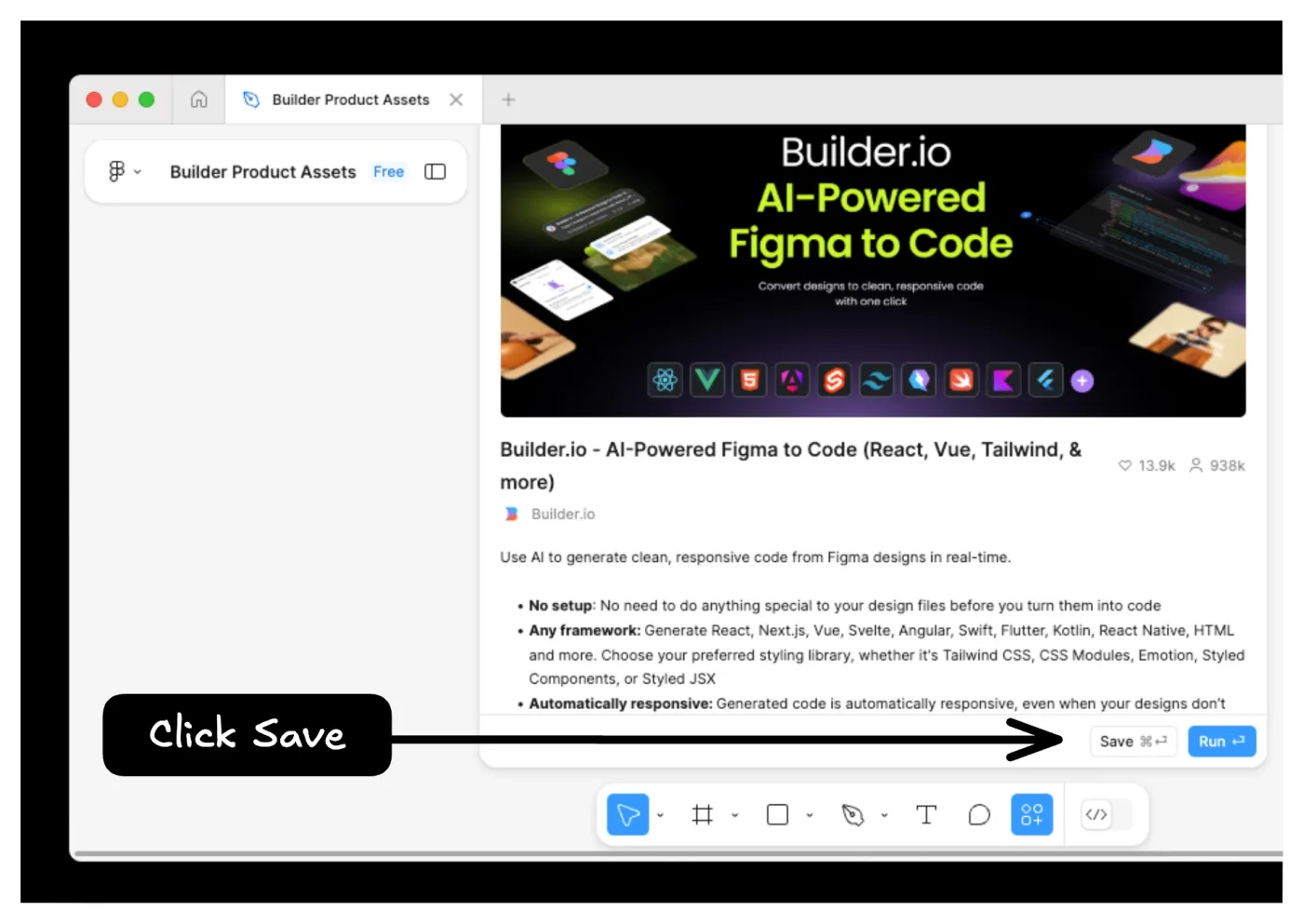
Builder.io's Visual Copilot plugin in Figma. Screenshot: Builder.io, builder.io/c/docs/builder-figma-plugin.
Figma Make sits in between: in one repo its AI-written code used real buttons, while the frames pasted in from Figma had 202 absolute positions and 8 buttons in 5,101 lines.
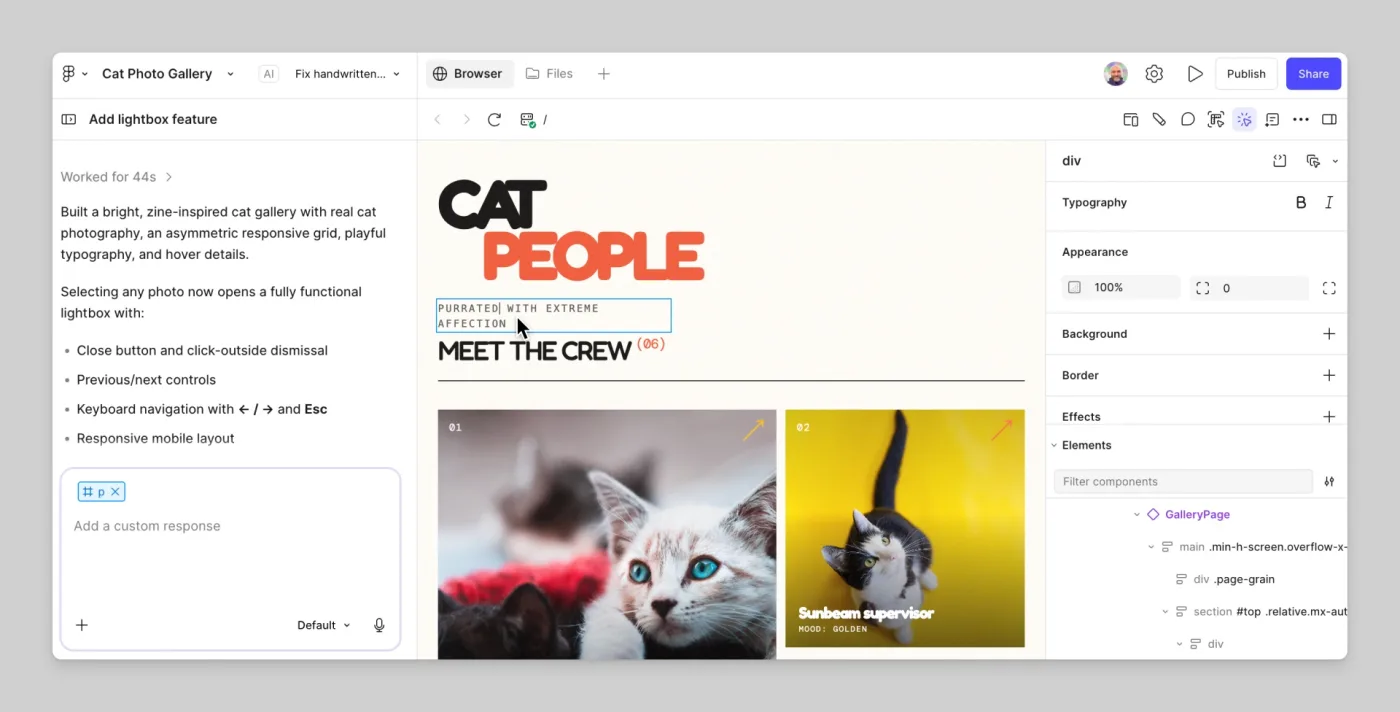
Figma Make: chat, preview and layers. Screenshot: Figma, help.figma.com (Explore Figma Make).
Step 3: Pull design tokens with the Figma MCP server
Start with the variables, by name. Connect your agent to Figma's remote MCP server (https://mcp.figma.com/mcp) and call get_variable_defs on the frame: it returns the variables and styles the selection uses. Generate your Tailwind theme from that list instead of retyping colours.
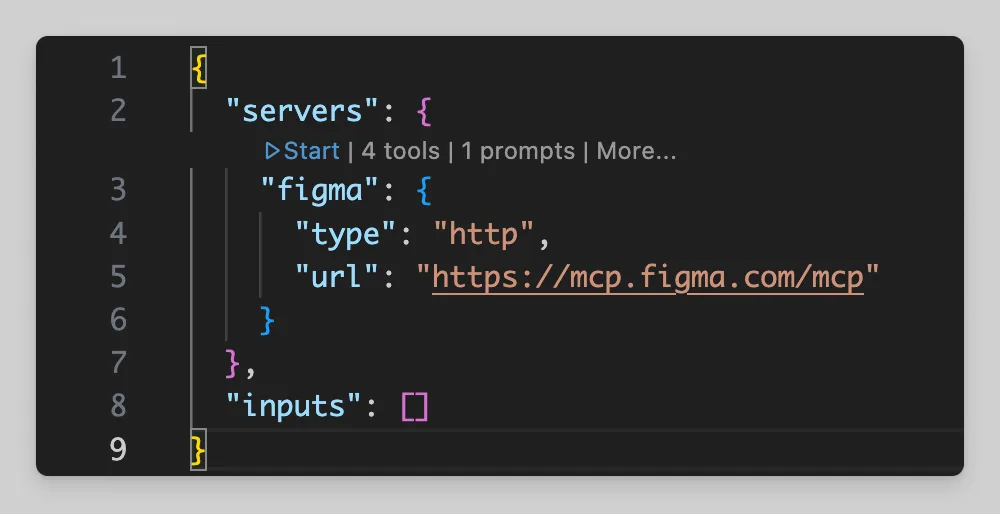
Connecting VS Code to the remote Figma MCP server. Screenshot: Figma, developers.figma.com/docs/figma-mcp-server.
This is the step a screenshot cannot do. In our test frame, Claude Code read all seven colours by eye and got every one exactly right, but it named them itself (surface-muted, ink-secondary). The design system calls the same colours --sds-color-background-default-secondary and the like. When a designer changes a variable in Figma, nothing in that code follows.
Step 4: Build each component with all its states
Build the small pieces first (button, input, card), each with every Figma variant, then the sections, then the page. A frame shows one state of everything. Our test frame's design system has 36 hover colours; the code we got from its screenshot had 9 hover styles and no custom focus styles, and the agent said it made the hover states up.
If your team uses Code Connect (Figma's link from a component to its React code), the MCP server passes that mapping to the agent, so it reuses your <Button>.
Step 5: Convert the frame with Claude Code
We gave Claude Code our test frame as a 1440 px screenshot, a fresh Next.js 16 app with Tailwind, and a short CLAUDE.md file:
# Project
`design/landing-1440.png` is a screenshot of one Figma frame (a landing page at 1440 px wide). `site/` is a fresh Next.js App Router app with Tailwind CSS. We are turning the design into React components in `site/`.

Rules
- One component per section, in `site/components/`. The page in `site/app/page.tsx` only composes them.
- Use Tailwind classes. No inline styles, no absolute positioning for layout.
- Semantic HTML: real buttons, links, headings in order, labels on inputs.
- Do not add dependencies.
- Run `npm run build` in `site/` at the end and make sure it passes.
- Report every file you created and why, plus everything you had to guess because the screenshot did not show it.
The prompt, verbatim:
Build the landing page in design/landing-1440.png as a Next.js page in site/. Do these in order and stop after each with a one-line note:
1. Look at the screenshot and list the sections, the colours, font sizes and spacing you can measure, and the interactive parts (buttons, inputs, toggles, accordions, links).
2. Put the colours and type sizes you found in one place (Tailwind theme in globals.css) and use those names in the components, not raw hex values.
3. Build each section as a component in site/components/ and compose them in site/app/page.tsx. Match the screenshot at 1440 px.
4. Make it work on a phone (390 px wide) as well. The screenshot only shows desktop, so say what you decided.
5. Make the Monthly/Yearly toggle and the FAQ accordion work.
6. Run npm run build in site/ and paste the last lines.
What it did on our test frame, in 4 minutes 52 seconds: six components and 519 lines, a passing static build, a working price toggle and accordion. We measured the result: 2.35% of pixels differ visibly from the design at 1440 px, zero accessibility errors in an automated WCAG check at desktop and phone width, and zero hard-coded colours, inline styles or absolute positions.
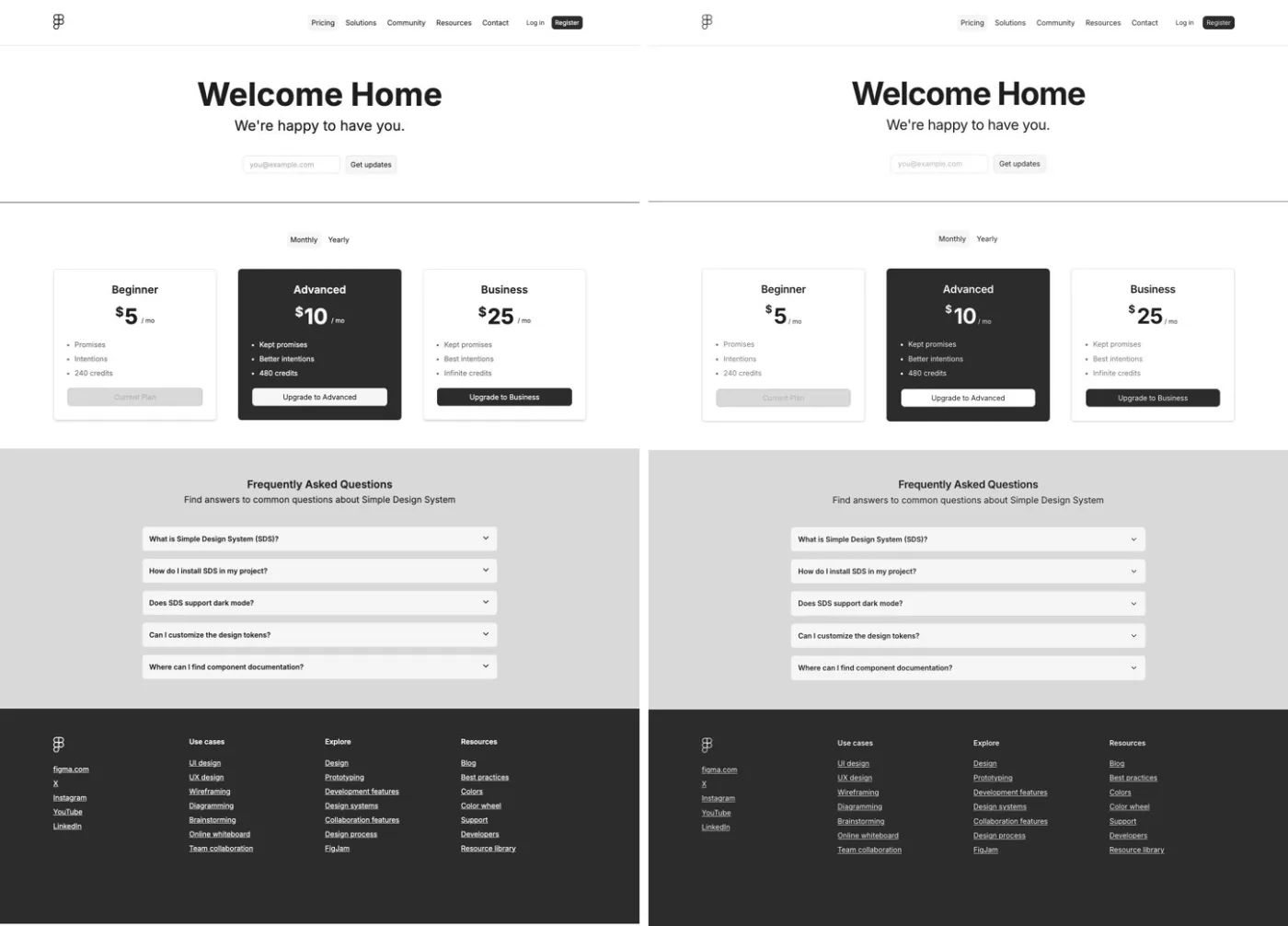
Left: our test frame from Figma's Simple Design System. Right: the Next.js page built from its screenshot. Screenshot: our own, 14 October 2026.
What a person had to catch: the FAQ answers were placeholder text it wrote (it said so in a comment), the yearly prices were a guess, seven links pointed to #, the email form posted nowhere, and the Figma logo was redrawn by hand rather than exported. Your frame will have more of these, not fewer.
Step 6: Add the phone layout, assets and real content
The phone layout is a design decision. Our test frame was desktop only, so Claude Code chose for itself: it stacked the email field and button at full width, shrank the subtitle and wrote a "Menu" text button. Figma's own phone layout for the same design keeps the field and button side by side, keeps the subtitle size and uses an icon. Three out of three decisions differed.
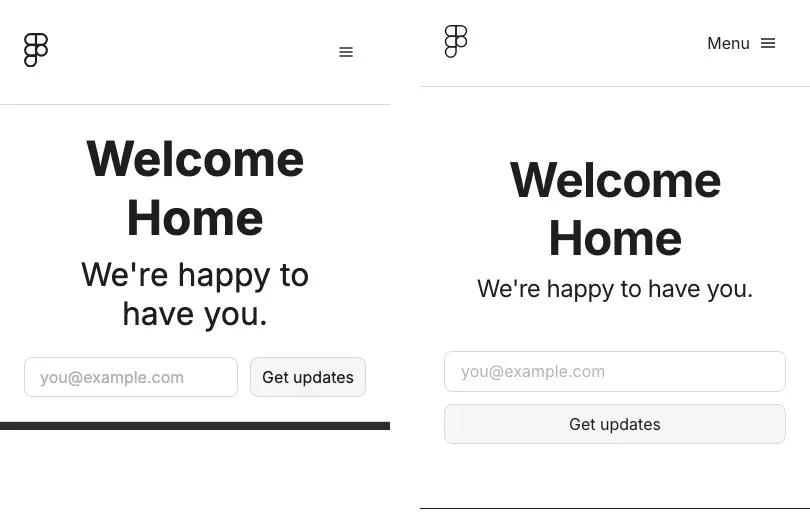
Left: the design system's own phone layout. Right: the layout Claude Code guessed. Screenshot: our own, 14 October 2026.
Give the agent the phone frame, or design it first. Then export icons and images into the repository with real alt text, and replace every placeholder.
Step 7: Wire it up and ship the Next.js app
A converted design is a front end with nothing behind it. Connect the forms, sign-up and data, add analytics behind your consent banner, and deploy. Keep Figma as the source of truth: when a variable changes, regenerate the theme from it. A short guide to building a design system helps keep both sides in step.
What to check before converting Figma to React
- Do I need a paid Figma seat? For regular MCP use, a Dev seat ($15 a month on Professional) or a Full seat. Free accounts get 20 MCP tool calls a month.
- Can Figma Make give me Next.js? It builds React on Vite and pushes one way to a new GitHub repository. Moving that to Next.js is a separate job.
- Will the AI build the phone version? It will guess one. In our test, every guess we checked differed from the designers' own.
- Is the output accessible? Ours passed an automated check because the rules asked for it. Plugin output in the public repos was mostly divs.
- How long does it take? Our one-frame conversion took under five minutes. The review, states, content and wiring take far longer than the conversion.
When to get help turning Figma designs into React
If you have a Figma file with a real design system and want a product built on it, with the tokens, states and phone layouts intact, our UI/UX and product design service covers design and build in one team. Moving an older front end onto your design system is part of our legacy application modernisation work. You can also read our Figma tool review, how we use Figma for design work, or contact us with a link to your file.
Frequently asked questions about Figma to React
Can AI convert Figma to React code?
Yes. Plugin output in public repos was mostly fixed-size, absolutely positioned divs. A coding agent with clear rules gave us clean, responsive Next.js, but it still guessed states, the phone layout and missing copy.
What is the Figma MCP server?
Figma's official way to give an AI coding agent your design's structure, variables and a screenshot. It is free during the beta, with 20 tool calls a month on free seats.
Does Figma Make export code?
Yes. Full and Dev seats can download a zip, and Make can push to a new GitHub repository, one way. The project is React on Vite with Tailwind, not Next.js.
Which Figma to React plugin is best?
In our scan, only Builder.io added phone rules by itself. For a product you will keep building, use a coding agent with your own components.
How long does it take to convert a Figma design to React?
Our test frame took under five minutes. A product with many screens takes weeks, mostly on states, phone layouts, content and data.
Sources and dates
What we read, all on 14 October 2026:
- Guide to the Figma MCP server and Figma MCP server FAQs, Figma help centre.
- Rate limits and access, Tools and prompts and Why the server returns web code, Figma developer docs.
- Figma pricing, USD, monthly and annual billing.
- Explore Figma Make, Figma Make FAQs and Push from Figma Make to GitHub, Figma help centre.
- Builder.io Figma plugin, Figma to code and pricing.
- Locofy docs and pricing.
- Anima Figma plugin and pricing, US price list.
- Simple Design System, Figma, MIT licence, commit of 2 October 2026.
What we ran ourselves:
- The Claude Code prompt in Step 5 (Claude Code 2.1.299, Next.js 16.4, Tailwind 4) on a 1440 px frame from Simple Design System, 14 October 2026, with a pixel comparison and an axe-core 4.10 accessibility check at 1440 and 390 px.
- A count of layout patterns in 18 public GitHub repos made with Locofy, Anima, Builder.io, Figma Make and the Figma MCP server, 14 October 2026.

Written by Tom
Founder and Lead Developer

Ready to start your project?
Book a free discovery call to learn how we can build your app in 4 weeks, or less.
Book a call