

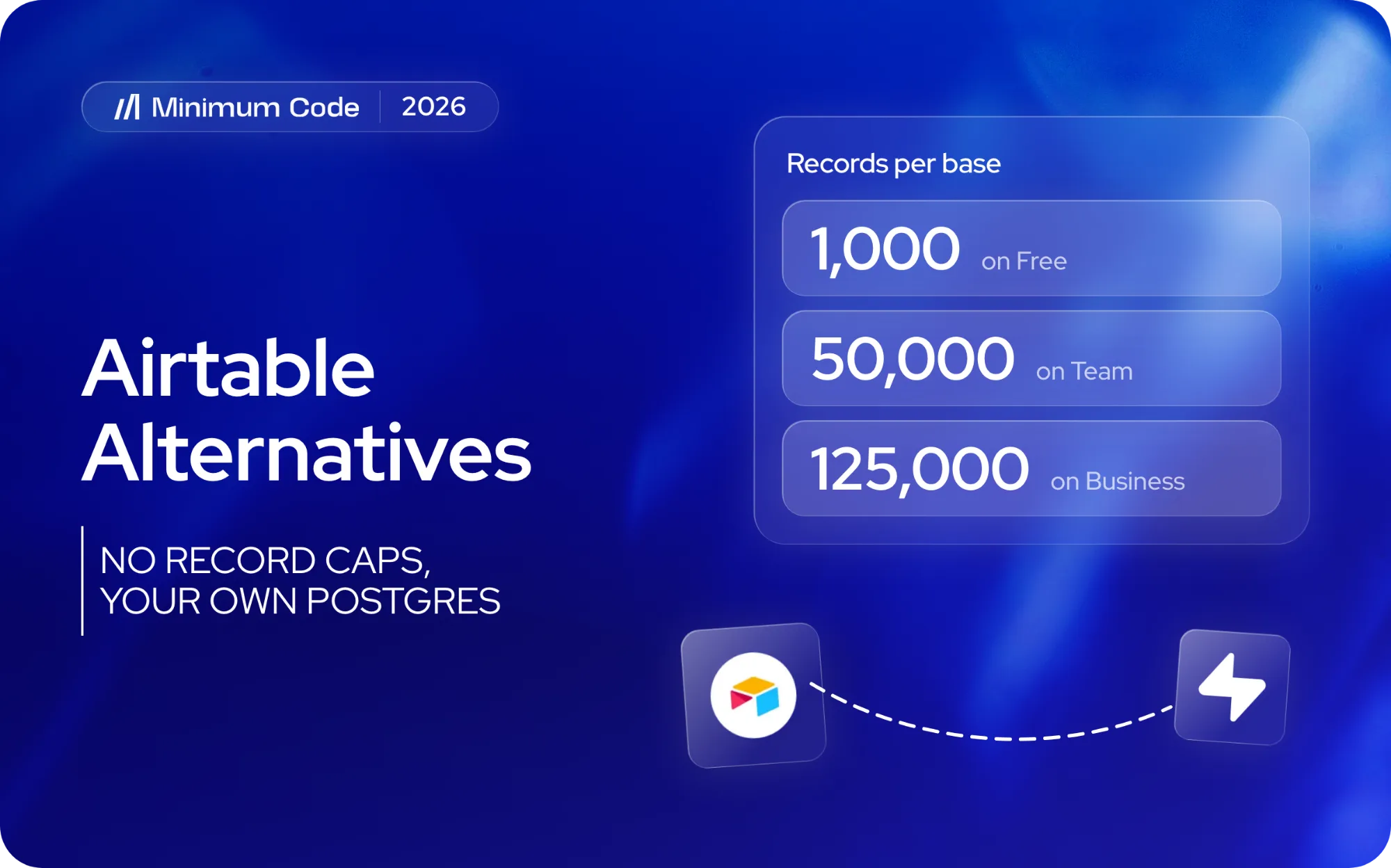
Most teams start looking for an Airtable alternative when a base hits its record cap: 1,000 records on Free, 50,000 on Team, 125,000 on Business, and past that Enterprise Scale with no public price. Others hit the API cap (1,000 calls a month on Free, 100,000 on Team) or the per-seat bill. You can stay on a bigger plan, keep Airtable and read it from Supabase, or move the data to a Postgres database you own. This guide shows the numbers, who should stay, and the steps we ran to move two real Airtable bases into Postgres.
It is part of our guides on moving from no-code tools to code, which compares the limits tool by tool.
Already past the cap, or building an app on top of your base? We build the custom app and move your Airtable data into it.
Talk to us about your Airtable base
Airtable pricing and plan limits (2026)
Airtable's plans as we read them on 14 October 2026, in US dollars per seat. Airtable charges everyone who can edit a base; read-only collaborators are free.
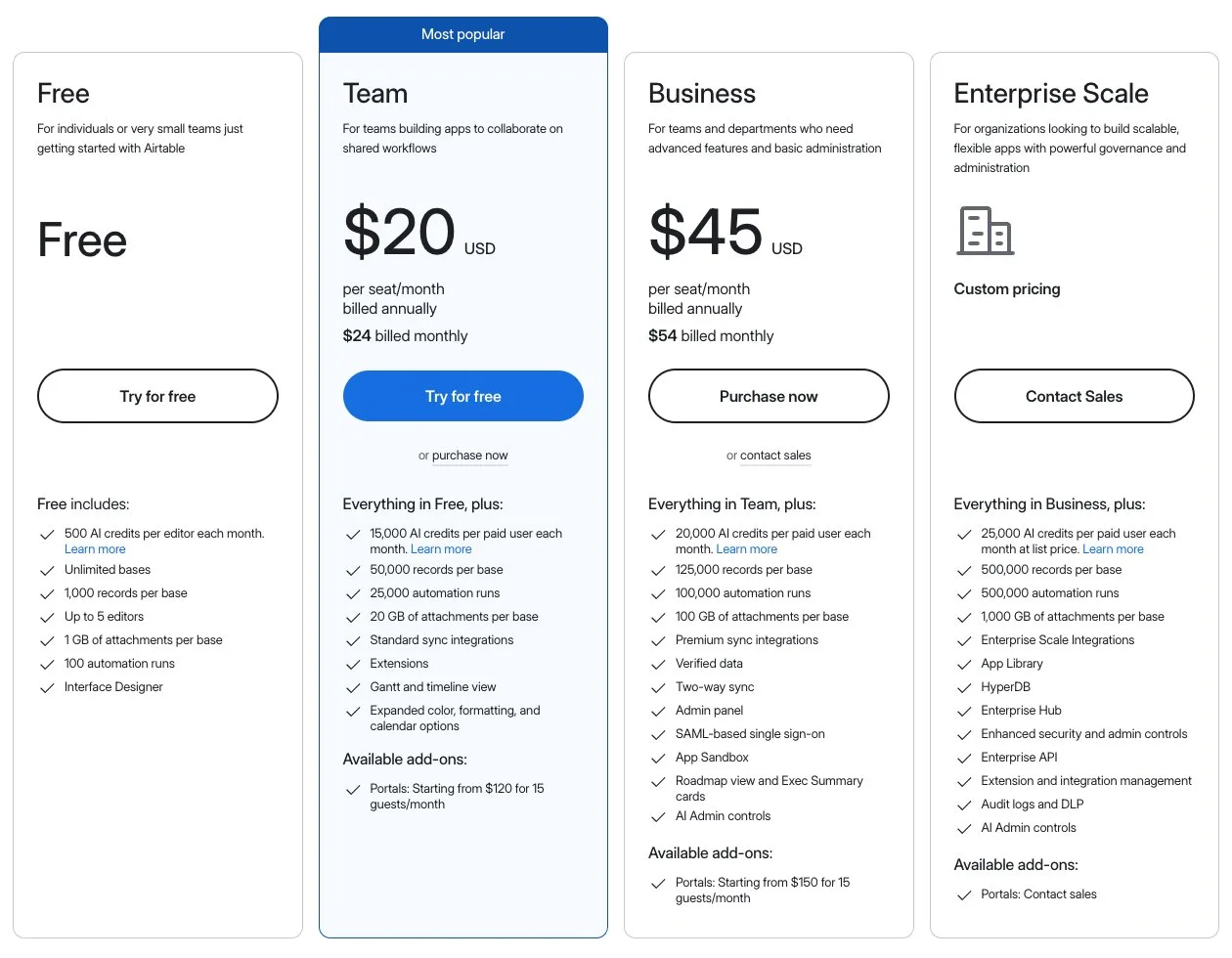
Airtable's plans, read 14 October 2026. Screenshot: Minimum Code, from airtable.com/pricing.
Free | Team | Business | Enterprise Scale | |
|---|---|---|---|---|
Price per seat, monthly billing | $0 | $24 | $54 | Custom |
Price per seat, annual billing | $0 | $20 | $45 | Custom |
Records per base | 1,000 | 50,000 | 125,000 | 500,000 |
Attachment space per base | 1 GB | 20 GB | 100 GB | 1,000 GB |
Automation runs per month | 100 | 25,000 | 100,000 | 500,000 |
API calls per month | 1,000 | 100,000 | Unlimited | Unlimited |
Editors | 5 | Unlimited | Unlimited | Unlimited |
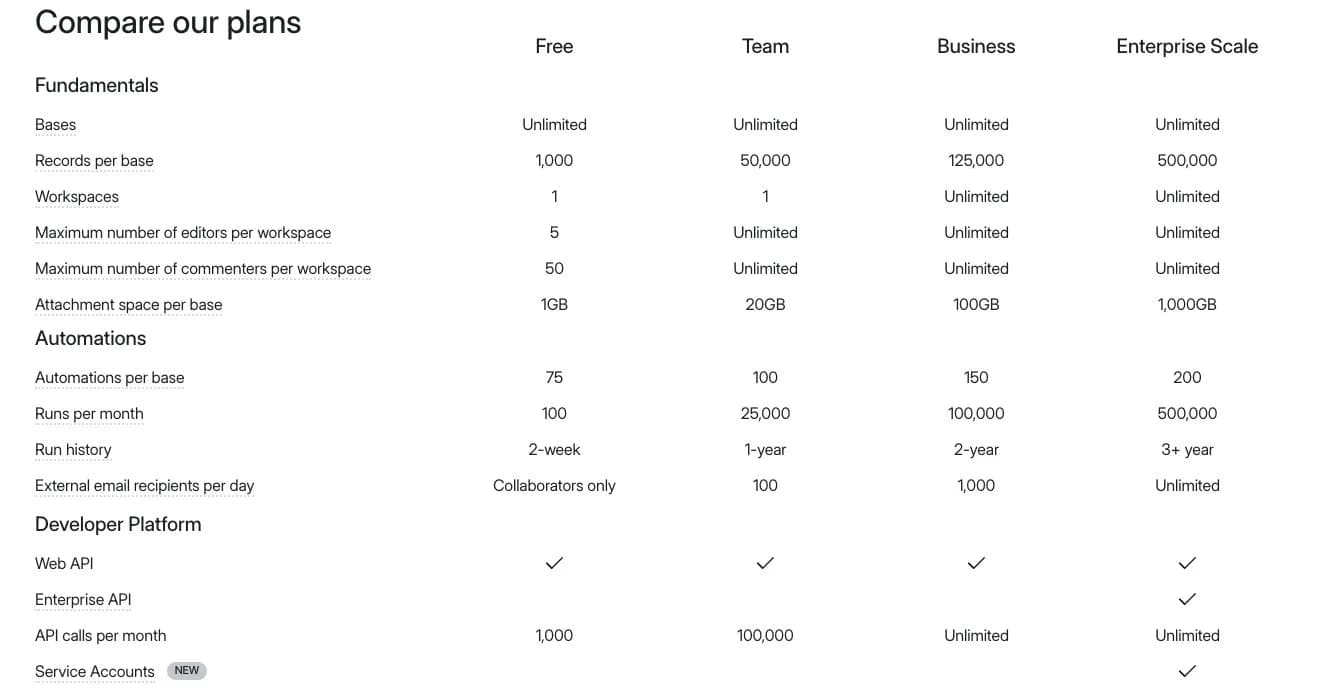
Rows excerpted from Airtable's comparison table, read 14 October 2026. Screenshot: Minimum Code, from airtable.com/pricing.
When you reach the record or attachment limit, Airtable keeps your data but "you will not be able to add more records or attachments until you upgrade". For automations and the API, "you will be capped at the usage limit on your current plan". On Team that means the API slows to 2 requests a second for the rest of the month, according to Airtable's help article on API limits. Every tool you connect to the base (Softr, Zapier, a website) spends the same monthly calls.
Two realistic setups, monthly billing:
- A 5-person startup, everyone editing, 10,000 records: Free stops at 1,000 records per base, so Team at 5 x $24, $120 a month.
- A 30-person company, 30 editors, 250,000 records: Business stops at 125,000 records per base, so you either split the data across bases (links do not work across bases) at 30 x $54, $1,620 a month, or ask for an Enterprise Scale quote.
Supabase Pro, for comparison, starts at $25 a month for the project, not per seat, with an 8 GB database. Our 50,000-record test table took under 7 MB in Postgres.
Airtable alternatives: stay, connect Supabase, or move to Postgres
Option | When it fits | What you keep | What you give up | Cost shape |
|---|---|---|---|---|
Stay on Airtable | Under the record cap, a handful of editors, the team lives in the grid | Everything | Nothing yet | $24 to $54 per editor a month |
Keep Airtable, connect it to Supabase | You want SQL reports on the data before you move | Airtable as the place people edit | Speed: every query goes through Airtable's API | Supabase plus your Airtable plan |
Another Airtable-style tool (NocoDB, Teable) | You want a grid UI but no record caps | The grid way of working | Airtable's interfaces, automations and extensions | Self-hosting, or their own plans |
Move to Postgres or Supabase with your own app | Past the caps, or the base has become the back end of a product | Your data and its relations | The Airtable editor and its automations | Hosting plus a one-off build |
The second row uses Supabase's Airtable wrapper, which its docs describe as read-only with "No query pushdown": fine for reports, not as the end state. For a small team under 50,000 records, staying on Team is usually right. The steps below are for teams past the caps, or whose base now runs a product.
Step 1: Decide what to keep in Airtable
List every table, view, automation, interface and extension in the base, and mark what people used last month. Most bases carry tables nobody reads.
- Tables and fields that matter, with their formulas, lookups and rollups.
- Automations: what triggers each one and what it changes.
- Interfaces and extensions people look at.
Step 2: Export your Airtable data
Airtable has two ways out: a CSV per view, or the Web API. We tested both on two of Airtable's own public templates, a Lightweight CRM and a Real Estate Listings Manager, opened from their share links. They are our test bases, not a client's. Yours will have different tables, but the same kinds of problems.
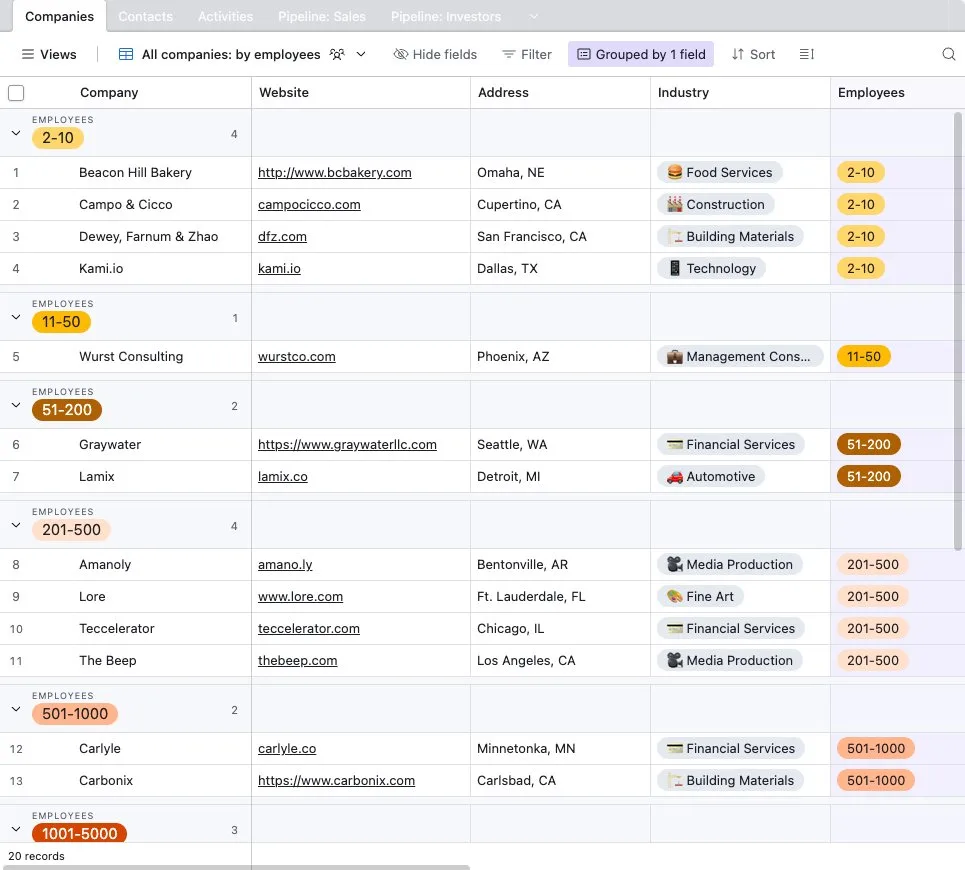
Our first test base: Airtable's public Lightweight CRM template, opened from its share link. Screenshot: Minimum Code, 14 October 2026.
The CSV export is in each view's menu, one table at a time. It leaves out hidden fields, filtered records, comments and field descriptions.
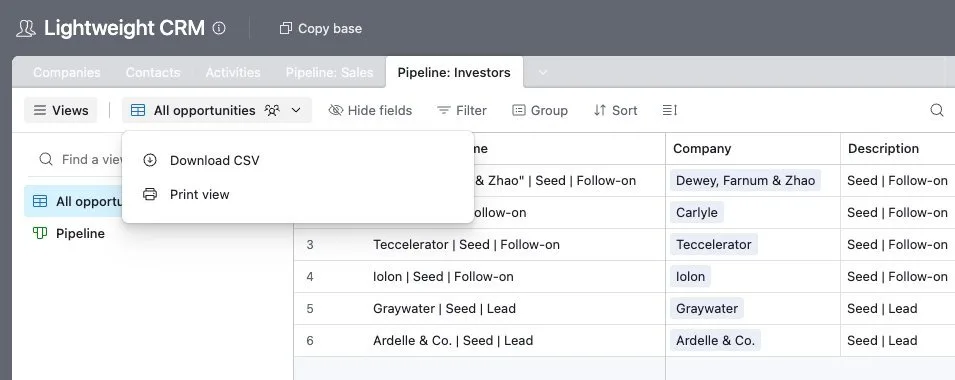
Download CSV sits in each view's menu. Screenshot: Minimum Code, from the template's public share link.
This is what it gave us for the CRM's investor pipeline:
Opportunity Name,Company,Description,Stage,Check Size
"""Dewey, Farnum & Zhao"" | Seed | Follow-on","""Dewey, Farnum & Zhao""",Seed | Follow-on,First Meeting,$100000
Carlyle | Seed | Follow-on,Carlyle,Seed | Follow-on,Partner Meeting,$250000
Linked records come out as names, not IDs, and a name with a comma gets extra quotes. Money comes out as text with a dollar sign. Fine for a spreadsheet, not for rebuilding relations.
The Web API gives you record IDs, links as lists of IDs, and the values of your formulas as Airtable computed them. You need a personal access token. Airtable allows 5 requests a second per base, and a 429 error means waiting 30 seconds. Each call returns at most 100 records. Our export script is about 70 lines of Node: it reads the base schema, pages through every table at 4 requests a second and writes one JSON file per table plus a Postgres schema. We ran it against a local copy of the API serving the same data, because the run needed no account. On our CRM:
Companies: 20 records in 1 calls, 8 fields
Contacts: 30 records in 1 calls, 7 fields
Pipeline: Sales: 7 records in 1 calls, 8 fields
schema.sql written; computed fields left for code: Contacts.Website (multipleLookupValues), Activities.Activity (formula), Activities.Companies (rollup), Pipeline: Sales.Opportunity Name (formula), Pipeline: Sales.ARR (formula), ...
At Team's cap, 50,000 records, the same script made 501 calls and took 125 seconds. That is half a percent of Team's monthly calls. Loading those 50,000 rows into Postgres took 1.3 seconds.
Attachments need care. The API gives each file a link that expires after 2 hours, so download the files in the same run. Our real estate template showed why: its 33 photos (75 MB) still carried old-style links saved before Airtable's change, and all 33 downloads returned HTTP 403.
How the field types mapped to Postgres in our test bases:
Airtable field type | Postgres type | Watch for |
|---|---|---|
Single line text, email, URL, phone | text | Numbers stored as text: "3 BR" in our listings |
Number, currency | numeric | Store the currency code yourself |
Checkbox | boolean | The API leaves out unticked boxes |
Date, created time | date, timestamptz | |
Single select | text | Or a lookup table |
Multiple select | text[] | Or a join table |
Linked record | text[] on import, then a foreign key or join table | Always a list in the API, even when there is one link |
Attachment | a files table plus storage | Links expire; download during the export |
Formula, lookup, rollup | not stored | Rebuild as a view |
Step 3: Move your users
Airtable has no list of app users with passwords. Collaborators and Portals guests sign in with their own Airtable accounts, and no password leaves Airtable. If a tool like Softr sits on top of your base, the users live in that tool; our Softr migration guide covers that side.
Create the accounts in Supabase from the emails in your tables, and send each person a magic link or a set-password email at cutover. Tell them a week ahead so the email does not look like phishing.
Step 4: Rebuild links, lookups and formulas
This is where an Airtable move takes its time. In the API every linked record is a list, even when every record only ever has one link. So for each link you check the data and choose: a foreign key when each record links to one, a join table when links go both ways. In our CRM, every contact had exactly one company, so that became a foreign key. One activity had two contacts, so activities got a join table.
Lookups, rollups and formulas become views. The sales pipeline's ARR formula, {Seats} * {Price / Seat} * 12, became seats * price_seat * 12 in a view. The export keeps the values Airtable computed, so you can check every rebuilt value against Airtable's own answer.
Automations become scheduled jobs or database triggers, one per automation you kept in Step 1.
Step 5: Reconnect integrations
Anything that writes to the base (forms, Zapier, Make, a website) needs a new destination. Anything that reads it, like a portal in Softr or Glide, needs the new database or an API in front of it. Stripe and email keys move as they are.
Step 6: Build the Postgres schema with Claude Code
We use Claude Code for the rebuild, with a short CLAUDE.md file of rules. This is the one we used on our two test bases, without the line that points at our local database:
# Project
We are moving two Airtable bases (a CRM and a real estate listings base) to Postgres (Supabase in production).
export-crm/ and export-listings/ hold what the Airtable Web API returned: one JSON file per table, _schema.json with field types, and schema.sql / data.sql that load the raw tables. Linked records arrived as text[] arrays of Airtable record ids. Formula, lookup and rollup fields were not loaded; their values as Airtable computed them are in the JSON files.

Rules
- Do not change the loaded data in place. Add numbered migration files in migrations/ and apply them.
- Linked records become real relations: a foreign key where the data is one-to-many, a join table where it is many-to-many. Decide from the data and _schema.json, and say why.
- Formula, lookup and rollup fields become views, never stored columns.
- Prove every view against the values Airtable computed (in the JSON exports). Paste the comparison output.
The prompt had six steps. The first three, slightly shortened:
1. Read export-crm/_schema.json and export-listings/_schema.json. For every multipleRecordLinks field, count from the data how many links each record really has on each side, and pick foreign key or join table. Print the counts.
2. Write migrations/001_relations.sql: the foreign keys and join tables, filled from the text[] columns, with a check that every linked id exists. Apply it and print row counts per new table.
3. Write migrations/002_computed_views.sql: one view per table that has formula, lookup or rollup fields, rebuilding each of them. Apply it.
The others asked for a script comparing every rebuilt value with Airtable's, whole numbers parsed from "3 BR", and one table for all the image fields.
What it did on our test bases, in about four minutes: six foreign keys, one join table and five views. All 70 computed values matched Airtable's, which we confirmed by rerunning its check. It found a rule we had missed: when a linked company name contains a comma, Airtable wraps it in quotes inside formulas, and the view copies that. It also moved 33 image records into one table, ready for the file upload.
What a person decides: whether a link that is one-to-one in the current data should stay that way, when to drop the old raw columns, and what happens with values like "2.5 BA", which stop the migration on purpose.
Step 7: Cut over
Keep Airtable running while you build. On the day, freeze edits, export one last time, rerun the migrations and the value check, and point your forms and tools at the new app. Keep the base read-only for a month before you cancel.
What to know before leaving Airtable
- Should I stay on Airtable? Yes, if your bases are under 50,000 records, a few people edit, and nothing outside Airtable depends on the API. That is $24 a seat a month on Team.
- Can I export a whole base at once? Not as CSV; that is one view at a time, with names instead of IDs. The Web API gets every table, with IDs, in one run.
- Do my formulas come with me? Their results do, through the API. The logic is rebuilt as views.
- How long does it take? The export and load take minutes. The work is the relations, the formulas, the automations and the screens.
- Can we keep Airtable running while we move? Yes. Edit in Airtable until the last export, then switch.
- Who maintains it afterwards? Your team or ours. The migration files and the value check help whoever picks it up.
When to get help moving off Airtable
If a base is near 125,000 records, splits across bases, or has become the back end of a product, our team builds custom web apps and moves the data, relations and formulas as part of the job. Comparing back ends first? Our Xano and Airtable comparison and the Airtable tool page cover what Airtable does well, and the no-code to code guide covers the other tools. Then send us your base schema.
Frequently asked questions
What are the Airtable free plan limitations?
1,000 records and 1 GB of attachments per base, 5 editors, 100 automation runs and 1,000 API calls a month.
What is the Airtable record limit?
Per base: 1,000 on Free, 50,000 on Team, 125,000 on Business and 500,000 on Enterprise Scale. At the limit you keep your data but cannot add records until you upgrade.
What are the Airtable API limits?
5 requests a second per base, with a 30-second wait after a 429 error, and at most 100 records per call. Free allows 1,000 calls a month and Team 100,000; Business has no monthly cap.
Can I connect Airtable to Supabase?
Yes, with Supabase's Airtable wrapper, which reads a base as a table in SQL. It is read-only and fetches all the data before filtering, so it suits reports, not running an app.
How do I export Airtable to PostgreSQL?
Pull every table through the Web API, load it with the links as lists of IDs, then turn the links into foreign keys or join tables and the formulas into views. Check each rebuilt value against Airtable's.
Sources
What we read:
- Airtable pricing, plan cards, Compare our plans table and FAQ. Read 14 October 2026 from Portugal, USD.
- Rate limits, List records and Field model, Airtable Web API docs. Read 14 October 2026.
- Managing API call limits in Airtable, Getting started with Airtable views and Airtable attachment URL behavior, Airtable support. Read 14 October 2026.
- Using Airtable Portals for external collaborators, Airtable support. Read 14 October 2026.
- Airtable wrapper and Supabase pricing. Read 14 October 2026.
- Lightweight CRM and Real Estate Listings Manager, Airtable templates used as test data. Source of the test base and CSV menu screenshots.
What we ran ourselves:
- CSV downloads from the CRM template's public share link, 14 October 2026.
- An export script for the Airtable Web API, run against a local copy of the API serving both templates and a 50,000-record table, with the documented rate limit, 14 October 2026.
- The exports loaded into a local Postgres 14, and the Claude Code prompt in Step 6 (Claude Code 2.1.299) run on them, 14 October 2026.

Written by Tom
Founder and Lead Developer

Ready to start your project?
Book a free discovery call to learn how we can build your app in 4 weeks, or less.
Book a call