
Most teams look for a Softr alternative after hitting one of three walls: the app user cap (250 client users on Pro, 500 on Business, then Enterprise with no public price), features locked to higher plans (custom code, API calls and CSV export start on Pro at $119 a month), or a layout or rule the blocks cannot express. You can stay on the right plan, move to another builder, or move to a codebase you own. This guide shows the numbers, who should stay, and the steps for moving to code.
It is one of our guides on moving from no-code to code, which compares when to leave each tool.
Already past the user cap? We build the custom version of your Softr app and move your data and users across.
Talk to us about your Softr app
Softr pricing and plan limits (2026)
These are Softr's plans as we read them on 6 October 2026, with monthly billing selected. Prices are in US dollars and exclude tax, which Softr adds at checkout.
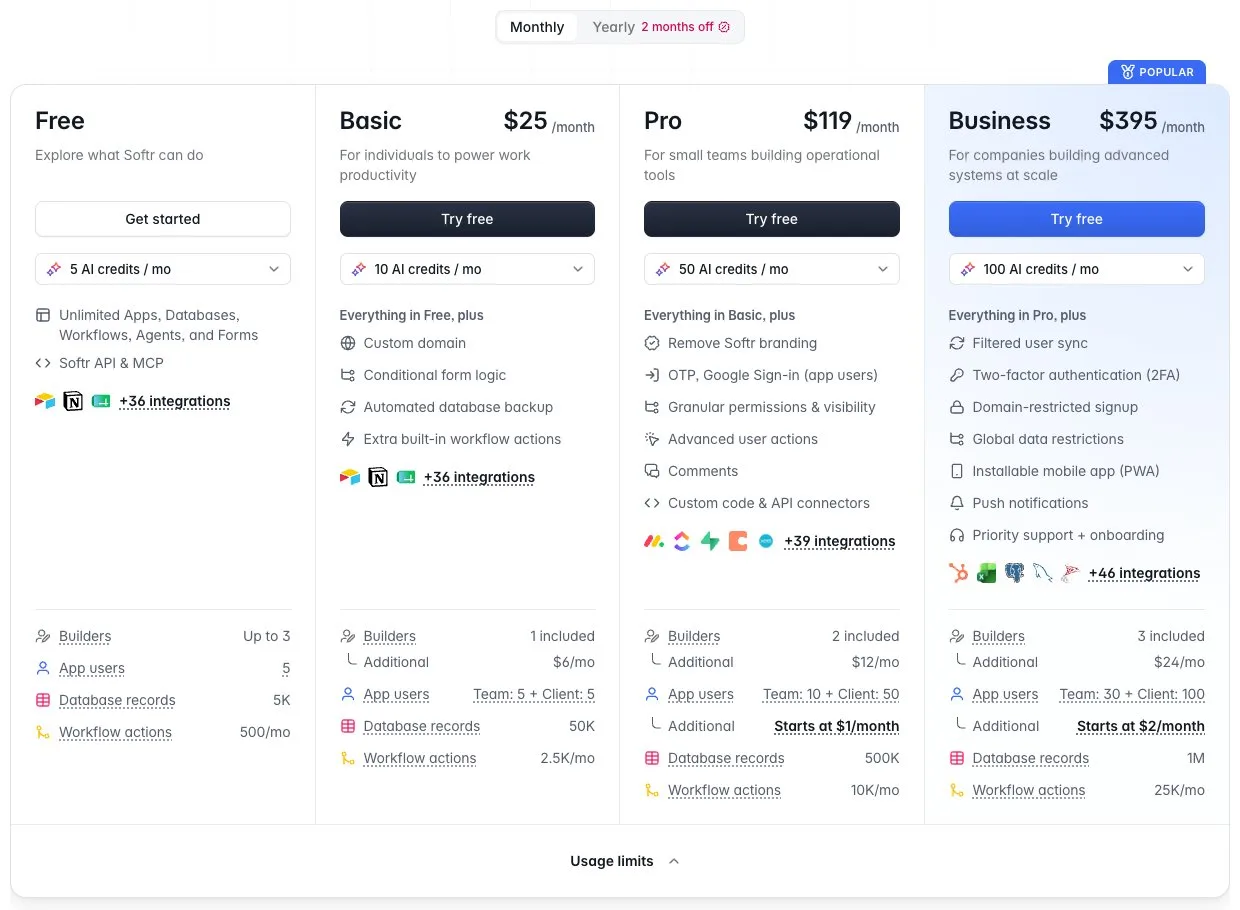
Softr's plans with monthly billing, read 6 October 2026. Screenshot: Softr pricing page, softr.io/pricing.
Free | Basic | Pro | Business | |
|---|---|---|---|---|
Price, monthly billing | $0 | $25 | $119 | $395 |
Price, yearly billing | $0 | $19/mo | $99/mo | $329/mo |
App users included | 5 | 5 team + 5 client | 10 team + 50 client | 30 team + 100 client |
Most app users you can buy | none | none | 50 team, 250 client | 100 team, 500 client |
Records per database | 1,000 | 10,000 | 50,000 | 200,000 |
Records per workspace | 5,000 | 50,000 | 500,000 | 1,000,000 |
Custom code, Call API, CSV export | no | no | yes | yes |
Team users share an email domain with a builder of the app; everyone else, Gmail addresses included, is a client user. Extra users cost $3 per team user and $1 per client user on Pro, $5 and $2 on Business.
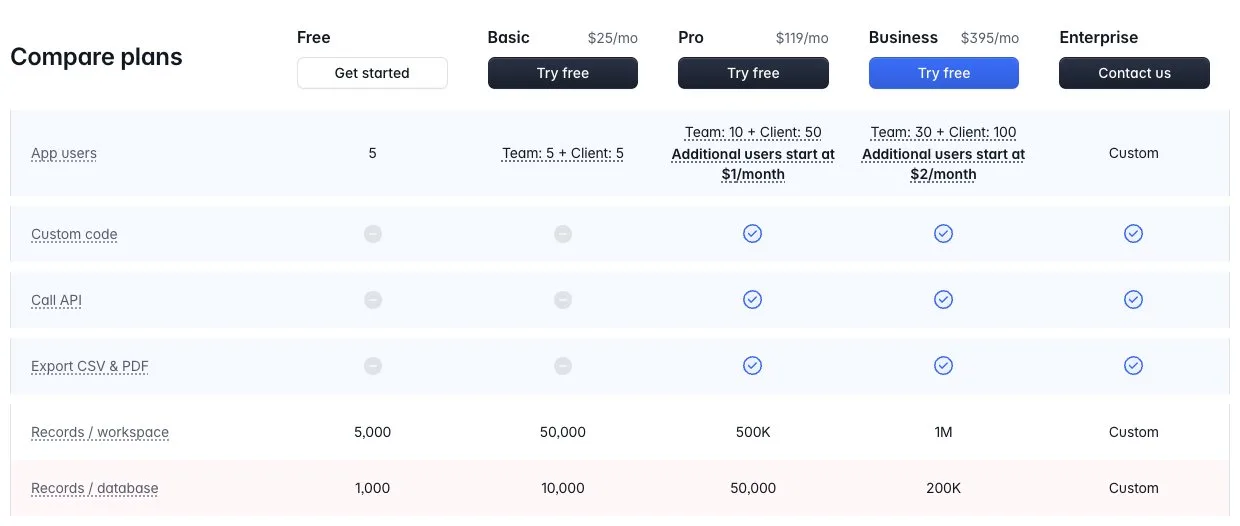
Rows excerpted from Softr's Compare plans table, read 6 October 2026. Screenshot: Softr pricing page, softr.io/pricing.
The free plan is for trying Softr out: 5 app users, 1,000 records per database, no custom code and no export. Here is what two realistic apps cost, using Softr's own user calculator:
- A 5-person startup with a client portal, 40 client users and 10,000 records: Basic stops at 5 client users, so you are on Pro at $119 a month, and everything else fits.
- A 30-person company with 300 client users and 250,000 records: Pro stops at 250 client users, so Business at $395 plus $400 for 200 extra client users, $795 a month. Business allows 200,000 records per database, so the data has to be split across databases. Past 500 client users the calculator says "Enterprise plan is needed".
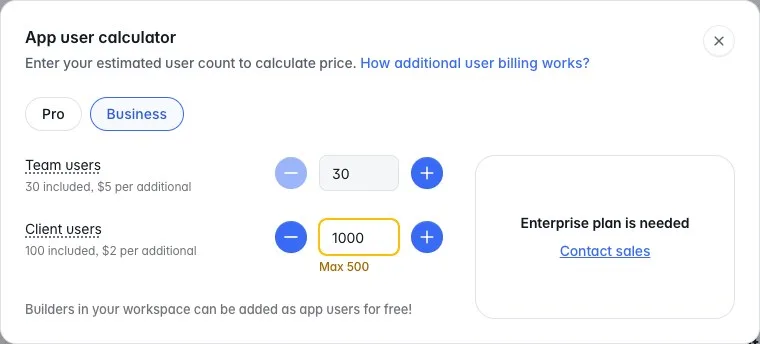
Business tops out at 500 client users. Screenshot: Softr pricing page, app user calculator, softr.io/pricing.
The caps have moved before. In November 2025 the Business user limit went "from 2,500 to 500 with no price change", as one builder put it on Softr's forum. When the current plans launched on 5 August 2026, another wrote that "a year ago the business plan got you 2,500 users for just over $300 USD and now your get 130 users for almost $400".
Your options
Option | When it fits | What you keep | What you give up | Cost shape |
|---|---|---|---|---|
Stay on Softr and pick the right plan | Under the user caps, and the blocks do what you need | Everything, including hosted login and permissions | Nothing yet | $119 to $795 a month at the sizes above |
Move to another no-code builder | You need a feature Softr lacks but no developers | Your data, if it lives in Airtable or a database you own | Your Softr layouts, rules and workflows, rebuilt in the new tool | Another per-user or per-plan subscription |
Move to your own code | Past 500 client users, or custom logic and screens | Your data and your users' emails | Softr's editor and its hosted login | Hosting plus a one-off build |
For most teams under the Pro caps, staying is the right call. The steps below are for teams past them, or bending the blocks to do things they were not built for.
Step 1: Decide what to keep
List every page, user group, visibility rule and workflow in your Softr app, then mark which ones people used last month. The rebuild only has to cover those.
- Pages and blocks people use, and which data each one shows.
- Permission rules: who sees which records, and who can edit them.
- Workflows, Call API actions and Zapier or Make automations, with what triggers each one.
Step 2: Get your data out
There is no app export in Softr. Nothing in its docs exports pages, rules or workflows. What comes out depends on where your data lives.
If your data is in Airtable, Google Sheets, Supabase or a SQL database, it never lived in Softr. Export it from that tool. If it is in Supabase or SQL already, this step is mostly done. If it is in Airtable, its own CSV export or API is the path.
If your data is in Softr Databases, use the Softr Database API. "Softr API & MCP" is ticked on every plan, Free included. In mid-2025 Softr's staff wrote that CSV export from the database editor was "coming but not immediately", and pointed people to the API. The docs we read on 6 October 2026 still do not describe one.
- In the Softr dashboard, open your workspace menu and go to API tokens, then click Create.
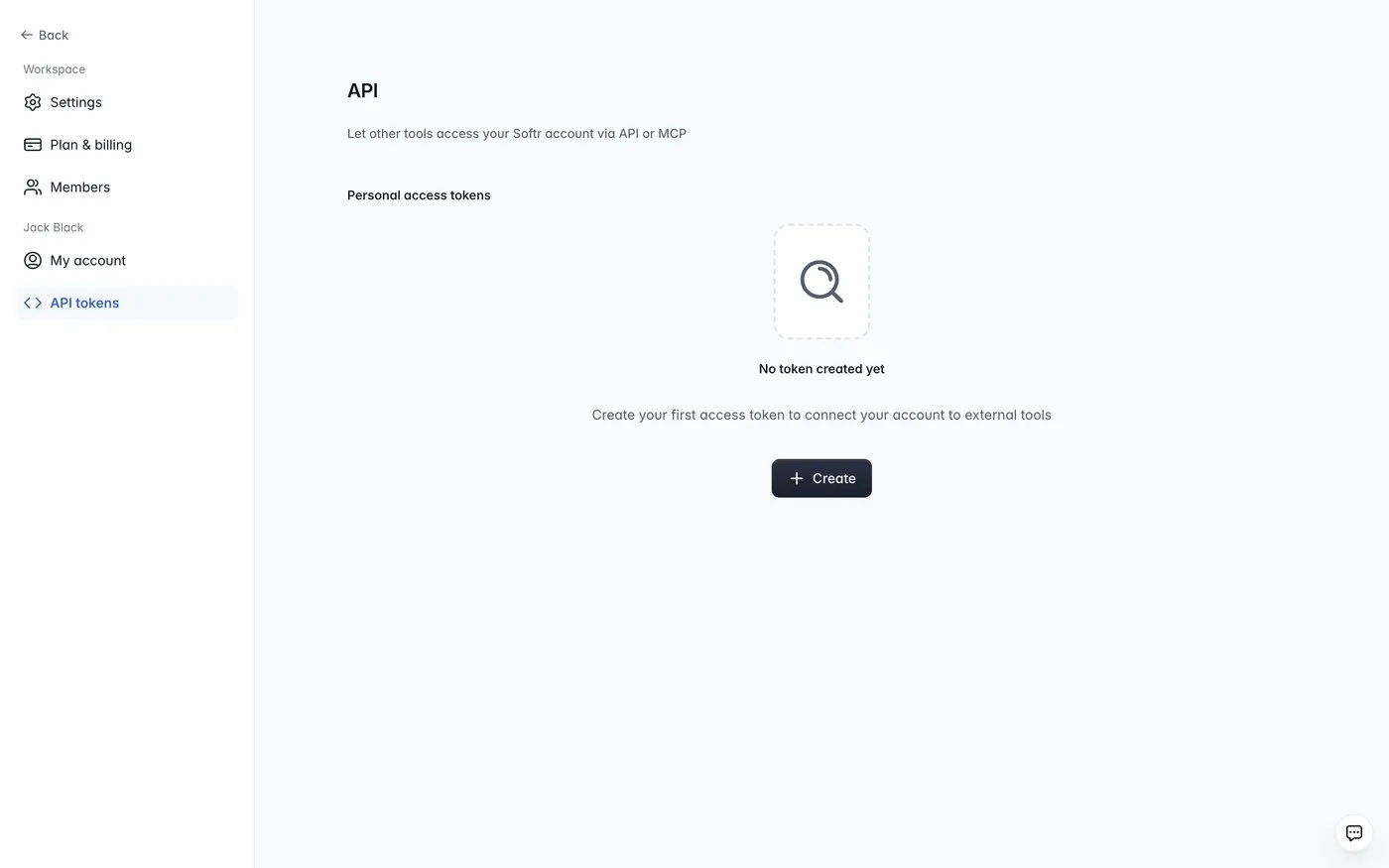
Workspace settings, API tokens. Screenshot: Softr docs, docs.softr.io/softr-api/api-setup-and-endpoints.
- Name the token, then set its scopes. The export only needs the Databases permission.
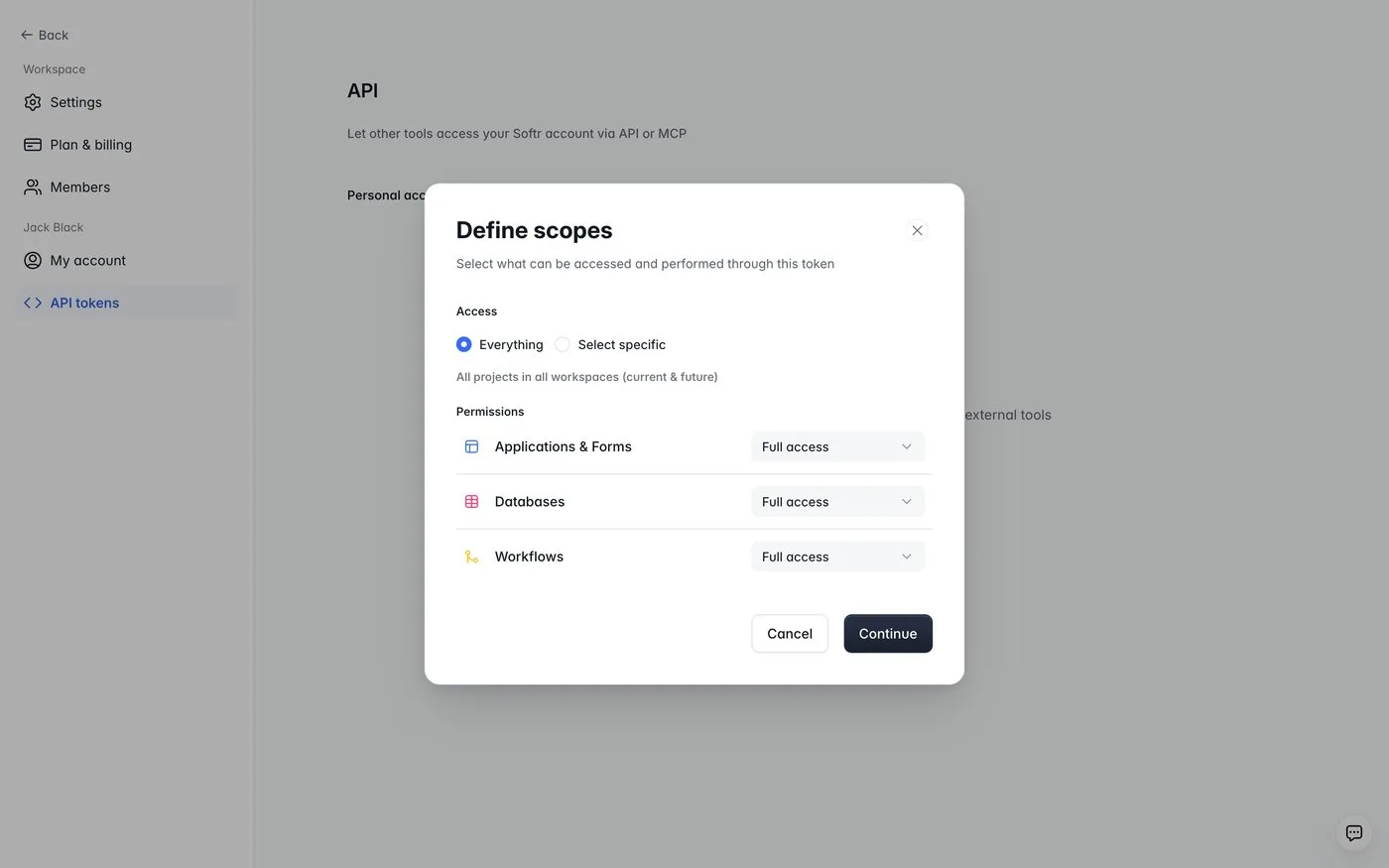
Choosing what the token can access. Screenshot: Softr docs, docs.softr.io/softr-api/api-setup-and-endpoints.
- Copy the token. Softr shows it once.
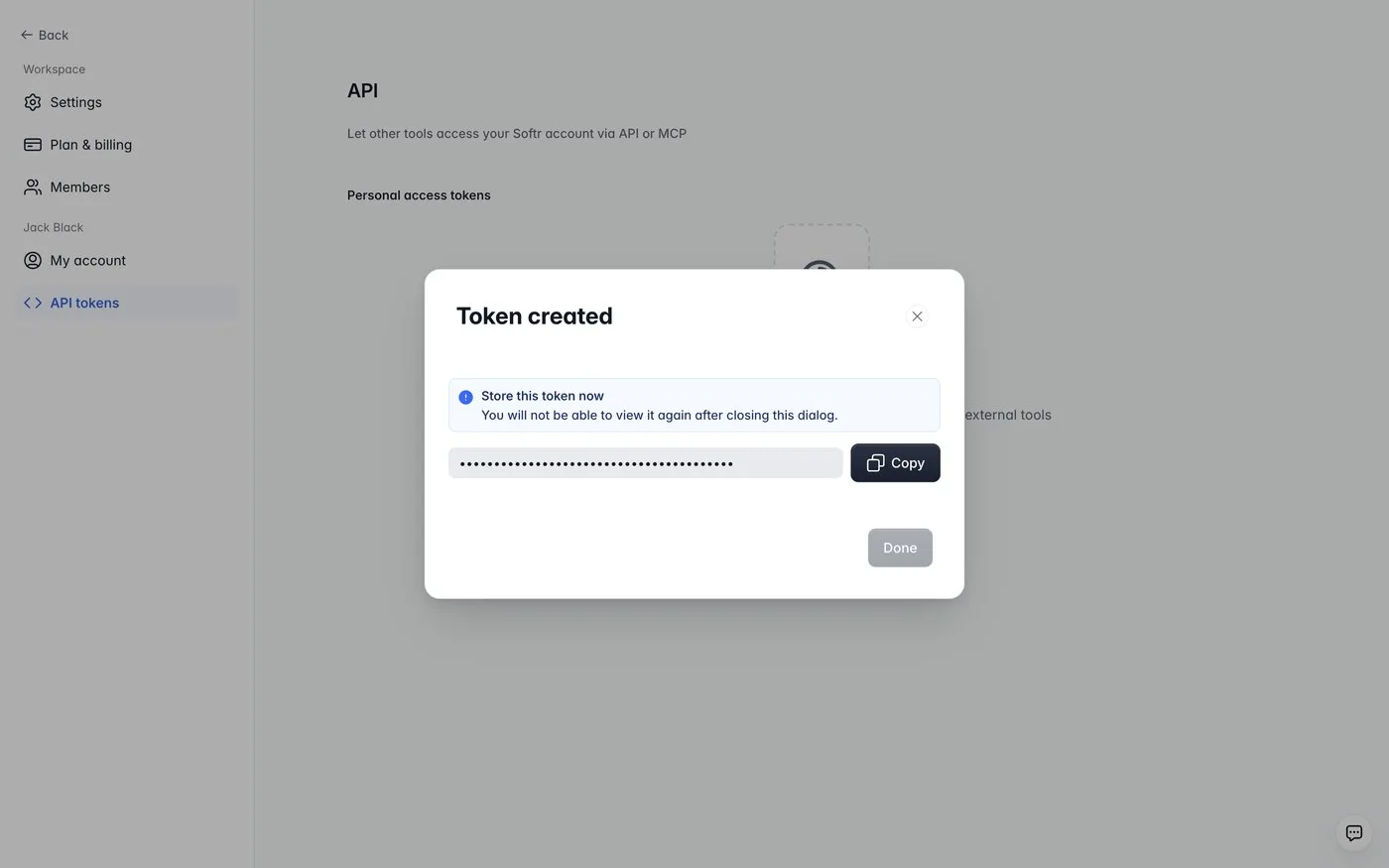
The token is shown only once. Screenshot: Softr docs, docs.softr.io/softr-api/api-setup-and-endpoints.
- Run an export script. Ours is 56 lines of Node: it pages through every record in a database, writes one JSON file per table and builds a Postgres schema from Softr's field types. We checked its requests against a mock built from Softr's published OpenAPI file, then ran it on our test portal, a small client portal we built for this guide with Clients, Projects and Invoices. Your tables will have different names; the output will have the same shape.
SOFTR_API_KEY=... SOFTR_DB=<database id> node softr-export.mjs

Clients: 40 records in 1 calls, 6 fields
Projects: 120 records in 2 calls, 7 fields
Invoices: 300 records in 3 calls, 6 fields
schema.sql written; computed fields left for code: Projects.Client email (LOOKUP), Invoices.Days overdue (FORMULA)
The API allows 40 reads a second per token. At its default page size of 10 records, 200,000 records is about eight minutes of calls.
On Pro and above, a Download button on a Table block also gives you a CSV or Excel file of what that block shows.
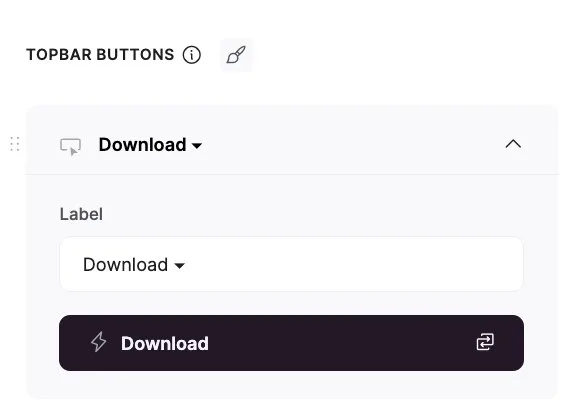
Table block, topbar button, Download action. Screenshot: Softr docs, docs.softr.io/actions/export.
How the field types mapped to Postgres in our test portal:
Softr field type | Postgres type | Watch for |
|---|---|---|
Text, Email, URL, Phone | text | |
Number, Percent, Currency | numeric | Store the currency code yourself |
Checkbox | boolean | |
Date, Created at | date, timestamptz | |
Select | text, or text[] for multiple | Consider a lookup table |
File | jsonb | Download every file and re-upload it to your storage |
Linked record | text[] on import, then a foreign key | Check one real record's value shape first |
Lookup, Rollup, Formula | not stored | Rebuild as a view or query |
We loaded the export into a local Postgres, turned linked records into foreign keys and rebuilt the lookup and formula as a view. All 460 records arrived, and every project kept its client.
Step 3: Move your users
The Users tab lets you select users and download them as a CSV.
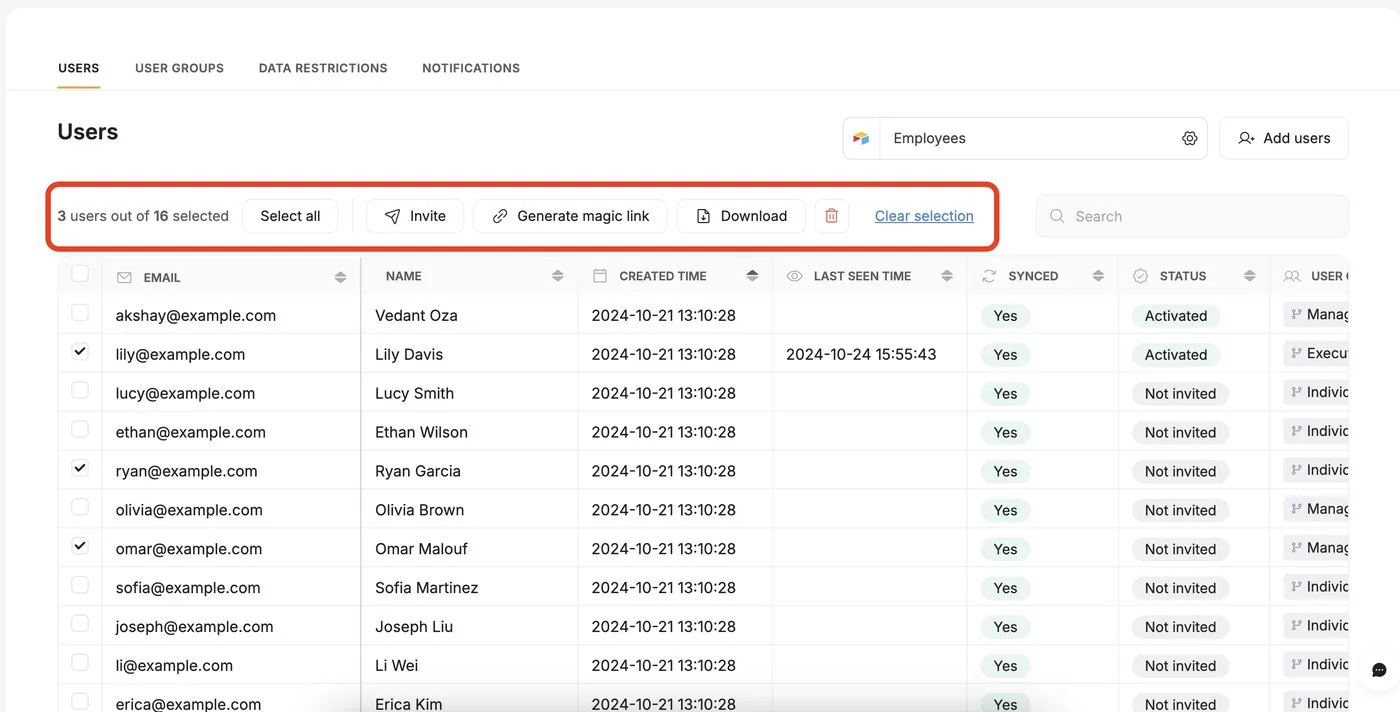
Users tab, select users, then Download. Screenshot: Softr docs, docs.softr.io/add-and-manage-users/users-menu.
Passwords do not come with them. A builder who asked in 2023 found the file held names and emails only, and a member of Softr's team replied that passwords are one-way encrypted: "no way it can be exported". That is correct security practice, and it means every user sets a new password on the new system.
Create the accounts in Supabase from the CSV and send each person a magic link or a set-password email at cutover. Warn users a week ahead so the email does not look like phishing.
Step 4: Rebuild the logic
Softr keeps your rules in the editor. In code they belong in the database, so a client cannot read another client's records even if the front end has a bug.
In our test portal the rule was the common one: a client user sees only their own client's projects and invoices, and team users see everything. In Postgres that became row level security, three policies plus two small helper functions (the run is in Step 6). The lookup and formula fields became a view. Softr Workflows become scheduled jobs or server functions, one per workflow you kept in Step 1.
Step 5: Reconnect integrations
Keys for Stripe, email and other services move over, but every webhook has to point at the new app. Call API actions become server routes. Zapier or Make automations that write into Softr need a new destination.
Step 6: Build it with Claude Code
We use Claude Code for the rebuild, with a short CLAUDE.md file that sets the rules. This is the one we used on the test portal:
# Project
We are moving a Softr client portal (Clients, Projects, Invoices) off Softr and onto Postgres (Supabase in production).
schema.sql, data.sql and relations.sql are the tables exported from Softr's Database API and loaded as-is.

Rules
- Do not change the data. Add migrations; never edit schema.sql or data.sql.
- Every permission rule that lived in Softr becomes a Postgres row level security policy, not app code.
- Local Postgres has no Supabase auth schema; stub auth.uid() and auth.jwt() in a separate file so the same policies run on Supabase unchanged.
- Test every policy with psql as a non-owner role and paste the output.
- Report every file you created and why, in a short list.
And the first prompt, verbatim:
In Softr this portal had one rule: a logged-in client user sees only the projects and invoices of their own client (matched by the user's email to Clients.Email), and team users see everything.
1. Write migrations/001_app_users.sql: an app_users table (id uuid, email, role 'team' or 'client', client_id references clients), filled from clients.email for client users plus one team user.
2. Write migrations/000_auth_stub.sql that creates schema auth and auth.uid() reading a session setting, for local testing only.
3. Write migrations/002_rls.sql: enable RLS on clients, projects, invoices and add select policies for the rule above.
4. Apply everything to the local database: psql -h /tmp -p 54329 -U postgres -d softr_rebuild (create it first, then load schema.sql, data.sql, relations.sql, then the migrations).
5. Prove it: as a non-owner role, count visible projects and invoices for one client user and for the team user. Paste the psql output.
What it did on our test portal, in 97 seconds: wrote three migration files, applied and tested them. As one client user it saw 1 client, 3 projects and 8 invoices, none of them another client's. The team user saw all 40, 120 and 300. An unknown user saw nothing, and writes were refused. It also caught a leak we had made ourselves: the view from Step 2 ran with its creator's rights and would have shown every invoice to every user. It fixed that for Supabase and left three decisions for a person: the real team email, linking each user to their Supabase login, and whether inactive clients should still get in.
The order of work after that: data and permissions first, then login, then the screens people use, then workflows and integrations, then tests around login and the main flow.
Step 7: Cut over
Keep Softr running while you build. On the day you switch, run a final export, import what changed, send the login emails and point your domain at the new app. Cancel Softr once nobody has logged into it for a couple of weeks.
Things to consider
- Should I stay on Softr? Yes, if you have under 10 team and 50 client users, under 50,000 records per database, and the blocks do what you need. That is $119 a month on Pro, with login and permissions handled for you.
- Can I export my app from Softr, or only the data? Only the data and the user list. Pages, rules and workflows are rebuilt.
- What happens to my users' passwords? They do not come out. Users set a new one, or log in with a magic link, on the new system.
- How long does it take? Moving the data takes minutes. The rebuild depends on how many screens, rules and workflows you kept in Step 1.
- What does it cost? A one-off build, then hosting. Compare it with $795 a month for a Business plan at 300 client users, or an unpublished Enterprise price past 500.
- Do we lose our integrations? No, but every webhook and automation that points at Softr has to be re-pointed.
- Who maintains the code afterwards? Your team or ours. The CLAUDE.md file and the tests help whoever picks it up.
Who should book a call
If your Softr app is past the Pro or Business user caps, or you keep fighting the blocks to build what your clients need, our team builds custom web apps and moves the data and the users across as part of the job. Still deciding between no-code and code in general? Our comparison of custom code and no-code covers the trade-offs, and the Softr tool page covers what Softr does well. Otherwise, contact us with a link to your app and your current plan.
Frequently asked questions
What are the Softr free plan limitations?
5 app users, 1,000 records per database and 5,000 per workspace, 500 workflow actions a month, and no custom code, Call API or CSV export. Those start on Pro.
Can you export a Softr app to code?
No. You can export your data through the Softr Database API or a Table block download, and your user list as a CSV. Pages, rules and workflows have to be rebuilt.
How many users can a Softr app have?
Pro includes 10 team and 50 client users and can go to 50 and 250. Business includes 30 and 100 and can go to 100 and 500. Beyond that Softr's calculator says Enterprise is needed.
What is a good Softr alternative with more flexibility?
If you need logic, screens or user numbers the blocks cannot handle, a custom app on Postgres or Supabase gives you that, at the cost of a one-off build. If you only need a different feature set, another no-code builder may do.
Sources
What we read:
- Softr pricing, plan cards, Compare plans table and app user calculator. Read 6 October 2026 from Portugal, USD, tax excluded.
- Softr Database API, Rate limiting and the published OpenAPI file, Softr docs. Read 6 October 2026.
- API setup and endpoints, Export, Users menu and Softr Databases overview, Softr docs. Read 6 October 2026. Source of the Step 2 and Step 3 screenshots.
- Business Plan User Limits, Softr community, November and December 2025.
- Updates to our pricing plans, Softr community, 5 August 2026.
- Softr Databases, Export to CSV, Softr community, June and July 2025.
- Exporting users to leave Softr, Softr community, February 2023.
What we ran ourselves:
- An export script for the Softr Database API, checked against a mock of Softr's OpenAPI file and run on a test client portal (40 clients, 120 projects, 300 invoices) served locally, 6 October 2026.
- The same data loaded into a local Postgres 14, with linked records turned into foreign keys, 6 October 2026.
- The Claude Code prompt in Step 6, run on that database on 6 October 2026.

Written by Tom
Founder and Lead Developer

Ready to start your project?
Book a free discovery call to learn how we can build your app in 4 weeks, or less.
Book a call