

Migrate if you need faster development, better SEO, ownership of your code or a choice of hosting, and stay on Bubble if none of those is blocking you. A migration is a rebuild of your app’s logic in a new stack, so it only pays off when the old platform is holding something back. This guide is the hub for our Bubble-to-code series, and each section links to a deeper article.
TL;DR
- Migrating means rebuilding logic, interface and data in code you own. Bubble doesn’t export your app as working code.
- The reasons that justify it are development speed, SEO, code ownership and hosting choice. Hiring, downtime fears and a rising Bubble bill rarely justify it alone.
- Simple all-in-one tools and prototypes often belong on Bubble. We’ll tell you so.
- Most of the time in a migration goes into planning and testing, not building.
- Get an audit and a migration roadmap first, agree a fixed price and scope, then ask for the rebuild quote.
What does migrating a Bubble app to code actually mean?
It means rebuilding your app’s database, business logic and interface in a conventional codebase, then moving your users and data across. Bubble keeps your workflows and data structure inside its own platform, so there’s no button that turns them into a standard application.
Our honest answer on exporting a Bubble app to code goes into detail, but the short version is this. You can export some data, and you can reuse your designs as a reference. The logic has to be rewritten by software engineers who read what your app does today and reproduce it.
Our default target is Next.js for the front end, Supabase for the database and authentication, Vercel for hosting and TypeScript throughout. That’s a mainstream stack with a large hiring pool, which matters if you ever bring development in-house.
A migration has four parts:
- Audit. Document every workflow, data type, plugin, API connection and privacy rule in the live app. Our code audit checklist lists seven checks to run first.
- Plan. Decide what to rebuild as is, what to simplify and what to drop. Plenty of Bubble apps carry years of workflows nobody uses.
- Build and test. Develop the new app beside the old one, with the live data used for testing.
- Cut over. Move users across, ideally with no downtime, and keep the old app on standby for a short period.
The word “migration” can mislead. You aren’t moving the same thing to a new house. You’re building a new house from the old one’s floor plans and moving the family in while they still live in the old one. That’s why the plan matters more than the typing.
If you want us to assess your app, our Bubble to code migration service starts with exactly that audit.
What are the signs that it’s time to move off Bubble?
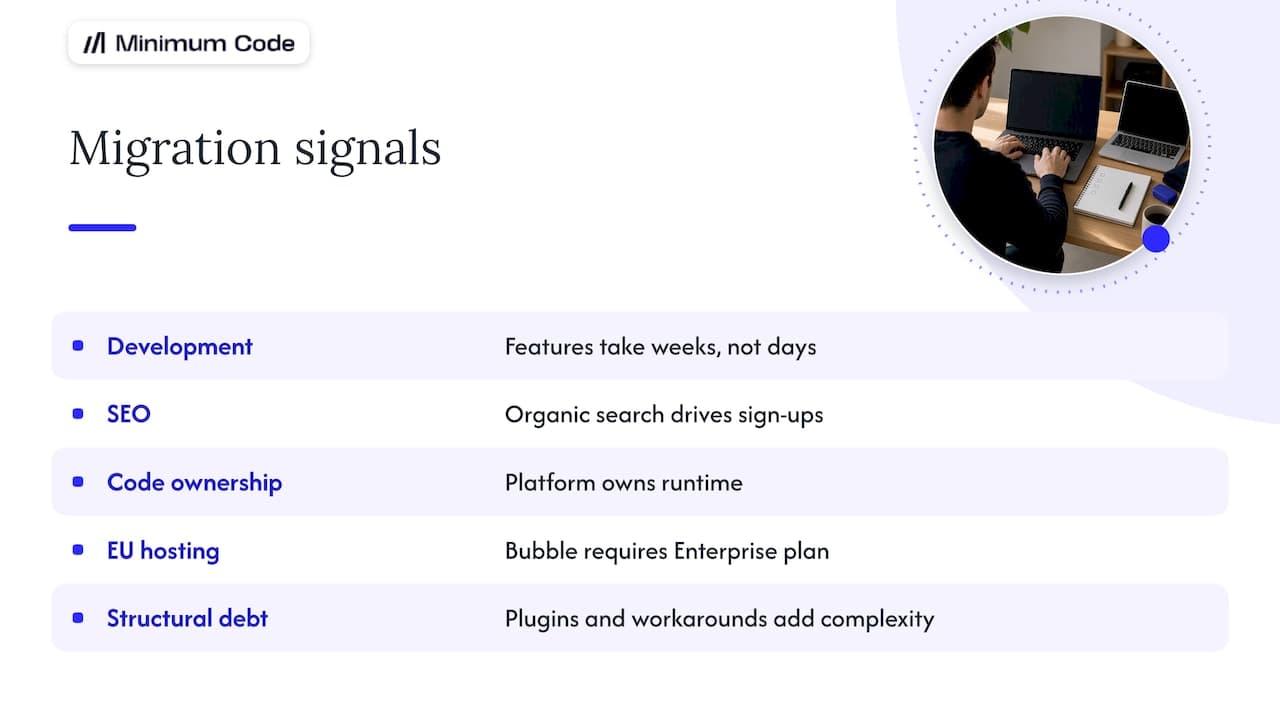
There are five signs we see most often, and they’re the ones that hold up when we look at the numbers. Any one can justify a conversation. Two or three together usually justify a project.
1. Development has slowed to a crawl. Features that should take days take weeks because workflows are tangled or the editor struggles with a large app. AI-assisted coding, with engineers reviewing every change, is now as fast as Bubble or faster for many tasks. That reverses the old argument that no-code is the quick option.
2. SEO matters to revenue. If you depend on organic search for sign-ups or marketplace listings, you’ll want full control over rendering, URL structure, metadata and page speed. A coded front end gives you that control directly. If you do move, treat redirects and URL mapping as a core workstream, and this migration SEO checklist is a useful reference for mapping every URL.
3. You want to own the code. With Bubble, the platform owns the runtime and you own the configuration. Investors, acquirers and enterprise customers sometimes ask for source code escrow or due diligence on the codebase, and “it lives in Bubble” is a harder answer to give.
4. You need to choose where it’s hosted. In our experience, EU hosting on Bubble is only available on the Enterprise plan. For most apps that’s fine, because Bubble’s GDPR guidance says a server in the EU isn’t strictly required, provided transfers follow GDPR rules such as Standard Contractual Clauses. Healthcare, fintech and defence work, though, usually needs EU hosting, and a coded stack handles that more easily than a Bubble front end with an external back end.
5. Your app has outgrown its structure. You’ve added plugins, workarounds and a second tool to patch gaps, and nobody can say with confidence what a change will break. That’s technical debt, and it exists on every platform. On Bubble it’s just harder to see.
Three frustrations get a lot of attention but rarely trigger a move by themselves: hiring difficulty, fear of downtime, and a growing Bubble bill. They’re real. They just don’t usually tip the decision unless one of the five above is also present.
When is staying on Bubble the better call?
Stay if your app is a simple all-in-one tool, if it’s still a prototype, or if none of the five signs above applies to you. We’re a Bubble Gold agency and started on Bubble in 2022, so we have no interest in moving an app that’s working.
Signal 1: it’s a simple, self-contained tool. An internal dashboard, a booking tool or a small client portal that does its job and changes rarely is well served by Bubble. A rebuild adds cost and gives you little you’d use.
Signal 2: you’re still finding product-market fit. If your product changes every few weeks, the ability to edit and test inside one visual platform is valuable. Rebuild when the product has settled, not before. Our product strategy service is a better use of money at that stage.
Signal 3: the pain is fixable on Bubble. Slow pages are often caused by how searches and data are structured, not by the platform itself. A performance clean-up can cost a fraction of a migration. Do that first and see whether the problem goes away.
A fair test: write down what you’d gain from migrating, in plain business terms, such as “rank for these 200 pages” or “pass this customer’s hosting review”. If you can’t write it down, wait.
What does a migration cost and how long does it take?
Cost and duration depend mostly on how many workflows, data types and integrations your app has, and on how much needs testing. We don’t publish a price list, so the figures here are placeholders: a small app costs [data needed], a mid-sized app [data needed], and a complex multi-role platform [data needed]. Any agency quoting without seeing your app is guessing.
What drives the price, in rough order of impact:
- Number and complexity of workflows. Each backend workflow becomes code that needs tests.
- Data volume and quality. Messy data takes longer to clean and map. Our data migration risks article covers the six worth putting in the plan.
- Integrations. Payments, email, CRMs and custom APIs each need rebuilding and checking.
- Design. Reusing your current interface costs less than a redesign.
- Compliance. Hosting rules and audit requirements add work.
Our breakdown in what actually drives Bubble to code migration cost goes through each one.
Timelines vary the same way: [data needed] weeks for a small app, [data needed] for a mid-sized one. Our six-phase timeline shows where the time goes. Most of it goes into planning and testing, not building, and a team that promises a fast build while skipping testing is moving the risk onto you. Our seven QA checks are the minimum we’d expect before any cutover.
One cost founders forget is running the new stack. Supabase’s own documentation notes that if you self-host, server maintenance, security hardening and backups become your responsibility, and features like point-in-time recovery aren’t included. A managed setup avoids that, and you can still choose the region.
We work on a fixed price and fixed scope, and the 60 days of free support after launch cover bugs found in real use.
Should you migrate in stages or all at once?
For a live, revenue-generating app, staged is usually safer. Moving one part at a time means a mistake affects one feature, not your whole customer base.
The pattern has a name. Microsoft’s Azure guidance on the Strangler Fig pattern describes putting a routing layer in front of the old system and replacing functionality piece by piece, so old and new run side by side. Martin Fowler’s team prefers gradual modernisation for the same reason: it avoids the all-or-nothing risk of a single cutover.
Big bang still makes sense for small apps, where staging would cost more than it saves, and for apps whose data model is so tangled that two systems can’t share it.
Stay on Bubble | Staged migration | Big bang rebuild | |
|---|---|---|---|
Best for | Simple tools, prototypes | Live apps with paying users | Small apps, tangled data |
Risk at launch | None | Low, one feature at a time | Higher, one cutover |
Time to full benefit | Immediate | Gradual | One date |
Cost profile | Platform fees only | Spread over months, some double running | Single project, shorter overall |
Code ownership | No | Grows with each stage | Full at launch |
Hosting choice | Limited by plan | Grows with each stage | Full at launch |
Staging has a cost: for a while you run two systems, and users and data have to stay in sync. Our four staged ways to move off Bubble compares the approaches. If you want a general project-level checklist for the cutover itself, this guide to large-scale migrations covers sequencing and post-launch monitoring well.
Our view: migrate for a reason you can name
We build on Bubble and we migrate off it, so we’ve seen both sides. Our view is that the platform is rarely the real problem. A vague unease about “scaling” is a poor reason to spend a project budget. A specific blocker, like search rankings, a hosting requirement or a feature your team can’t build in reasonable time, is a good one.
We’d also say the economics have shifted. AI coding tools handle much of the implementation now, and our software engineers own architecture, code review and testing. That has cut the gap in speed between Bubble and code, which is why development speed has become one of the main reasons founders move.
What hasn’t changed is that planning and testing decide whether a migration goes well. If a quote is mostly build hours and has little about test plans, treat it with caution.
— Tom
How Minimum Code handles Bubble migrations
We run a Bubble migration as a fixed-price, fixed-scope project, starting with an audit and a written roadmap. The new app is built in Next.js, Supabase, Vercel and TypeScript, switched over with no downtime, and handed to you with the code and hosting under your control. After launch we give 60 days of free support.
Our team of software engineers is based across Europe and the legal entity is in Vienna, so EU hosting and GDPR are defaults. If the audit says your app should stay on Bubble, we’ll tell you. See the Bubble migration service for how an engagement works, or legacy app modernisation if your software isn’t on Bubble at all.
What should you do next?
Start with an audit and a migration roadmap, then agree a fixed price and scope, and only then ask for the rebuild quote. That order keeps you in control, because the quote is then based on a documented app and not on assumptions.
- Write your reasons down. Pick from speed, SEO, ownership and hosting, and add a measurable target to each.
- Try the cheaper fixes first. Check whether a Bubble clean-up solves the problem.
- Audit the app. Count workflows, data types, plugins and integrations. The code audit checklist is a good place to begin.
- Get a roadmap. Ask for staged and big bang options with the risks of each.
- Fix price and scope. Agree in writing what’s included and what happens to anything that changes.
- Then request the rebuild quote.
If you’d like us to do the audit, talk to us about your Bubble app.
FAQ
Can Bubble export my app as code?
No, not as a working application. You can export data and reuse designs as a reference, but the workflows and logic have to be rebuilt in code. That’s why a migration is a rebuild with planning and testing around it.
Is Bubble GDPR compliant if it’s hosted in the US?
For most apps, yes, when the transfer is covered properly. Bubble’s own documentation says an EU server isn’t required for GDPR compliance, as long as transfers are lawful, and its DPAs include Standard Contractual Clauses. Healthcare, fintech and defence projects usually still need EU hosting, so check your sector’s rules and ask your data protection adviser.
Will my app go down during the switch?
It shouldn’t. A staged approach runs old and new side by side, and users move once the new version has passed testing. We plan every cutover for no downtime and keep the old app available as a fallback.
Is a migration cheaper than staying on Bubble?
Usually not in the short term. Your Bubble bill is smaller than a rebuild, so the case rests on what you gain: speed, search traffic, ownership or hosting. The cost of the new project is [data needed] until your app has been audited.
Who owns the code after a migration?
You do. With us you own the code and choose where it’s hosted. Whatever agency you pick, confirm ownership and repository access in the contract before work starts.
Sources
- Bubble manual: GDPR
- Strangler Fig pattern, Azure Architecture Center (Microsoft Learn)
- Strangler Fig, Martin Fowler
- Self-hosting, Supabase documentation
Recommended

Written by Tom
Founder and Lead Developer

Ready to start your project?
Book a free discovery call to learn how we can build your app in 4 weeks, or less.
Book a call