


You can move a Firebase app to Supabase and keep every user's password. Export your users with firebase auth:export, copy your project's password hash parameters from the Firebase console, and create each user through Supabase's admin API with the hash in a $fbscrypt$ format that Supabase Auth has accepted since September 2024. Users then sign in with the password they already have. The data move is the bigger job: Firestore documents need a real schema, your security rules become Postgres policies, and every user gets a new ID.
A note on the examples. We did not migrate a client's app for this page. We built a small project tracker in the Firebase emulators (three users, a projects collection with a tasks subcollection, owner-only security rules) and moved it into a local Supabase with the official community tools and then with Claude Code, on 6 October 2026. Your app will differ in names and size, not in the kind of problems you meet.
Want the move done without resetting a single password? Our legacy application modernisation team runs it end to end.
Talk to us about your Firebase app
Supabase vs Firebase: pricing and limits compared
Firestore charges per document read, write and delete. On the Standard edition in Iowa (us-central1), the free quota is 50,000 reads, 20,000 writes and 20,000 deletes a day. Beyond that it costs $0.03 per 100,000 reads and $0.09 per 100,000 writes.
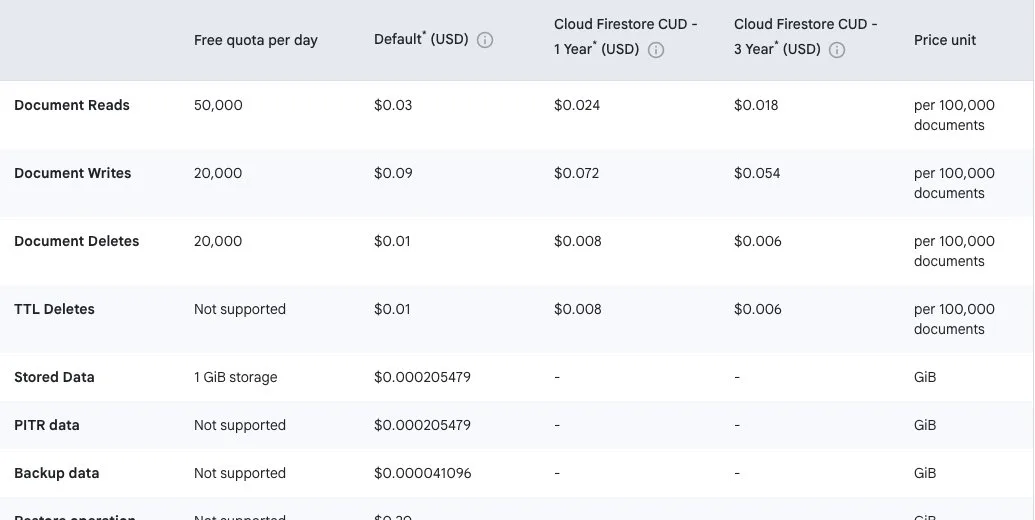
Firestore prices per 100,000 documents, us-central1, 6 October 2026. Screenshot: Minimum Code, from cloud.google.com/firestore/pricing.
Supabase Pro starts at $25 a month, with 100,000 monthly active users, 8 GB of disk and $10 of compute credit (one Micro instance) included. It does not charge per read. A bigger instance costs more: Small is $15 a month, Medium $60.
Your app | Firestore per month | Supabase per month |
|---|---|---|
1M reads and 100k writes a day, 2 GiB | about $11 | $25 (Pro, Micro) |
20M reads and 1M writes a day, 20 GiB | about $209 | $25 to $75 (Pro, Micro to Medium) |
Our own arithmetic on a 30-day month, list prices in USD on 6 October 2026. Which Supabase instance a busy app needs depends on its queries, so treat that column as a range.
What to take from the table: a small app is cheaper on Firebase, so cost alone is not a reason to move one. The Firestore bill follows how your app reads, and Google's pricing page says a query with an offset is "charged a read for each skipped document". Teams usually move when that bill keeps growing, or when they need joins and SQL.
Your options
Option | When it fits | What you keep | What you give up |
|---|---|---|---|
Stay on Firebase | Small read volume, the data is simple documents, the team knows Firebase | Everything | Nothing yet |
Keep Firebase Auth, move the data to Supabase | You want Postgres but cannot touch logins right now | Logins, user IDs, the sign-in screens | Two vendors to run and pay |
Move both to Supabase | You want one backend, SQL and predictable cost | Your users and their passwords | Firestore rules, offline sync, Firebase-only extras |
Supabase supports Firebase Auth as a third-party login, so the middle row is a safe first stage. For most teams at the wall above, moving both is the right end point, and the steps below are that route. Still choosing a backend? Our comparison of Firebase, Supabase and Xano covers the trade-offs.
Step 1: Decide what to keep
List every collection, subcollection and Cloud Function, and mark which ones the app still uses. Then write down three things you will need later:
- Every place your code reads a user's uid or a custom claim (like
role: admin). - Your security rules file, which becomes the spec for Step 4.
- Any feature that leans on Firestore's offline cache or real-time listeners.
Step 2: Get your data out of Firestore
Supabase's migration guide points to the community scripts in supabase-community/firebase-to-supabase. We ran them against our test app. Two things first: npm ci fails on the repository's own lockfile (npm install works), and on Node 25 every script crashes at start, so use Node 22.
$ node collections.js
projects
users
$ node firestore2json.js projects
4 records written to projects.json
$ node firestore2json.js tasks
0 records written to tasks.json
The tool only sees top-level collections. Our tasks subcollection held four documents and the export found none. Then json2supabase.js failed on the empty tasks.json it had written. If your app uses subcollections, and most Firestore apps do, you need your own export for them.
The documents that did come out kept Firestore's internal shapes. In our test app, a reference to the owner, a due date and a location looked like this:
"owner": {"_firestore": {"projectId": "demo-mc-migrate"}, "_path": {"segments": ["users", "rgPlONltREGhIZjM7a6m1kIz2Mmy"]}, "_converter": {}},
"dueDate": {"_seconds": 1774915200, "_nanoseconds": 0},
"location": {"_latitude": 41.1496, "_longitude": -8.611},
The import turned most of that into jsonb columns. One project stored its budget as the text "8500" while the others used numbers, so the tool made the whole budget column jsonb. This is how each type landed, and what it should be:
Firestore type | Community import | What it should become |
|---|---|---|
Timestamp | jsonb | timestamptz |
Reference to another document | jsonb of SDK internals | uuid foreign key |
GeoPoint | jsonb | two number columns |
Number in one doc, text in another | jsonb for the whole column | numeric, with the odd values fixed |
Array of strings | jsonb | text[] |
Map | jsonb | columns, or a child table |
Subcollection | not exported | its own table with a foreign key |
Firebase uid | text | uuid, through a mapping table |
Use the community scripts for a first look at your data, and write a migration that knows your schema for the real move (Step 6).
Step 3: Move your users with their passwords
Firebase hashes passwords with its own modified scrypt. Supabase's migration guide still describes a middleware server that checks the old password on first login, and the community repository marks part of it as still to be done. We ran the community user import: all three users arrived with an empty password, and the original password returned Invalid login credentials.
Supabase Auth itself can do better. Since version 2.162.0 (September 2024) it accepts Firebase scrypt hashes directly. Here is how:
- In the Firebase console, open Authentication, then Users, and click the three-dot menu above the user list.
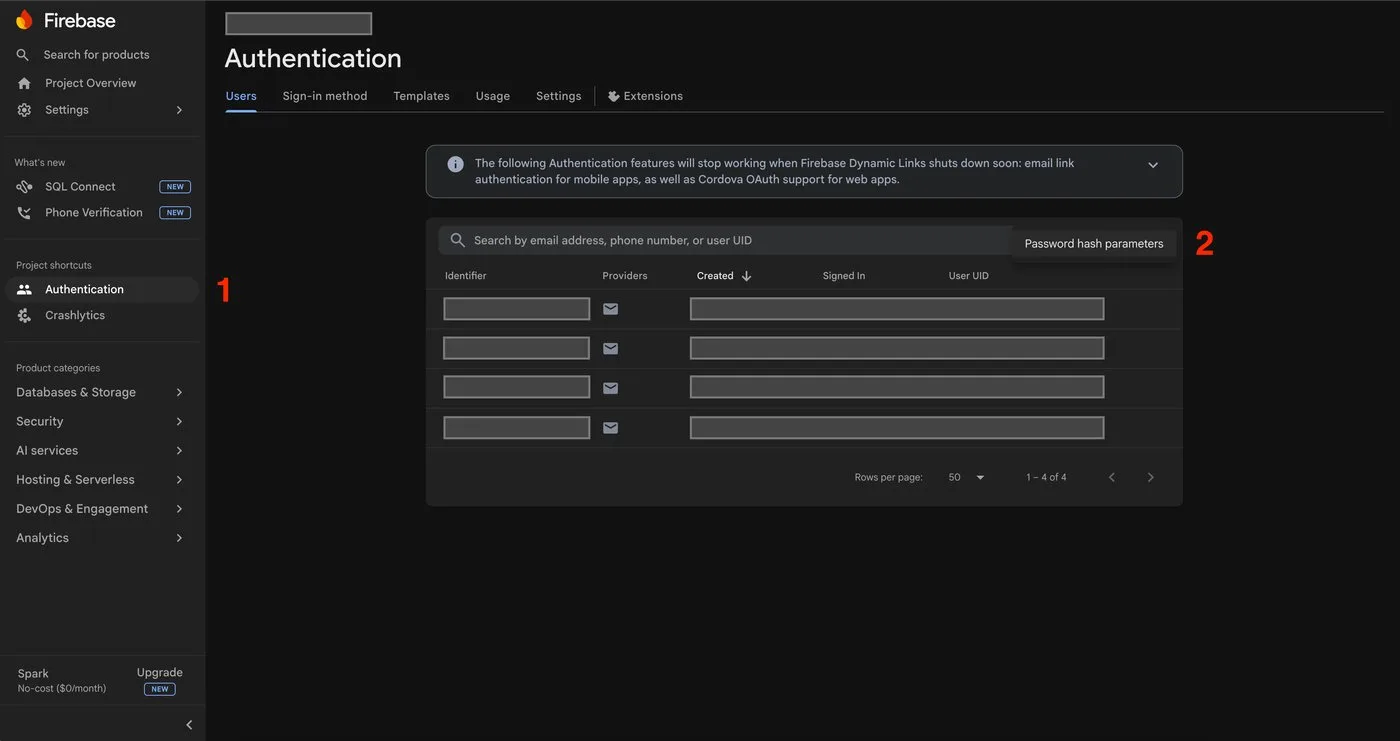
The menu above the user list. Screenshot: Hanko docs, docs.hanko.io/guides/import_export/firebase.
- Choose Password hash parameters and copy the four values:
base64_signer_key,base64_salt_separator,roundsandmem_cost. Keep them out of your repository; Firebase calls them sensitive.
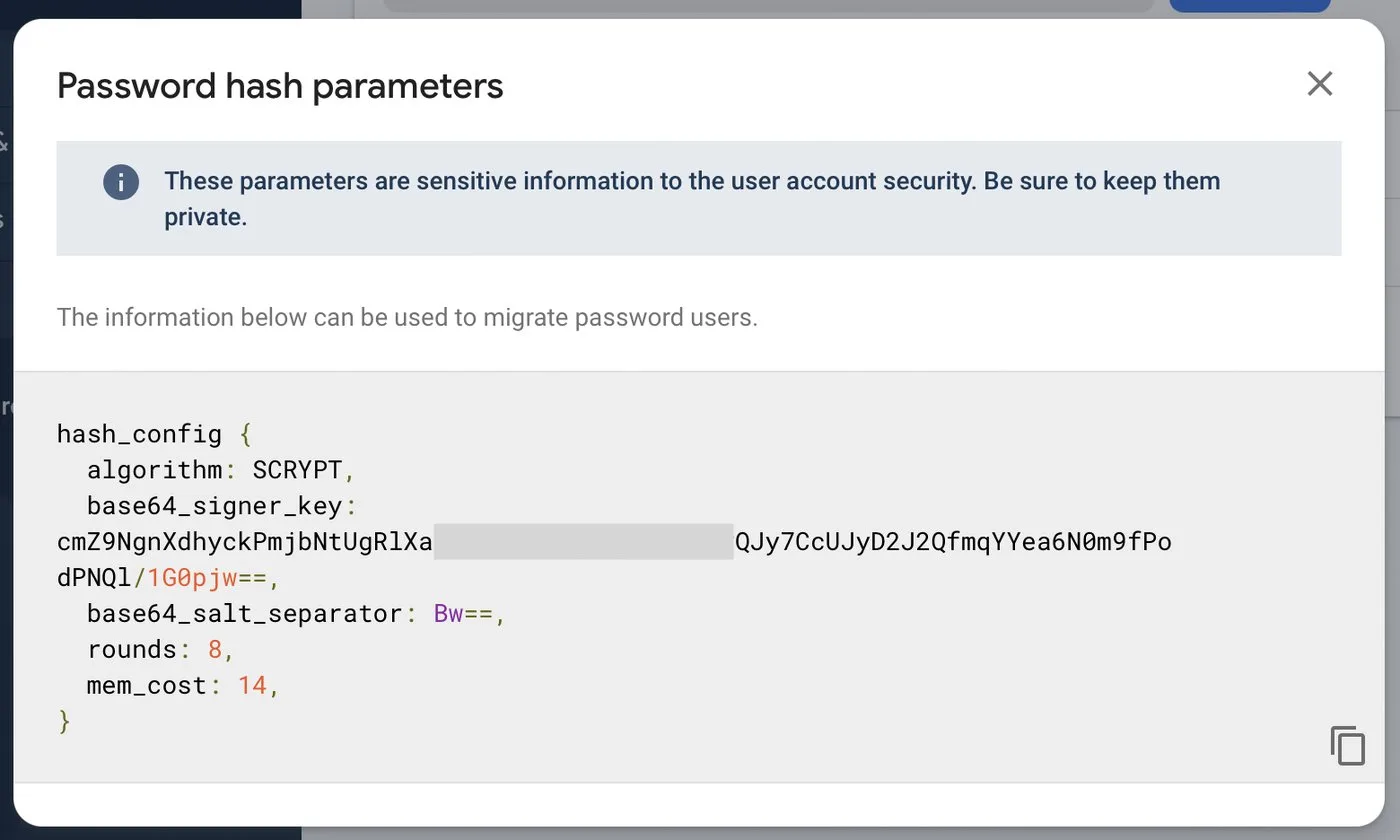
The hash parameters dialog. Screenshot: Appwrite on DEV, dev.to/appwrite/migrate-firebase-users-to-appwrite-5aia.
- Export your users with the Firebase CLI. Each user record has a
passwordHashand asalt.
firebase auth:export users.json --format=json --project <your-project-id>- For each user, build the hash string and create the user through the Supabase admin API, with the Firebase uid kept in
app_metadata:
$fbscrypt$v=1,n=<mem_cost>,r=<rounds>,p=1,ss=<base64_salt_separator>,sk=<base64_signer_key>$<salt>$<passwordHash>

POST /auth/v1/admin/users
{"email": "user1@test.com", "password_hash": "$fbscrypt$v=1,n=14,r=8,p=1,ss=Bw==,sk=jxspr8Ki...$42xEC+ixf3L2lw==$lSrfV15c...",
 "email_confirm": true, "app_metadata": {"firebase_uid": "kYi4EvWQlQTKSfnJ3dRSP6IH3ed2"}}
We tested this on local Supabase Auth (v2.197.0) with the sample hash Firebase publishes in its scrypt repository, because the emulator stores fake hashes. The right password returned HTTP 200 and a session. A wrong one returned Invalid login credentials. After the login, the stored hash was still the Firebase one; Supabase checks it as is and does not convert it.
Three things to watch:
- User IDs change. We tried to keep a Firebase uid as the Supabase ID and got
ID must conform to the uuid v4 format. Save a mapping from old uid to new UUID before you move any data. - Custom claims go in app_metadata. The community import copies the whole Firebase record, password hash and salt included, into
user_metadata. In our run that data then rode along in every access token, and a normal user could edit it: our test user gave himselfrole: adminwith his own token. Users can changeuser_metadata; they cannot changeapp_metadata. - Some users have no hash. Firebase's docs say the export only carries passwords hashed with its scrypt; others come out empty. Google and Apple logins have no password at all and need the same provider set up in Supabase. Those users get a reset email.
Step 4: Turn security rules into Postgres policies
Firestore rules do not migrate. In Supabase, the browser or the mobile app talks to the database directly with the public key, so Row Level Security (RLS) does the job your rules did. Rewrite them one by one. This is one rule from our test app and the policy it became:
// firestore.rules
match /projects/{projectId} {
  allow read, write: if request.auth != null && request.auth.uid == resource.data.ownerId;
}

-- rls.sql
create policy projects_select on public.projects for select to authenticated
  using (owner_id = (select auth.uid()));
The rewrite caught something the original hid. Our Firestore update rule only checked the old owner, so an owner could hand a project to someone else. The new policy checks the new owner too. That is a change in behaviour, so a person should approve it. We then checked as each user: one test user saw only her one project, and a request with just the public key got permission denied for table projects.
Step 5: Switch the app's client code
Every screen that calls Firebase needs the Supabase equivalent. In a Flutter app, the firebase_auth and cloud_firestore calls become supabase_flutter calls. From Supabase's Dart reference:
await Supabase.initialize(url: 'https://<project>.supabase.co', publishableKey: '<publishable-key>');
final res = await supabase.auth.signInWithPassword(email: email, password: password);
final rows = await supabase.from('projects').select();
supabase.from('projects').stream(primaryKey: ['id']).listen((rows) { /* update UI */ });
Two differences matter. With RLS in place, you drop the where ownerId == uid filters, because the database only returns the user's rows. And real-time is off by default for new tables, so turn it on where your screens listen. Firestore's offline cache has no built-in equivalent, so plan offline use separately. Rebuilding the app too? Our cross-platform mobile team does that work.
Step 6: Build the migration with Claude Code
We gave Claude Code the running emulators, the local Supabase and a short CLAUDE.md file:
# Project
We are moving a small app's backend from Firebase (Auth + Firestore) to Supabase (Auth + Postgres). This folder holds the migration scripts.

Rules
- Proper Postgres types: timestamptz for timestamps, numeric for money, real foreign keys. No jsonb dumping unless the data really is free-form.
- Supabase user ids are UUIDs; Firebase uids are not. Keep the Firebase uid in a mapping, never as the primary key.
- The Firestore security rules in firestore.rules are the spec for Row Level Security.
- Run what you write and paste the output. Report every file you created and why.
Then one prompt with six steps, shortened here:
Migrate this Firebase app to Supabase. In order, stopping after each with a one-line note:
1. Inspect every collection AND subcollection and print each field's Firestore types, including mixed ones.
2. Write schema.sql with proper Postgres types, a firebase_id column, owners as uuid references to auth.users. Apply it.
3. Write migrate-users.js: create users through the Auth admin API, uid and custom claims in app_metadata, password_hash in the $fbscrypt$ format when a real hash exists, and a uid-map.json.
4. Write migrate-data.js: Timestamps to timestamptz, references to ids, GeoPoints to two columns, uids through uid-map.json. Print row counts and anything it could not convert.
5. Write rls.sql translating firestore.rules into policies. Apply it.
6. Run everything and paste the output.
What it did on our test app, in 191 seconds: found the tasks subcollection, flagged the budget stored as text and converted it with a note, merged the two owner fields after checking they always agreed, turned a list of reviewer uids into a proper join table, and put the admin claim in app_metadata. The output was users 3 -> 3, projects 4 -> 4, tasks 4 -> 4. It also flagged the owner-transfer gap in Step 4.
What a person had to catch: its schema.sql drops and recreates the tables when rerun, fine in rehearsal and destructive after go-live. And the RLS change needs a sign-off, not just a passing test. Your app will need the same passes with more collections; the review is where the time goes.
Step 7: Cut over
Rehearse the whole run on a copy, with real hashes. On the day, set Firebase rules to read-only, run the export and the migration, check row counts against Firestore, and ship the app version that talks to Supabase. Old mobile app versions keep calling Firebase until people update, so keep it read-only for a while and force an update if you can. Turn Firebase off once your logs show no more traffic.
Things to consider
- Should we stay on Firebase? If your Firestore bill is small, your data is simple documents and nobody needs SQL, yes. In our table, a million reads a day costs about $11 a month on Firestore, less than Supabase Pro.
- Will users have to reset their passwords? Not email and password users with a Firebase scrypt hash. Users whose export has an empty hash, and anyone you cannot match, get a reset email.
- Can we move in stages? Yes. Keep Firebase Auth as a third-party login in Supabase, move the data first, and move the users later.
- What about Cloud Functions? They become Supabase edge functions, database functions or your own server code. Plan them one by one.
- How long does it take? The scripts ran in minutes on our test app. The time goes into the schema, the policies and the client code.
Who should book a call
If your Firebase bill keeps growing, or you need SQL and reports, and you have real users whose passwords you do not want to reset, our legacy application modernisation team does this move as a fixed piece of work, including the honest answer on whether you should move at all. Send us your collection list and rules file through the contact form. Still comparing backends? Read Xano versus Firebase first.
Frequently asked questions
Can I migrate Firebase Auth users to Supabase with their passwords?
Yes. Export users with firebase auth:export, copy the project's password hash parameters, and create each user through Supabase's admin API with the hash in the $fbscrypt$ format. We tested it: the original password signed in, a wrong one was refused.
How do I migrate a Flutter app from Firebase to Supabase?
Move the data and users first, then replace the firebase_auth and cloud_firestore calls with supabase_flutter. With Row Level Security on, queries no longer need owner filters, and real-time has to be switched on per table.
Should I migrate from Firebase to MongoDB instead?
If you want to keep a document model, MongoDB needs less reshaping of your data than Postgres. You would still rebuild logins, rules and real-time yourself. Supabase brings logins that accept Firebase password hashes and database policies in one place. We tested the Supabase route, not a MongoDB one.
Do the official Firebase to Supabase scripts work?
For a first look at your data, yes. In our test they missed subcollections, stored timestamps and references as raw JSON, and imported users without passwords. Use them to explore, then write a migration for your schema.
How long does a Firebase to Supabase migration take?
The automated part runs in minutes. A small app with a few collections is a short project; many collections, Cloud Functions and an offline mobile app take longer. We quote after reading your rules and collection list.
Sources
What we read:
- Firestore Standard edition pricing, Google Cloud. Read 6 October 2026, USD, us-central1.
- Firebase pricing. Read 6 October 2026.
- Supabase pricing. Read 6 October 2026, shown in USD from Portugal.
- auth:import and auth:export, Firebase docs. Read 6 October 2026.
- Migrate from Firebase Auth to Supabase and Firebase Auth as a third-party provider, Supabase docs. Read 6 October 2026.
- Supabase Auth changelog, v2.162.0 and
internal/crypto/password.goin the same repository, for the$fbscrypt$format. - firebase/scrypt, Firebase's published hash test vector.
- supabase-community/firebase-to-supabase, commit of 15 May 2026.
- Supabase Dart reference. Read 6 October 2026.
- Firebase import guide, Hanko, and Migrate Firebase users to Appwrite, Appwrite on DEV. Sources of the Step 3 screenshots.
What we ran ourselves:
- A test app in the Firebase Emulator Suite (firebase-tools 15.32.1) moved into local Supabase (CLI 2.119.0, Auth v2.197.0, Postgres 17) with the community scripts, 6 October 2026.
- A Firebase scrypt hash imported into Supabase Auth and signed in with, 6 October 2026.
- The Claude Code prompt in Step 6 (Claude Code 2.1.291), run on the same app, 6 October 2026.

Written by Tom
Founder and Lead Developer

Ready to start your project?
Book a free discovery call to learn how we can build your app in 4 weeks, or less.
Book a call