
Yes, Bolt.new exports your code, through a two-way GitHub sync or a zip. What comes out is a plain Vite and React app with Supabase migrations and edge functions, and almost nothing tied to Bolt. The catch is the database: new projects use Bolt Database, and moving it into a Supabase account you own needs the Pro or Teams plan. This guide is the Bolt chapter of our checklist for taking a vibe-coded app to production.
How we tested it: we took a public Bolt export from September 2026 (a study planner with sign-up, 16 tables and one AI edge function), checked out its first commit, the untouched export, and ran it. We also scanned 100 public Bolt exports on GitHub for patterns that repeat. Your export will differ in names, not in shape.
Rather hand it over? Our web app development team takes Bolt exports to production as a fixed piece of work.
Talk to us about your Bolt app
Step 1: Export Bolt.new code to GitHub or a zip
Bolt's docs give no plan requirement for either route.
GitHub (the route to pick). Click the GitHub icon in the top right, log in and authorise StackBlitz (the company behind Bolt), install the GitHub app, then name a repository and click Create repository. It starts private, on main.
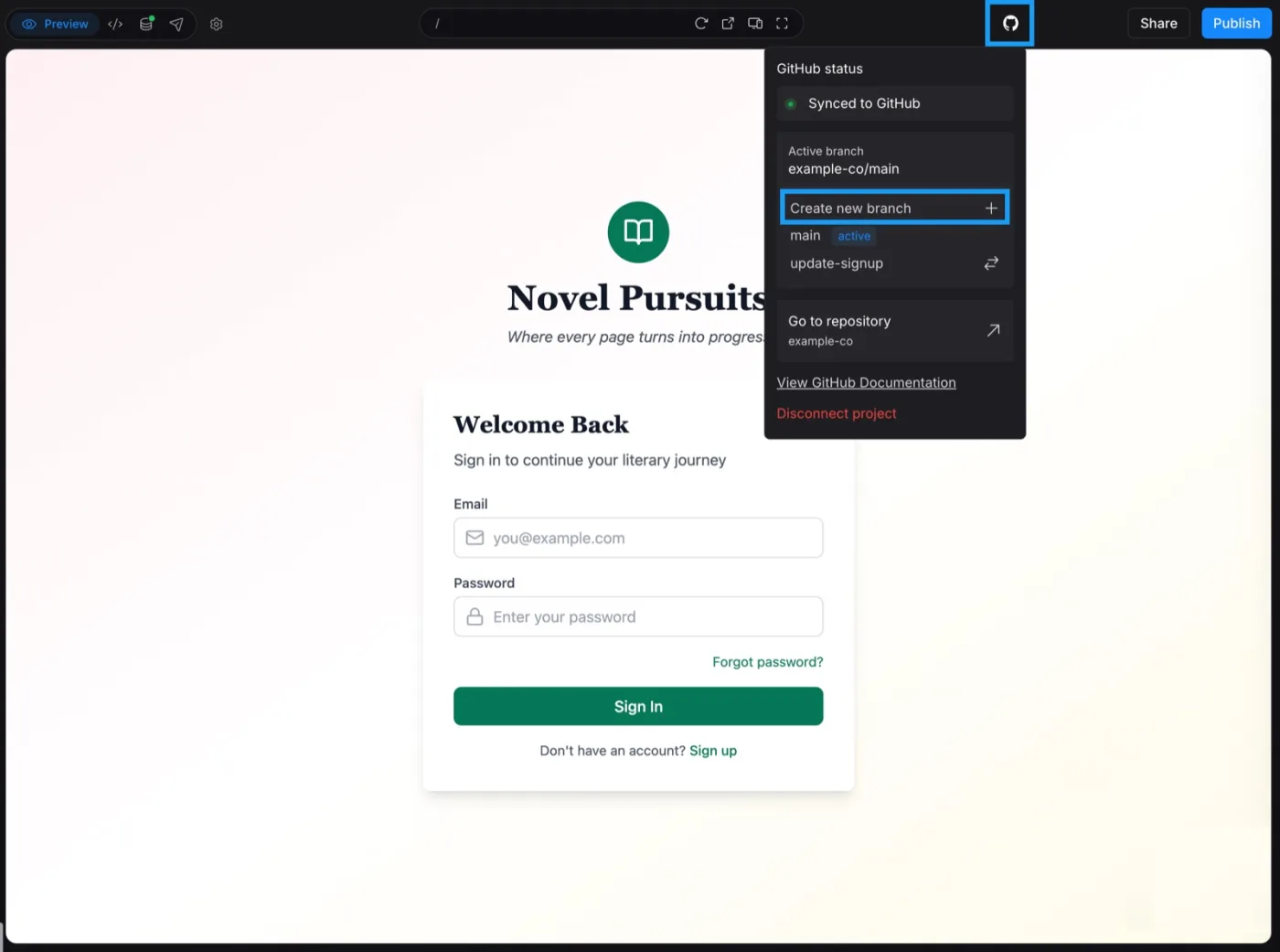
Once connected, the GitHub menu shows the sync status and links to the repository. Screenshot: Bolt docs, support.bolt.new/integrations/git.
The sync runs both ways: Bolt commits every change that does not break the project and pulls GitHub commits every 30 seconds. If both change at once, "Bolt keeps your changes and overwrites the GitHub version". Disconnecting cannot be undone from Bolt; only support can reconnect the same repository.
Zip. Click the project title, then Export, then Download. Fine for a one-off copy; it has no history.
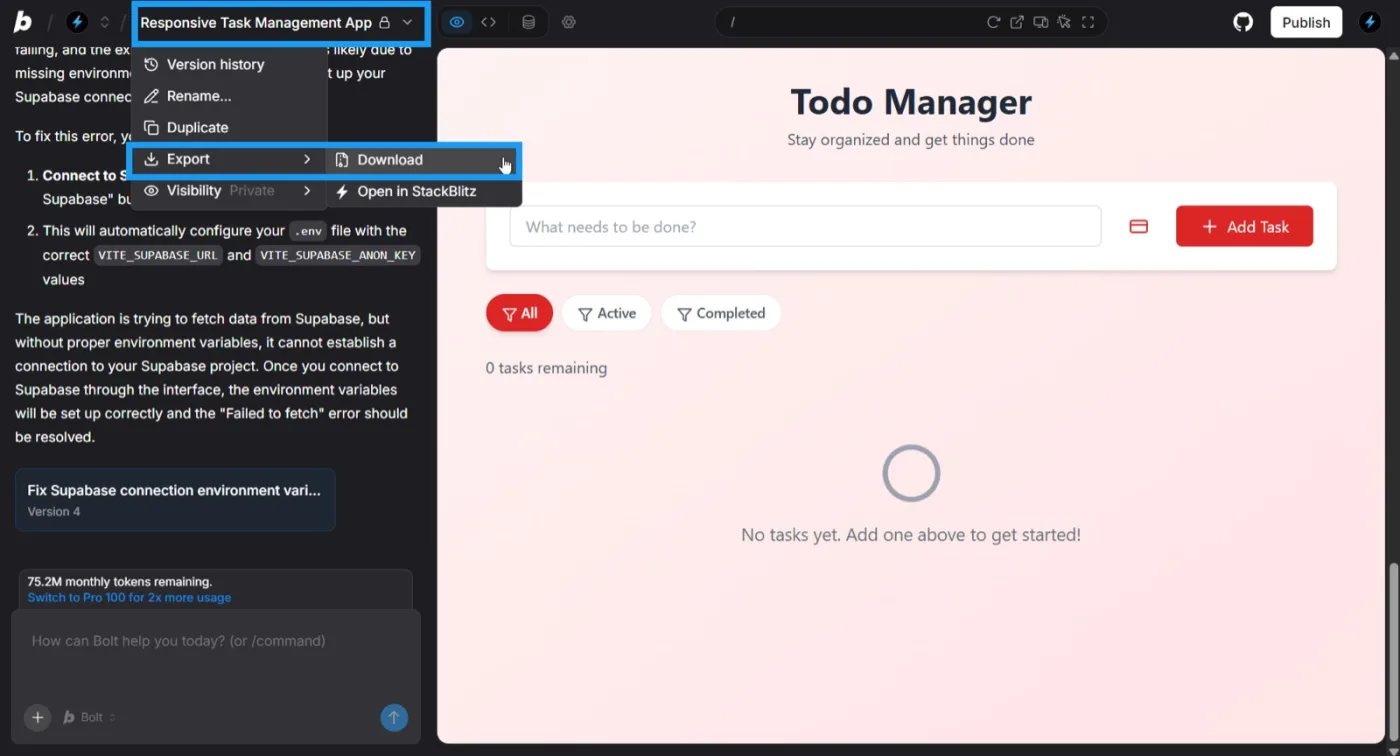
The zip export: project title, Export, Download. Screenshot: Bolt docs, support.bolt.new/building/using-bolt/projects-files.
Your database, before you leave. If your project uses Bolt Database, the default on every plan, your data is not in the export. Bolt's way out is Project settings, Database, Advanced, Claim in Supabase, which moves it into your own Supabase account. Claiming needs Pro or Teams ($25 a month, or $30 per member, at the time of writing) and you must own the Supabase organisation. Connecting a different Supabase project instead "may cause data loss", in Bolt's words.
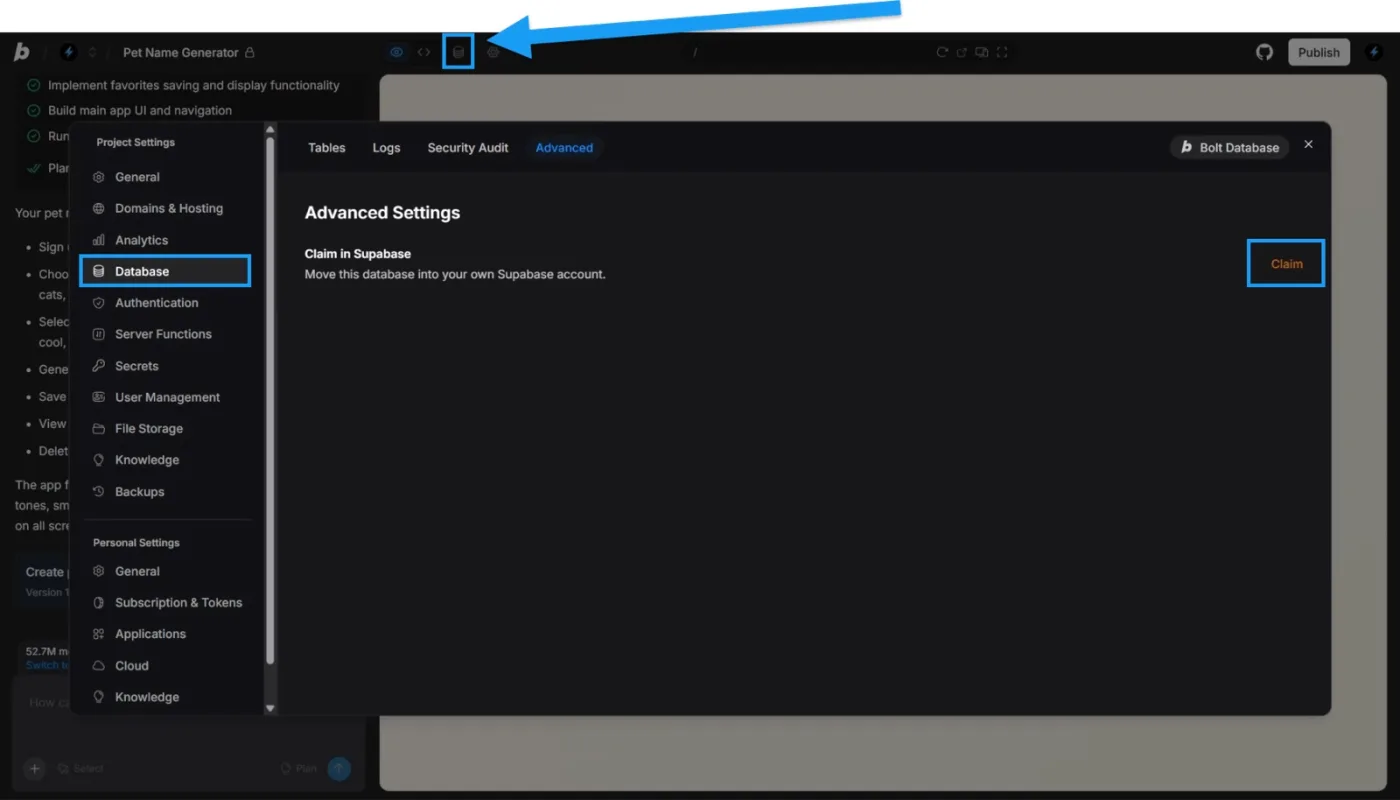
Claiming a Bolt Database into your own Supabase account (Pro or Teams plan). Screenshot: Bolt docs, support.bolt.new/integrations/supabase.
Step 2: Clone it and run it
On our test app (your timings will differ, the steps will not), install took about a minute:
git clone https://github.com/<you>/<your-project>
cd <your-project>
npm ci
npm run dev

  VITE v5.4.8  ready in 277 ms
The build passed (one warning about a 547 KB bundle) and TypeScript compiled clean. Here is where people get stuck. Without the file that holds your keys (.env), our test app opened to a blank white page. The only clue was a console error: supabaseUrl is required. The README Bolt wrote was a title and an "Open in Bolt" badge, with no setup steps. Copy .env.example to .env and fill in the two variables it lists, VITE_SUPABASE_URL and VITE_SUPABASE_ANON_KEY, from your Supabase project's API settings. Edge function secrets are not in the repository; set them again on your own Supabase project.

Our test app from a clean clone with no .env: a blank page and one console error. Screenshot: Minimum Code, 14 October 2026.
Step 3: See what you actually have
The trimmed tree from our test app. Yours will have different page names; look for where the data calls and the keys live:
.bolt/config.json          template name, nothing the app runs
.env.example               the two Supabase variables
package.json               name "vite-react-typescript-starter"
src/
  App.tsx                  page switch in React state, no router
  lib/supabase.ts          browser client, public key
  lib/*-service.ts         data calls straight to Supabase
  context/AuthContext.tsx  Supabase Auth session
  pages/                   17 pages
supabase/
  functions/ai-assistant/  one Deno edge function
  migrations/              9 SQL files, RLS on every table
capacitor.config.json      mobile wrapper config, no native project
src-tauri/                 desktop wrapper config, no Rust code
The framework is Vite, React 18, TypeScript and Tailwind, with four runtime dependencies. In the 100 exports we scanned, 64 were Vite projects, 11 Next.js, 5 Expo for mobile, and the rest Angular, Astro and other templates, so check package.json. There is no server of your own: pages call Supabase from the browser with the public key, and anything secret runs in an edge function. Unlike the Lovable export, there is no platform package, build plugin or login broker in the code; the .bolt folder is editor config the app never reads.
Step 4: Fix what would break in production
In the order we would fix it. Counts out of 100 or 35 come from the scan; the rest are from our test app, and your app will have some of these, not all.
- Open write rules on the database (7 of 35 exports with migrations). With the public key in every browser, Row Level Security (RLS) policies decide who can change what. Replaying every policy in migration order, 7 of 35 projects still let anyone with the public key update or delete rows (
FOR DELETE TO anon USING (true)), on tables like a clinic's clinical documents and a shop's customers and orders. Our test app was clean: RLS on all 16 tables, owner-only writes. Read the policies, not just the RLS switch. - Third-party keys committed (5 of 100 exports). OpenAI and Anthropic keys in a
.env, Gemini and OpenRouter keys in a.env.production, a Gemini key pasted into browser code; 13 of 100 commit a real.envfile. Rotate anything ever committed and move it into an edge function secret. (5 exports hardcode a Supabase key in source; all five were the public key.) - AI calls to a free public endpoint. Our test app sends every prompt, student profile included, to a keyless public AI endpoint with no contract. Point it at a provider whose terms you accept, with the URL and key in secrets.
- Usage tracking that never records. In the same function, the stream ends on the provider's
[DONE]signal before the usage insert runs, and the insert would fail anyway on a requireduser_idcolumn. Claude Code found this one (Step 5). - No URLs per page. Navigation is a switch in React state, so 17 pages share one address and the back button does nothing useful.
- No tests, and lint fails. No test runner at all; 19 of 100 exports have any test file.
npm run lintreported 48 errors and 10 warnings, andnpm cireported 33 vulnerabilities in the pinned packages.
Step 5: Fix the Bolt export with Claude Code
Point Claude Code at the repository with a short CLAUDE.md file of rules, then give it the fixes in order. Our file:
# Project
This is a Bolt.new export (Vite + React + TypeScript + Tailwind + Supabase). We are taking it out of Bolt and into a codebase we own.

Rules
- Do not change product behaviour or the UI.
- Keep the Supabase project and the database schema; only change configuration and code around it.
- Add a dependency only when a step below asks for it.
- Run `npm run build`, `npm run lint` and `npm test` at the end and paste the last lines of each.
- Report every file you changed and why, in a short list.
And the prompt, verbatim. The file names are from our test app; swap in yours:
Make this Bolt.new export ready to run outside Bolt. Do these in order and stop after each with a one-line note:
1. src/lib/supabase.ts: when VITE_SUPABASE_URL or VITE_SUPABASE_ANON_KEY is missing the app shows a blank page ("supabaseUrl is required" in the console). Make it fail with a clear message on screen and in the console that names the missing variables and says to copy .env.example to .env.
2. supabase/functions/ai-assistant/index.ts: the AI call goes to a free public endpoint with no key. Keep it as the default, but read the endpoint URL, model and an optional API key from Supabase secrets (AI_API_URL, AI_MODEL, AI_API_KEY) so we can point it at our own provider without a code change. Document the new secrets in README.md.
3. Same function: it writes to ai_usage_tracking with the service role key using a conversationId taken from the request body. Verify the caller (from the Authorization header) owns that conversation before inserting; skip the insert if not.
4. Make `npm run lint` pass. Fix unused variables and similar issues without changing behaviour; do not disable rules.
5. There are no tests. Add vitest, @testing-library/react, @testing-library/jest-dom and jsdom as devDependencies, a `test` script, and one test that renders src/pages/AuthPage.tsx with Supabase mocked and asserts the email and password inputs exist.
6. Rename the package in package.json from "vite-react-typescript-starter" to "ai-assistant-app".
7. Run npm run build, npm run lint and npm test and paste the last lines of each.
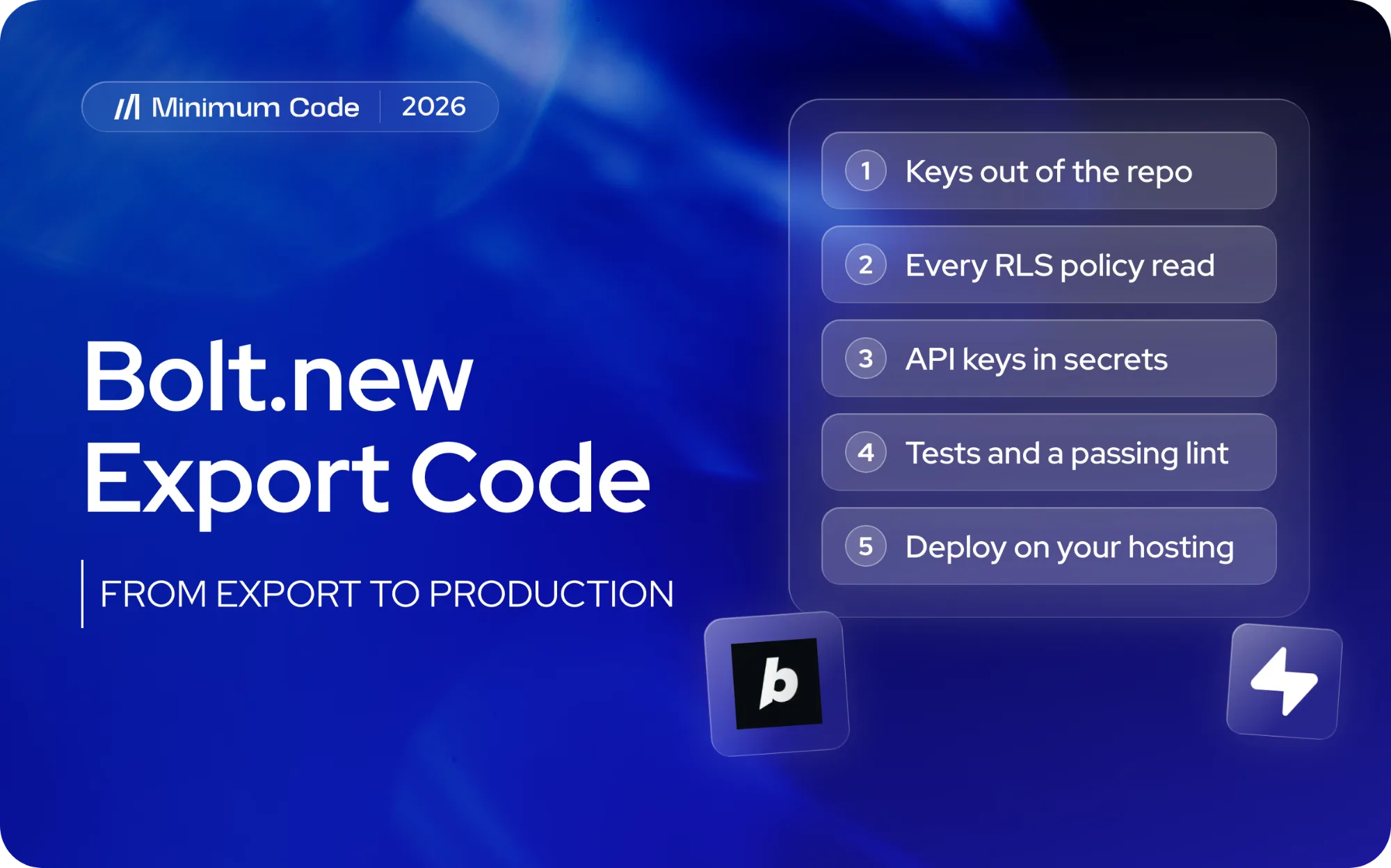
The order of work for any Bolt app: (1) keys out of the repository, (2) every RLS policy read and anonymous writes removed, (3) every third-party call in an edge function with its key in secrets, (4) tests and a passing lint, (5) deploy.
What it did on our test app, in six minutes (yours will need the same passes, with different file names): the on-screen error, a configurable AI provider (and, unasked, no public fallback once you set your own), the ownership check, 19 files cleaned until lint showed no errors, a passing login test, the rename. It reported the usage-tracking bug from Step 4 without fixing it, because that changes behaviour. We reran build, lint and test: all passed. What a person still had to do: check the error screen in a browser (it had not) and deploy the edge function to a real Supabase project, since it could not type-check the Deno code. Adding a router is a separate job.
Step 6: Deploy your Bolt.new app to Vercel or Netlify
The export is a static Vite site, so any static host works; Bolt also has a Netlify integration. On Vercel:
- Click Add New, then Project, and import the repository Bolt created.
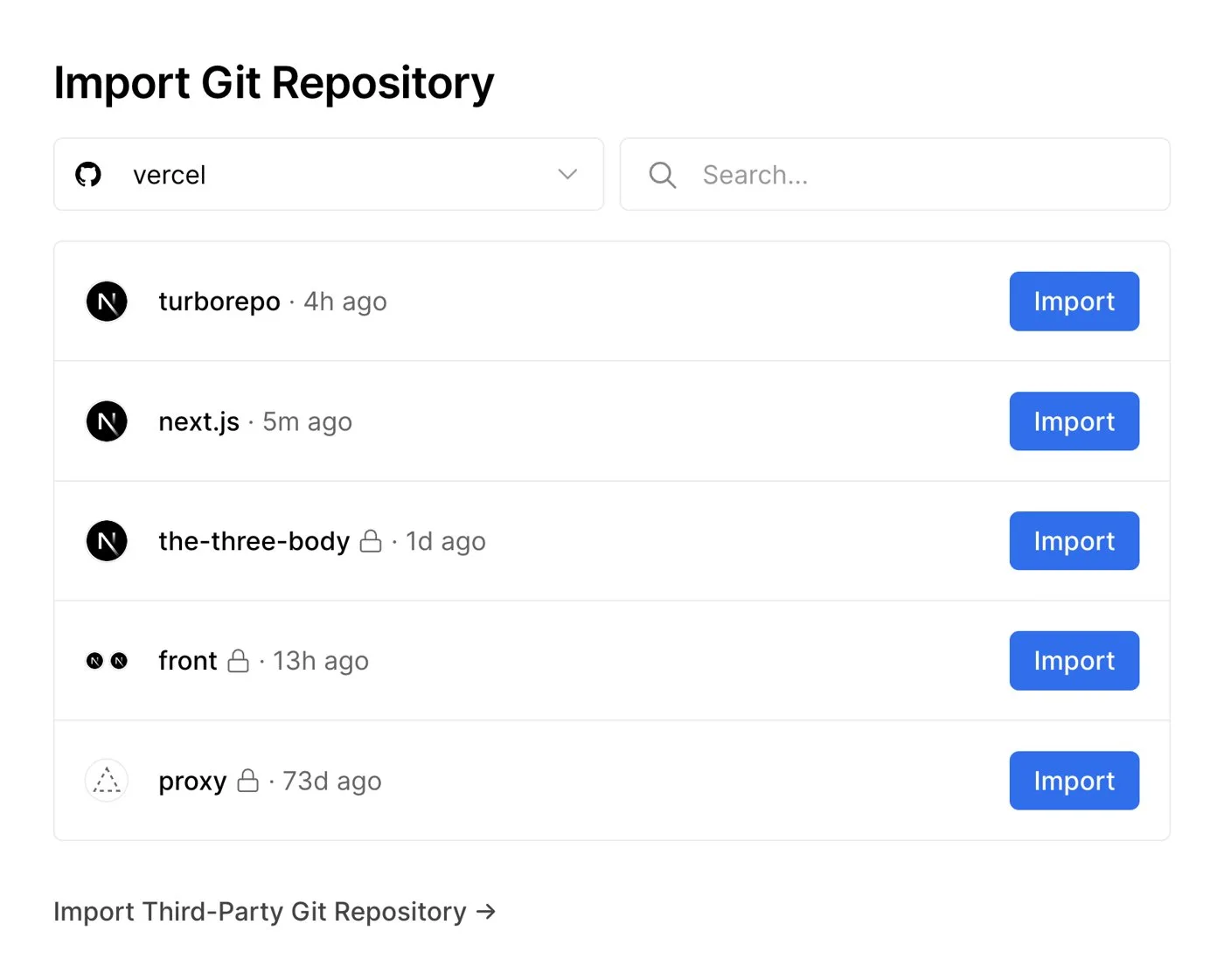
Importing the repository in Vercel. Screenshot: Vercel docs, vercel.com/docs/git.
- Before the first deploy, add
VITE_SUPABASE_URLandVITE_SUPABASE_ANON_KEYunder Environment Variables.
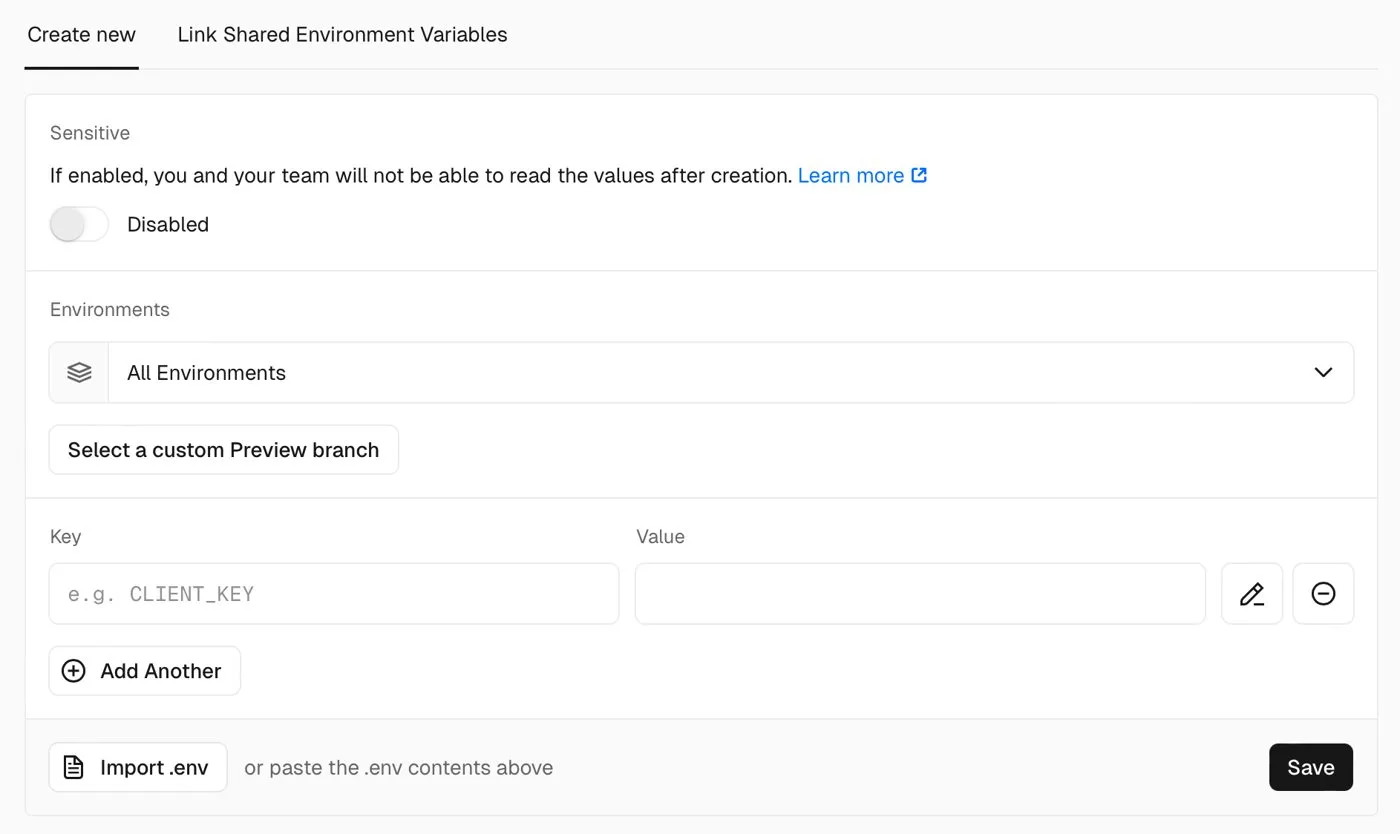
Adding the two Supabase variables in Vercel. Screenshot: Vercel docs, vercel.com/docs/environment-variables.
- Deploy. Vercel detects Vite; the build command is
npm run buildand the output folder isdist.
Deploy the edge functions with the Supabase CLI and set their secrets there. Point your domain at the new host, and keep the GitHub sync on until you are sure you will not go back to Bolt.
What to check before leaving Bolt.new
- Should I even migrate yet? If you change the product weekly, have no paying users and nobody to maintain code, stay on Bolt with the GitHub sync as a backup. Move when real users' data is in the database or token costs pass a developer's.
- Can I keep using Bolt after exporting? Yes, the sync is two-way. Once the structure starts to change, pick one side.
- Do I need my own Supabase? On Bolt Database, yes: claim it (Pro or Teams) before you leave. If you connected your own from the start, you have it.
- How long does this take? The prompt ran in six minutes. Reading every policy, re-pointing third-party calls, writing tests and deploying is a few days for a small app.
- What does it cost to have it done? A small app is a short engagement; payments, roles or more integrations make it longer. We quote after reading the export.
- What do I lose by leaving Bolt? The editor,
bolt.hosthosting and its analytics, and Bolt's version history. Nothing in your code depends on Bolt. - Can I do it with Claude Code alone? For the code changes, mostly. The policy review and behaviour decisions, like the AI provider, need a person.
When to get help taking a Bolt app to production
If your Bolt app has real users, or is about to, and you want the database locked down, keys out of the repository and a deploy you control, our web app development team does this as a fixed piece of work. See the eight checks every AI-built app needs or the Bolt.new tool page, or send us your repository link.
Frequently asked questions
Does Bolt.new let you export code?
Yes. Connect GitHub for a two-way sync to a private repository, or use Export, then Download, for a zip. Bolt's docs list no plan requirement for either.
Is my database included in the Bolt export?
No. The export has your schema as migration files, not your data. If the project uses Bolt Database, claim it into your own Supabase account first, which needs the Pro or Teams plan.
Can I convert a Bolt app to Next.js?
Most Bolt exports are Vite apps, though 11 of the 100 we scanned were already Next.js. Get the app running on your own hosting first; a move to Next.js is a separate rewrite of routing and data access.
How do I deploy a Bolt.new app to Vercel?
Import the GitHub repository in Vercel, add the two Supabase variables, and deploy. Vercel detects Vite and builds to dist.
Will my app keep working if I disconnect GitHub in Bolt?
Your code and repository stay. The project stops syncing and cannot reconnect to the same repository without Bolt's support, so disconnect last.
Sources and dates
What we read:
- GitHub for version control, Bolt docs. Read 14 October 2026.
- Projects and files: download a project, Bolt docs. Read 14 October 2026.
- Supabase for databases and Database: Advanced settings, Bolt docs. Read 14 October 2026.
- Bolt pricing. Read 14 October 2026, US dollar prices, monthly billing.
- Deploying Git repositories and Environment variables, Vercel docs. Source of the Step 6 screenshots.
What we ran ourselves:
- A public Bolt export (first commit 29 September 2026), cloned, built and run, with its 9 migrations applied to a local Postgres, 14 October 2026.
- A scan of 100 public Bolt exports on GitHub (pushed December 2025 to October 2026), 14 October 2026.
- The Claude Code prompt in Step 5, run on the same export, 14 October 2026.

Written by Tom
Founder and Lead Developer

Ready to start your project?
Book a free discovery call to learn how we can build your app in 4 weeks, or less.
Book a call