
For most live production web apps, moving to Azure makes sense, and the lowest-risk route is incremental: the Strangler Fig pattern, where you replace the app piece by piece while the old version keeps running. Start with an Azure Migrate assessment before you commit to a budget or a date. It shows blockers, readiness and sizing early, when changing course is still cheap.
TL;DR:
- An Azure Migrate discovery and App Service assessment reveal blockers, readiness, recommended SKUs, and hosting estimates before you commit to a budget or date.
- Assessment, testing, and validation consume more migration time and budget than building, so complete the inventory and pilot before pricing full implementation.
- Pilot two or three apps with limited exposure, then migrate in waves; rehearse a rollback for every task and define its trigger before shifting traffic.
- Treat data migration as a separate workstream: copy records in stages, sync changes until cutover, and reconcile counts, checksums, and sensitive records.
- Keep prototypes, apps that meet legal needs, and underfunded projects where they are; migration can add cost and risk without clear business benefit.
What should you know before reading on?
- Incremental migration suits live apps because old and new run side by side, so you can roll back any single step.
- Run Azure Migrate discovery and an App Service assessment first. They surface blockers and give you a cost estimate to plan against.
- Assessment and testing take most of the effort and budget, not the building.
- Move a small pilot first, then waves, with rollback runbooks you’ve actually tested.
- Timelines vary with the app’s complexity, team structure and migration scope.
What do Azure Migrate and App Service assessments actually give you?
They give you facts before you spend money: what’s running, whether it can move, and roughly what it will cost to host. Azure Migrate uses a lightweight appliance to discover servers and web apps, then builds an assessment from that discovery data. Microsoft’s own guidance says this tooling estimates monthly hosting costs and identifies migration blockers before you move production traffic (Microsoft Learn, 2026).
What you’ll get back:
- Readiness states for each app: Ready, Ready with conditions, Not ready or Unknown.
- Recommended App Service SKUs, plus consolidation advice so several small apps can share one plan.
- Cost estimates shaped by settings you choose: target region, savings options, comfort factor and whether to include Microsoft Defender for Cloud.
You can size by configuration alone, or add performance data if you can collect runtime metrics. Performance-based sizing is usually tighter, but it needs time on the appliance. If you don’t have that time, configuration-based sizing still gives you a workable first number.
Azure App Service assessments report readiness as Ready, Ready with conditions, Not ready or Unknown. Treat every “Ready with conditions” as a line item in your plan, not a pass.
For setup details, the web app assessment guide walks through the appliance and settings.
Which migration strategy should you choose?
For a live app, choose incremental replacement. The standard options, often called the “R” strategies, look like this for a web app:
- Rehost: move the app as it is onto Azure infrastructure. Fast, but you carry old problems with you.
- Replatform: move to a managed service such as App Service with minor changes.
- Refactor: change the code so it fits the new platform properly.
- Repurchase: replace the app with a ready-made product.
- Retire: switch off what nobody uses.
- Retain: leave it where it is, for now.
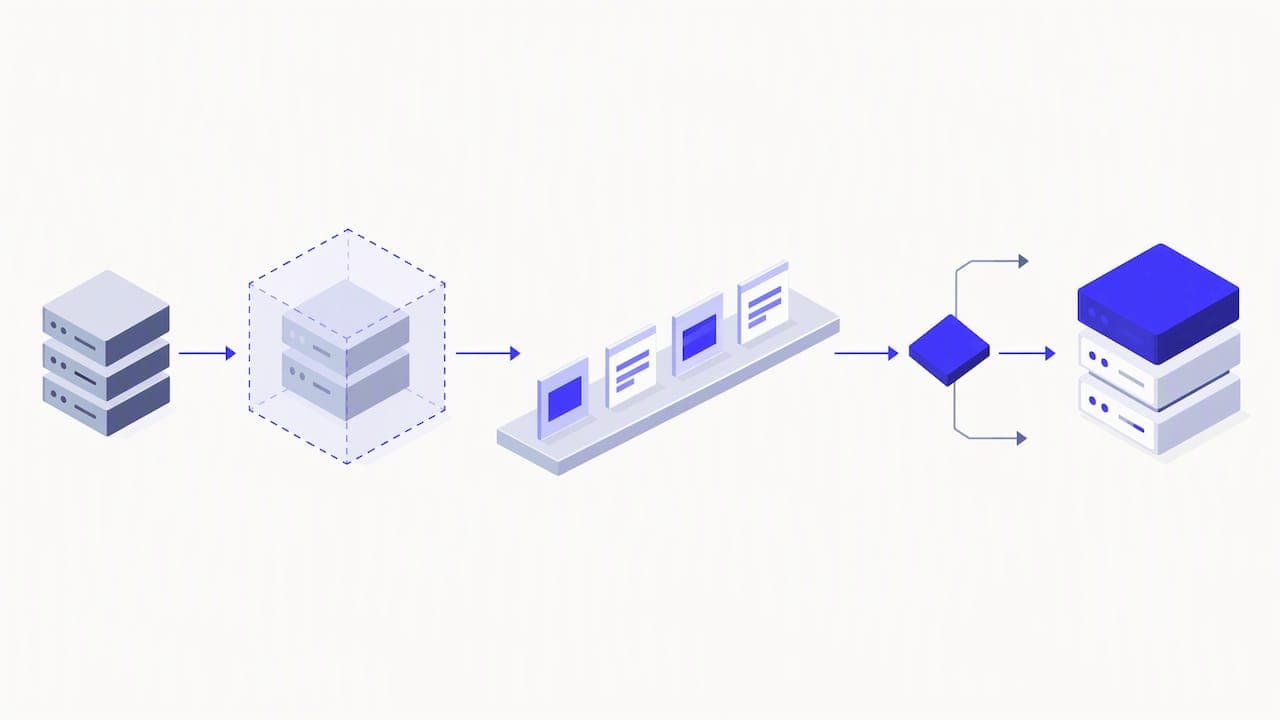
The Strangler Fig pattern sits across these. You build new functionality on the target platform and move existing modules over one at a time, behind a routing layer. Old and new run together, so if a module misbehaves you route traffic back. There’s no single cutover date to dread.
A big-bang rewrite is justified only when the old architecture is fundamentally incompatible with where you’re going. If you take that route, expect more risk and tighter governance: a frozen scope, a longer testing window and a firm go/no-go gate.
Pro Tip: Pick the first module to strangle by value and isolation, not size. A self-contained feature with clear inputs and outputs teaches you the most for the least risk.
What should you prepare before any code moves?
Several artefacts help determine whether your estimate is realistic:
- A feature inventory. List routes, integrations, data models and third-party dependencies. Start here, because everything else depends on it. Our code audit checklist covers the checks we run before any migration.
- A complexity score. Rate codebase size, coupling, test coverage and integrations. The score points you to the right “R” strategy for each part.
- Success criteria and constraints. Write down your recovery time and recovery point targets, plus compliance and data residency needs. Add a comfort factor and savings options to your Azure cost estimates so the number has headroom.
- An App Service assessment. Produce SKU, consolidation and security cost outputs before you schedule heavy development.
If you skip the inventory, the rest is guesswork. Most surprises in a migration are things nobody wrote down: a cron job, a webhook, a spreadsheet someone imports every Friday.
How do you run pilots and manage cutover?
Move something small first. Pilot two or three low-risk apps to check your tooling, runbooks and cost assumptions. The pilot isn’t a trial of the app; it’s proof that your process repeats. Then move in waves, each one a little larger.
During each wave:
- Split traffic and run in parallel. Send a small share of users to the new system, compare outputs against the old one, then raise the share gradually.
- Automate regression and performance tests. You’ll run them dozens of times, so they have to be cheap.
- Verify data by counts and spot checks, and test sensitive flows by hand: payments, permissions, anything that touches personal data.
- Write a rollback for every migration task, and rehearse it during the pilot. A rollback you’ve never run isn’t a plan. Our post on a no downtime data migration plan shows how we sequence this for live apps.
Pro Tip: Decide the rollback trigger in advance, such as an error rate or a failed reconciliation check, so nobody debates it in the middle of the night.
How long does a migration take and where does the money go?
Planning numbers from practitioner playbooks, not guarantees:
Budget typically covers areas such as: planning and assessment, migration work, data migration, infrastructure setup, security and compliance, testing and verification, and optimisation afterwards.
Assessment, testing and validation often take a bigger share than founders expect. That’s normal. Most of a migration’s time goes into planning and testing, not building. You reduce surprises by finishing the inventory and assessment before you price the build, and by treating the pilot as a paid learning step. Exact prices depend on scope, so we quote after an assessment rather than from a rate card.
When isn’t migrating right for you?
Sometimes the honest answer is to stay put. We started on Bubble and are still a Bubble Gold agency, so we have no interest in moving an app that doesn’t need to move.
- Small, single-purpose tools and prototypes. Staying on Bubble or another no-code platform is usually faster and cheaper.
- Needs already met. If legal and residency requirements are satisfied and migration adds little business benefit, don’t pay for it.
- No capacity. If you lack the staff or budget, a half-funded migration creates more risk than value. Wait until you can finish it.
The reasons founders do move are development speed, SEO requirements, owning the code and choosing where it’s hosted. If none of those apply to you, that’s a signal. Our Bubble migration strategy article covers staged options for the cases in between.
How does Minimum Code handle this?
We offer fixed-price, fixed-scope migrations from Bubble and legacy code to Next.js, Supabase and Vercel, with support after launch. Our software engineers own architecture, code review and testing, while AI coding tools handle implementation. We tell you plainly when an app should stay on Bubble. Where EU hosting is required, we set it up by default.
What support and maintenance should you plan after go-live?
Launch isn’t the finish line. The first weeks after cutover are when real traffic finds what testing missed, so plan for them. Our post-launch support covers that settling-in period: fixing defects traced to the migration, tuning performance and answering questions from your team.
After that window, you need a decision. A good maintenance plan has a clear scope and duration, and it usually covers several areas:
- Monitoring and incident response: someone watches error rates, uptime and costs, and knows what to do when an alert fires.
- Dependency and security updates: frameworks, libraries and runtime versions need regular patching, or the code you now own slowly ages.
- Small improvements: a monthly allowance for minor changes, so every tweak doesn’t need a new proposal.
- Cost review: hosting bills drift. Regular reviews of your App Service plan or equivalent help keep it in line with actual use. This is where Azure’s savings options and right-sizing from your original assessment pay off.
Agree the scope and length in writing before the free support ends. Some teams prefer a rolling monthly arrangement, others bring maintenance in-house once documentation and handover are done. Either works, provided your developers can read the code, run the tests and deploy without us. Owning the code means exactly that: you can walk away. Ask any provider, including us, for the runbooks, the architecture notes and the deployment steps as part of handover, not as an extra.
How do you migrate data without losing integrity or breaking GDPR?
Treat data as its own workstream with its own checks. The aim is simple: every record that should arrive does, unchanged, and nothing arrives that shouldn’t.
Techniques that hold up:
- Migrate in stages, not once. Do a full initial copy, then keep syncing changes until cutover so the final switch moves only a small delta.
- Reconcile after every run. Compare row counts, checksums on key fields and totals such as order values. Spot-check sensitive records by hand.
- Keep old and new consistent during parallel running. Decide which system is the source of truth for each table at each stage, and write that down. Two systems both accepting writes without a plan is how duplicates happen.
- Rehearse on a copy. Run the entire migration against a staging dataset, time it and fix what breaks before touching production.
For European clients, GDPR adds duties on top. Know what personal data you hold and where it lives. Move only what you need, and use this chance to delete what you don’t. Keep a record of where data sits during the move, protect it in transit and at rest, and make sure access is limited to people who need it. If you use a processor, a data processing agreement should cover the new environment. Check these points with your own legal adviser, because the details depend on your data and your sector.
Our guide to moving from Bubble without losing momentum shows how data steps fit into the wider project.
Where should your app be hosted after the move, and what about EU compliance?
Choose hosting deliberately, because it’s one of the main reasons to move in the first place. Once you own the code, you decide where it runs and which provider runs it.
Start from your requirements. For many apps, a data processing agreement with a US-hosted provider keeps things GDPR compliant. On Bubble, for example, EU hosting is available only on the Enterprise plan, and Bubble’s DPA covers most apps. Healthcare, fintech and defence usually need EU hosting, and a coded stack handles that more easily than a Bubble front end paired with an external back end.
Practical points for the new environment:
- Pick the region early. Choose an EU region for the database, file storage and backups, not only the app servers. Data often leaks out through the parts people forget: logs, analytics and email services.
- Separate environments. Run development, staging and production apart, with their own credentials, so a test never touches real customer data.
- Automate deployment. A pipeline that builds, tests and deploys the same way every time is what makes rollbacks reliable.
- Choose the platform that fits. Azure App Service suits teams already in that ecosystem. Our default stack of Next.js, Supabase and Vercel suits many founder-led products. Pick based on your compliance needs, team skills and cost, not habit.
Moving a site also affects search. If SEO is one of your reasons, keep every URL mapped and redirected, and read this guide on site migration SEO before you switch.
What have real migrations taught us?
Spend more time on assessment and pilots than feels comfortable. The hours you put in there come back as fewer surprises later. And don’t treat a migration as engineering work alone. It changes how your team works, what support needs, and how customers experience the product, so give it an owner on the business side too.
— Tom
Want help planning your migration?
If you’re weighing a move, the sensible next step is a discovery call or an assessment workshop, where we look at your app and tell you honestly whether to move, stay or move in stages. Our Migrate Bubble to Code service covers it end to end. Every migration comes with a fixed price, fixed scope, no downtime during the switch and post-launch support.
FAQ
What is web app migration?
Web app migration is moving a live application, with its data and integrations, to a new platform or hosting environment. That can mean a new cloud provider, a managed service or a new codebase. The goal is to keep the app working for users throughout.
What is the fastest way to migrate a web app to the cloud?
Rehosting, which moves the app largely as it is, is usually the quickest route. It carries existing problems along, though. For a live production app, an incremental approach such as the Strangler Fig pattern is the safer path, even if it takes longer overall.
What are the main migration strategies?
The common set is rehost, replatform, refactor, repurchase, retire and retain. You often combine them: retire what’s unused, replatform the simple parts and refactor the core. Your complexity score from the planning stage guides which applies where.
How much does a web app migration cost?
It depends on scope, complexity and how much data you hold. Budget goes mainly to assessment, migration work, data migration, infrastructure, security, testing and optimisation. We quote a fixed price after assessing your app, so you know the number before work starts.
Recommended

Written by Tom
Founder and Lead Developer

Ready to start your project?
Book a free discovery call to learn how we can build your app in 4 weeks, or less.
Book a call